CITEC is the Queensland Government’s primary ICT services provider. It has supported government operations and service delivery for more than 60 years by delivering and managing technology infrastructure, platforms and specialist ICT capabilities. (ForGov)
Unlike a normal public-facing online service, CITEC is designed around government and agency-to-agency requirements. This means that access, service requests and technical arrangements are generally handled through an employee’s agency rather than through an open public registration process.
For Queensland Government employees and participating public-sector organisations, the For Government portal provides access to agency-specific information. The CITEC page currently provides a Log in to For government option, with most employees able to use single sign-on (SSO). Users can also select their agency to see information relevant to their organisation. (ForGov)
Fore More Information:
Visit Homepage
What Is CITEC?
cidetec is a Queensland Government ICT organisation responsible for providing technology services and capabilities that support government agencies.
The official Queensland Government describes cidetec as its primary ICT services provider and states that it has delivered and managed technology infrastructure, platforms and specialist ICT capabilities for more than 60 years. (ForGov)
In practical terms, cidetec can be relevant when an agency needs government-focused technology infrastructure or specialist ICT capability rather than an ordinary consumer technology product.
The wider Queensland Government structure also identifies cidetec within the Department of Customer Services, Open Data and Small and Family Business. Current organisational information lists separate cidetec leadership areas for Enabling Services and Integration & Enabling Technologies. (cdsb.qld.gov.au)
What Does CITEC Support?
The cidetec service environment covers government ICT capabilities and can include areas such as:
- Hosting services
- Managed data centre housing
- Data centre infrastructure
- Queensland Government cloud services
- Network and connectivity capabilities
- Server management
- Specialist ICT services
- Government technology platforms
- Integration and enabling technologies
The Queensland Government’s For Government site map, for example, lists cidetec under agency services and includes hosting services such as managed data centre housing, data centre rack management and Queensland Government cloud. (Queensland Government)
The exact services available to an agency depend on its requirements, arrangements and the relevant cidetec service offering.
Who Uses CITEC?
cidetec is primarily relevant to Queensland Government organisations and other eligible public-sector entities, rather than ordinary members of the public looking for a personal online account.
Potential users may include:
- Queensland Government departments
- Government agencies
- Statutory bodies
- Local government organisations
- Government-owned corporations
- Public-sector technology and procurement teams
- Authorised government employees
The important distinction is that cidetec services are organisation-focused. An individual employee normally accesses relevant information because of their relationship with an eligible organisation and its internal systems.
This also explains why there isn’t a typical “create your personal cidetec account” journey like you might see with a public government service.
Fore More Information:
Visit Homepage
CITEC Login: How For Government Access Works
If you need to access cidetec information through the Queensland Government’s For Government portal, the official page currently provides an agency login process.
Most employees can log in using single sign-on (SSO). The page also provides an alternative pathway for agencies that do not use SSO. (ForGov)
Step 1: Open the official CITEC page
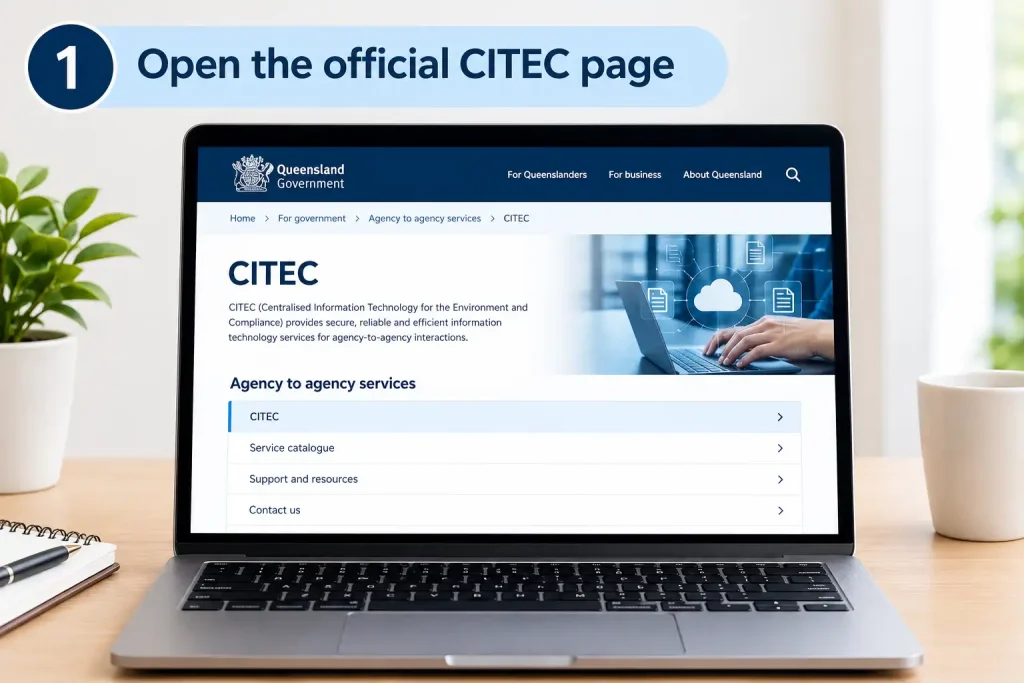
Go to the Queensland Government’s cidetec page on For Government:
Step 2: Find the For Government login
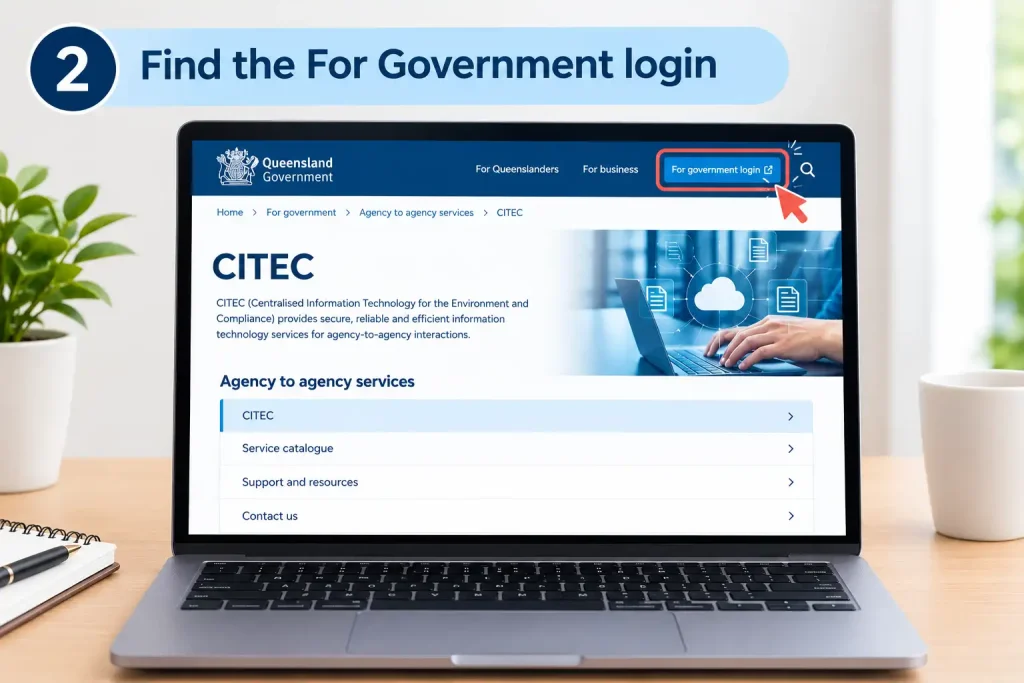
At the top of the page, look for Log in to For government.
The official page currently shows a Log in with single sign-on option. (ForGov)
Step 3: Select your agency
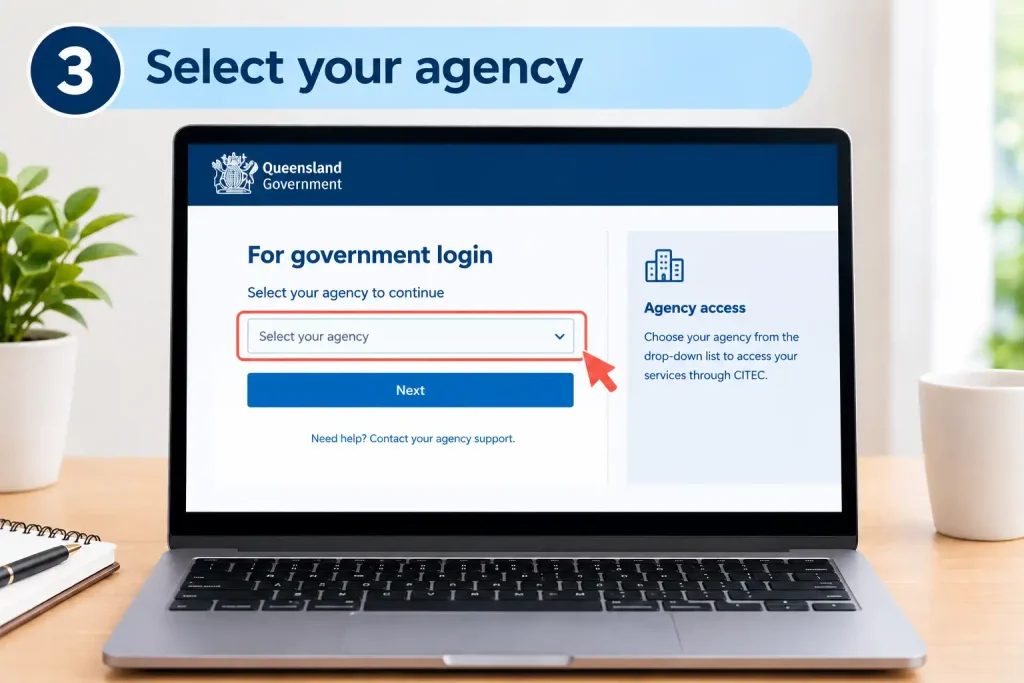
The portal provides an Select your agency area so information can be tailored to the relevant organisation. (ForGov)
Choose the agency associated with your employment or authorised government access.
Step 4: Authenticate
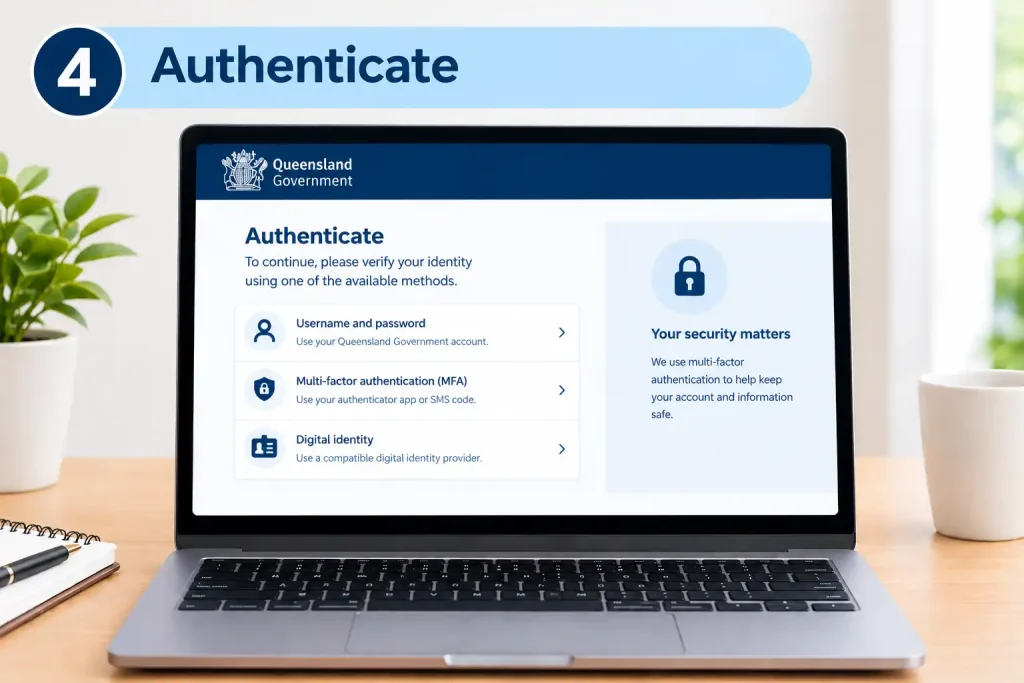
If your organisation uses SSO, continue with your normal agency authentication process.
Your agency’s authentication system may require additional security verification, such as multi-factor authentication, depending on its own configuration.
Step 5: Open CITEC information
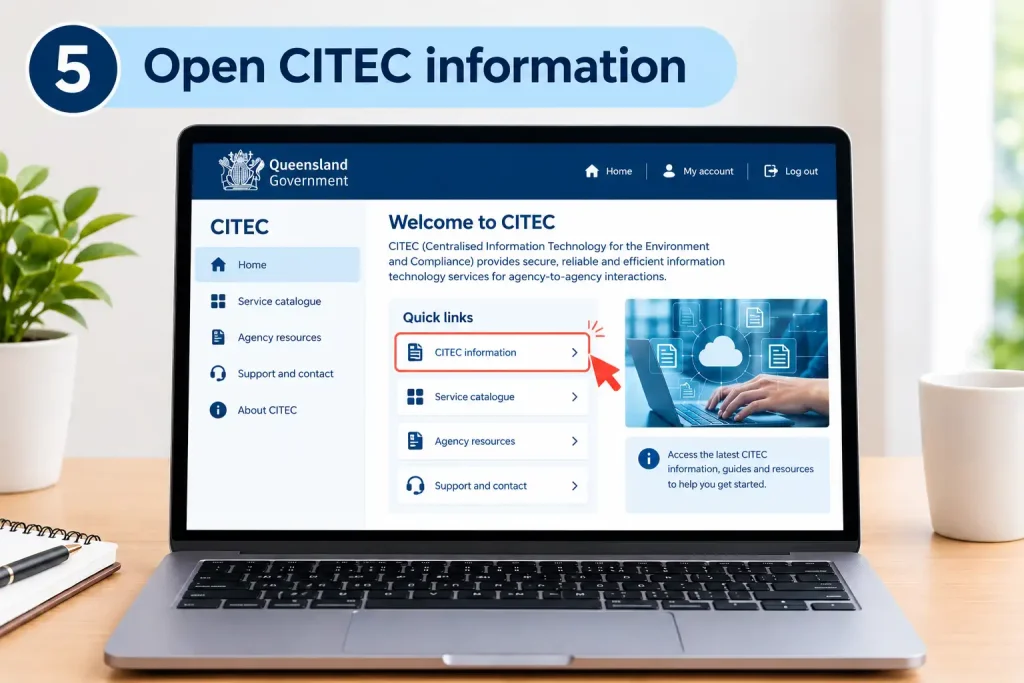
Once authenticated, you can access the relevant For Government information and CITEC service material available to your agency.
CITEC Registration and Account Access
There is an important difference between registration and access provisioning.
For a normal public website, registration might involve entering your name, email address and creating a password. cidetec’s agency-to-agency environment is different.
Your organisation normally controls whether you are authorised to use particular government systems or services. As a result, a new employee’s access can be linked to internal onboarding, directory services and agency permissions.
What You May Need
Depending on the service, an organisation may need:
- An active government or agency employment relationship
- Approved organisational access
- Agency network or identity credentials
- SSO access where supported
- Appropriate permissions for the requested service
- Internal IT approval
- Service-specific agreements or arrangements where required
Not every employee will automatically have access to every cidetec capability.
For example, someone working in an administrative role may not have the same service permissions as an agency ICT administrator or infrastructure team.
What Services Does CITEC Provide?
The cidetec offering is broader than simply providing a login portal.
Queensland Government material describes cidetec as supporting government technology infrastructure, platforms and specialist ICT capabilities. (ForGov)
Depending on the agency’s requirements, the service environment can involve several major technology areas.
Hosting and Data Centre Services
Government organisations may require secure environments for hosting technology systems and infrastructure.
cidetec’s For Government service structure includes areas such as managed data centre housing and data centre rack management. (Queensland Government)
These capabilities can be relevant when an agency needs managed infrastructure rather than maintaining every component independently.
Queensland Government Cloud
Cloud capability is another area associated with cidetec services.
For agencies, cloud services can involve decisions around hosting, management, security, connectivity and operational responsibilities. The appropriate arrangement depends on the technical and organisational requirements of the project.
Network and Connectivity
Government agencies often depend on reliable connectivity between systems and locations.
cidetec has historically been associated with whole-of-government network and infrastructure capabilities, while current Queensland Government information continues to identify cidetec ICT services as an important government service area. (cdsb.qld.gov.au)
Specialist ICT Capabilities
cidetec also supports specialist technology capabilities that may not be practical for each agency to operate independently.
This can include integration and enabling technologies, infrastructure support and other enterprise ICT functions.
How to Request a CITEC Service
A cidetec service request should normally begin with a clear understanding of the agency’s business and technical requirement.
For example, an agency might need hosting, infrastructure management, cloud capability or another specialist ICT service.
A practical process is:
1. Define the Requirement
Start by documenting what the agency needs.
Include information such as:
- Business purpose
- Required technology
- Expected users
- Existing infrastructure
- Connectivity requirements
- Security considerations
- Desired implementation timeframe
- Internal technical contacts
A clearly defined requirement makes it easier for the appropriate ICT team to assess the request.
2. Review Available CITEC Services
Use the official cidetec services area on For Government to understand which capabilities may be relevant.
The cidetec page links directly to information about the available range of ICT services and capabilities. (ForGov)
3. Speak With the Relevant Agency Team
Before submitting a significant infrastructure request, involve your agency’s IT, procurement or technology team.
This is particularly useful where the project affects existing systems, network connectivity, cloud environments or data hosting.
4. Submit the Appropriate Request
The actual submission method can depend on the service and the agency’s internal arrangements.
A request may involve an established service-management process, procurement pathway, agreement or other formal documentation.
5. Complete Technical Planning
For larger projects, technical teams may need to establish the required architecture, connectivity, security controls, hosting environment and operational responsibilities before implementation.
6. Provision and Implement
After approvals and planning are complete, the relevant technical teams can proceed with provisioning and implementation according to the agreed service arrangements.
Fore More Information:
Visit Homepage
Does CITEC Have a Standard Public Price?
cidetec should not be approached like a consumer subscription service with one standard monthly price.
The cost of an enterprise government ICT service can depend on the specific capability, infrastructure, consumption, management requirements and service arrangement.
For that reason, agencies should confirm pricing directly through the relevant cidetec or government procurement/service channel rather than relying on a generic online figure.
Your supplied service information indicates that larger deployments may require a tailored quotation and agency-level charging arrangements. Because the current public cidetec page does not publish a universal price list, those commercial details should be confirmed for the specific service being requested.
Fore More Information:
Visit Homepage
CITEC vs a Normal Public Government Portal
| Feature | CITEC / For Government | Public Government Service |
|---|---|---|
| Main audience | Government organisations and authorised employees | General public |
| Account model | Organisation-based | Individual-based |
| Login | Agency authentication / SSO where supported | Public account or identity system |
| Services | Enterprise ICT capabilities | Public transactions and services |
| Pricing | Service-specific arrangements | Often published fees or free |
| Access | Controlled by organisation | Usually open to eligible individuals |
The key takeaway is simple: CITEC is an enterprise government ICT service environment, not a normal public registration portal.
Common CITEC Access Problems
If you reach the For Government login but cannot proceed, check the basics before escalating the issue.
SSO Login Not Working
First confirm that you are using the correct agency account. If the agency uses SSO, make sure you are signing in through the appropriate organisational authentication process.
You can also retry after closing the browser session and starting a fresh authentication attempt.
Your Agency Is Not Available
If your organisation does not appear or the available information does not match your employment situation, contact your internal IT administrator or the relevant government support team.
The official cidetec page specifically provides an alternative pathway for agencies that do not use SSO. (ForGov)
You Can Log In but Cannot Open a Service
Successful For Government authentication does not necessarily mean you have permission for every cidetec service.
Service-level access can depend on your agency role and authorisation.
Ask your internal IT or system administrator to verify your permissions before treating the problem as a cidetec system failure.
Managing CITEC Services Within Your Agency
Once you understand what cidetec provides and how the For Government login works, the next step is knowing how an agency should manage an ICT requirement.
cidetec is intended for organisational technology needs, so many requests involve several people rather than a single employee. An agency may have business owners, ICT specialists, procurement staff and security teams involved in the same project.
This is especially relevant for larger requirements such as hosting, cloud environments, infrastructure management and connectivity.
Before You Submit a Request
Prepare the basic information your agency is likely to need:
- The service or capability required
- The business reason for the request
- Existing systems or infrastructure
- Expected users and workloads
- Technical requirements
- Connectivity requirements
- Security or compliance considerations
- Implementation timeframe
- Internal agency contact details
- Relevant procurement or approval information
Having this information ready can reduce unnecessary back-and-forth during the initial assessment.
CITEC Service Requests: A Practical Workflow
Although the exact process depends on the service and agency arrangements, a typical government ICT request can be viewed as a series of stages.
Stage 1 — Identify the Business Need
Start with the problem rather than a particular technology.
For example, an agency may need additional hosting capacity, a new cloud environment or management of existing infrastructure. Defining the desired outcome first helps technical teams determine which service is appropriate.
Stage 2 — Check the CITEC Offering
Review the official cidetec information available through the Queensland Government’s For Government portal.
The official cidetec page identifies cidetec as the Queensland Government’s primary ICT services provider and provides access to information about its technology capabilities.
Stage 3 — Involve Your Internal IT Team
Employees should normally discuss significant requirements with their agency’s ICT team before trying to arrange an enterprise service independently.
Your internal team can determine whether:
- An existing service already meets the requirement
- The request needs procurement approval
- Additional security assessment is necessary
- A formal service arrangement is required
- Existing infrastructure can be expanded instead
Stage 4 — Submit the Service Request
Once the requirement has been defined and approved, the agency can use its appropriate cidetec or internal service-management pathway.
The exact submission process is service-dependent, so avoid assuming that every cidetec request uses the same form or portal.
Stage 5 — Technical Assessment
The relevant technical teams can then assess the proposed solution.
This may involve architecture, hosting, connectivity, security, capacity and operational considerations.
Stage 6 — Provisioning
After the required approvals and technical arrangements are complete, the service can move into implementation and provisioning.
CITEC Cloud and Hosting Services
Cloud and hosting are important areas for government agencies that need reliable enterprise infrastructure without independently managing every component.
The Queensland Government’s For Government information includes cidetec-related hosting capabilities such as managed data centre housing, data centre rack management and Queensland Government cloud services.
These services can support agencies with different infrastructure requirements, depending on the nature of their systems.
Data Centre Services
A government organisation may need physical infrastructure hosted within an appropriately managed data-centre environment.
Rather than maintaining every facility component itself, an agency can use an established government ICT service arrangement.
Potential considerations include:
- Infrastructure capacity
- Physical hosting requirements
- Network connectivity
- Operational management
- Security requirements
- Availability requirements
- Technical support
The exact service configuration should be confirmed with the appropriate cidetec team.
Cloud Services
Cloud projects can be more complex than simply choosing a hosting location.
Before requesting a cloud service, agencies should understand:
- What applications will run in the environment?
- What data will be stored or processed?
- What level of connectivity is required?
- Who will administer the environment?
- What operational support is needed?
- What security controls apply?
- How will the service be scaled?
A well-prepared project brief gives technical teams a clearer picture of the intended environment.
CITEC and Government Network Connectivity
Connectivity is another important consideration when systems need to communicate across government environments.
A network requirement should not be treated as an isolated technical request. The agency should explain which systems need to communicate, where users are located and what operational requirements exist.
For a connectivity project, prepare information such as:
- Source and destination environments
- Number of locations
- Applications involved
- Expected traffic
- Required connectivity
- Security requirements
- Existing network arrangements
- Business-critical systems
Your internal agency ICT team can help determine the appropriate pathway before the request reaches the relevant cidetec service area.
CITEC Service Management and Support
Technical support is different from general portal access.
If you cannot log in to the For Government website, the issue may relate to your identity, agency selection or SSO configuration.
If an approved ICT service is experiencing an operational problem, however, the appropriate response may involve your agency’s IT helpdesk, service-management system or designated cidetec support arrangement.
Where Should You Start?
Use this simple decision process:
| Problem | First place to check |
|---|---|
| Cannot authenticate | Agency IT / identity support |
| Wrong agency displayed | Agency administrator |
| Cannot access a restricted service | Internal system administrator |
| Existing infrastructure problem | Agency IT service desk |
| CITEC-managed service incident | Designated agency support pathway |
| New ICT requirement | Agency ICT/procurement team |
| Large hosting or cloud project | Agency ICT team + relevant CITEC service pathway |
The most useful information to provide when reporting a technical issue is the exact error, time of occurrence, affected service and any relevant reference number.
How to Troubleshoot CITEC Login Problems
A failed cidetec login does not necessarily mean that the cidetec platform itself is unavailable.
Start with these checks.
Check 1: Confirm Your Agency
Make sure you have selected the organisation associated with your authorised government account.
Check 2: Verify Your SSO Account
If your agency uses SSO, confirm that your normal organisational credentials are working elsewhere.
If you cannot sign in to other agency systems either, the problem may be associated with your agency identity account rather than cidetec.
Check 3: Start a Fresh Session
Close the current authentication session and try again using a fresh browser window.
If appropriate, clearing old browser data or using a private browsing session can help identify whether an old session is interfering with authentication.
Check 4: Check Your Authorisation
You may be able to authenticate successfully but still receive an access-denied message for a particular resource.
That can indicate a permissions issue.
Your internal administrator can check whether your account has been assigned the required access.
Check 5: Escalate With Evidence
If the problem continues, record:
- The exact error message
- Date and time
- Selected agency
- Browser used
- Service you were trying to access
- Any reference number displayed
Providing these details makes technical investigation easier.
CITEC Access vs CITEC Service Access
One point is worth remembering: logging into For Government and having permission to use a cidetec service are not necessarily the same thing.
The first is an authentication question.
The second is an authorisation and service-management question.
For example, an employee may successfully enter the Queensland Government portal but still be unable to access a particular infrastructure service because that capability is controlled at an organisational or role level.
This distinction can prevent unnecessary troubleshooting.
CITEC Requirements for Agencies
Requirements vary according to the service, but your organisation should be prepared to establish its eligibility, technical need and internal authority before requesting an enterprise capability.
A useful preparation checklist is:
Agency Checklist
- Confirm the organisation is an eligible government entity.
- Identify the business owner.
- Identify the internal ICT contact.
- Define the required service.
- Document technical requirements.
- Confirm security and compliance requirements.
- Check whether internal approvals are required.
- Determine whether procurement involvement is necessary.
- Review the relevant cidetec information.
- Prepare supporting documentation.
- Confirm the appropriate service-request pathway.
This preparation is particularly useful for larger infrastructure projects because several internal teams may need to review the request.
Does CITEC Offer Services to the General Public?
cidetec is not designed as a general public ICT service account.
Its role is to provide technology infrastructure, platforms and specialist ICT capabilities for government operations.
That means an ordinary member of the public should not expect to register for a personal cidetec account simply to obtain access to government ICT infrastructure.
If you are a Queensland Government employee and need access for work, use your agency’s normal IT and identity-management channels.
What If You Leave Your Government Agency?
Because access is organisation-based, employment or organisational changes can affect your access to government systems.
If you transfer to another agency, change roles or leave government employment, your previous permissions may no longer apply.
Your new organisation may need to provision access separately.
For this reason, don’t assume that an existing cidetec or For Government permission automatically follows you to a new organisation.
CITEC for Queensland Government ICT Teams
For ICT professionals, cidetec can be relevant beyond simple portal access.
A project may require coordination between:
Business team → Agency ICT → Procurement/Security → cidetec service area → Implementation → Operational support
The exact sequence can change depending on the service.
For example, a simple information request may require little preparation, while a major infrastructure migration can involve architecture planning, security assessment, service agreements, implementation planning and ongoing operational support.
The larger the project, the more important it is to establish responsibilities early.
Common Mistakes to Avoid
Mistake 1: Looking for a Public Sign-Up Button
cidetec is not structured like a public consumer website. Access is connected to government organisations and their identity systems.
Mistake 2: Assuming Every Employee Has the Same Access
Permissions can vary according to organisational responsibilities and service requirements.
Mistake 3: Treating Every Problem as a CITEC Outage
An authentication problem may be caused by your account, agency selection or permissions.
Mistake 4: Starting a Large Project Without Internal Approval
Enterprise ICT requirements often involve several agency teams. Establish the internal owner and approval pathway first.
Mistake 5: Using Unofficial Contact Details
For current support or service arrangements, rely on the official Queensland Government CITEC information rather than third-party websites.
Frequently Asked Questions About CITEC
CITEC Support: What to Do When Something Goes Wrong
When a CITEC service or login does not work as expected, the fastest solution is usually to identify whether the problem relates to authentication, permissions, the agency’s own network, or the underlying ICT service.
Because CITEC operates in an agency-to-agency environment, your internal IT team is often the best starting point. They can determine whether the problem is local to your account or needs to be escalated through an established CITEC support arrangement.
CITEC Troubleshooting Guide
| Problem | Possible reason | What to check |
|---|---|---|
| SSO login fails | Incorrect agency selection or expired authentication session | Confirm the correct agency and start a fresh login session |
| Access denied | Your account may not have the required permission | Ask your agency administrator to verify your access |
| CITEC page loads but service is unavailable | Service or network issue | Check with your internal IT team |
| Cloud or M365-related issue | Configuration or synchronisation problem | Provide the error details to your designated support team |
| Network connection problem | Local or government network issue | Check whether other agency systems are affected |
| New service request | Requirement has not yet been formally submitted | Contact the relevant agency ICT/procurement team |
Avoid repeatedly trying the same login if your account has become locked or requires administrator intervention. Record the error first, then follow your agency’s support procedure.
How to Prepare for a CITEC Project
A large CITEC project is easier to manage when the agency establishes its requirements before requesting implementation.
For example, an agency planning a server migration should not only identify the destination environment. It should also understand application dependencies, users, data, network requirements and operational responsibilities.
A Useful Project Brief
Your internal project documentation can cover:
Business requirement
What problem is the agency trying to solve?
Current environment
What infrastructure or application exists today?
Target environment
What needs to be provided?
Users
Who will use or administer the service?
Data
What information will the system process or store?
Connectivity
Which systems and locations need to communicate?
Security
What security requirements apply?
Timing
When does the agency need the service?
Support
Who will manage the environment after implementation?
This information gives the technical teams a much clearer starting point.
CITEC and Service-Level Arrangements
Some enterprise ICT services may require formal arrangements between the participating organisations.
Your supplied service information identifies possibilities such as a service-level agreement (SLA) or memorandum of understanding (MOU) for particular technical solutions.
The exact documentation should not be assumed in advance. It depends on the service being requested and the participating organisations.
An SLA can be particularly relevant when an agency needs clearly defined operational responsibilities, service expectations and support arrangements.
For a new project, ask the relevant agency ICT or CITEC contact which agreements apply before implementation begins.
Understanding CITEC Costs and Billing
There is no single public subscription fee that covers every CITEC service.
Enterprise ICT costs can vary according to factors such as:
- Infrastructure requirements
- Service scope
- Consumption
- Management level
- Hosting requirements
- Connectivity
- Technical complexity
- Project-specific work
- Ongoing operational support
Your supplied information describes CITEC as operating through a cost-recovery and enterprise service-billing model, with charging arrangements handled at agency level.
That means an employee should not expect to enter a personal payment card when requesting an enterprise CITEC capability.
For a major deployment, the agency should request the applicable commercial information and quotation through the appropriate official channel before committing to the project.
Checking a CITEC Service Request
Status checking depends on what you are trying to track.
For a Service Request
If your agency has submitted a request or support ticket, keep the relevant reference number.
When requesting an update, provide:
- Request or ticket number
- Service name
- Agency
- Date submitted
- Brief description of the issue or project
- Current impact, if applicable
This allows the support team to locate the correct record more quickly.
For an Infrastructure Issue
A service interruption may be communicated through your agency’s established operational or IT communication channels.
Employees should check their agency’s internal notices before assuming that an isolated problem represents a wider CITEC outage.
CITEC and Microsoft 365 Environments
Government organisations may have Microsoft 365 environments that require administration, integration or technical support.
However, access to a Microsoft 365 tenant is separate from simply having a CITEC login.
An employee experiencing a Microsoft 365 problem should first establish whether the issue affects:
- Their individual account
- Their agency’s Microsoft 365 environment
- A specific application
- Network connectivity
- A broader managed service
Provide the relevant error message and affected service when escalating the issue.
What Employees Should Know About CITEC
For most employees, the most important point is that CITEC is an organisational ICT service rather than a personal online account.
You generally do not need to understand the full technical architecture behind CITEC to use the For Government portal.
Instead, focus on three questions:
- Am I authorised to access this government service?
- Does my agency provide the required CITEC capability?
- Who is my internal support contact if access or service delivery fails?
These questions can quickly separate an account problem from a service-management problem.
CITEC vs Queensland Shared Services
CITEC and other Queensland Government shared-service organisations can have very different purposes.
| Area | CITEC | Queensland Shared Services |
|---|---|---|
| Main focus | ICT and technology services | Corporate and administrative services |
| Typical technology | Hosting, infrastructure, cloud and ICT capabilities | Corporate administration systems |
| Primary users | Government organisations and authorised ICT users | Participating government organisations |
| Service type | Enterprise ICT | Shared corporate services |
| Individual public account | Generally not the main model | Depends on the service |
If your requirement concerns technology infrastructure, hosting, connectivity or specialist ICT capability, CITEC may be the relevant area.
If your requirement concerns payroll, finance, human resources or other shared corporate administration, a different Queensland Government service may be appropriate.
Other Queensland Government Services to Know
People researching CITEC may also encounter other shared government organisations.
Queensland Shared Services
Queensland Shared Services supports shared corporate functions such as finance, human resources and payroll-related activities.
QFleet
QFleet is associated with Queensland Government vehicle fleet services.
Corporate Administration Agency
The Corporate Administration Agency provides corporate support services to participating statutory bodies and government organisations.
These services have different purposes, so they should not be treated as alternatives to CITEC simply because they are all government shared-service arrangements.
CITEC User Checklist
Before contacting support or submitting a major request, run through this checklist.
Access Checklist
- I am using the official Queensland Government CITEC page.
- I selected the correct agency.
- I am using my authorised organisational credentials.
- My SSO account is working.
- I have the required permission.
- I know whether the problem is authentication or service access.
Service Request Checklist
- I have identified the business requirement.
- I have discussed it with my agency ICT team.
- I understand the technical requirement.
- I have identified the relevant systems.
- I know the required timeframe.
- I have considered security and connectivity.
- I have obtained required internal approvals.
- I have the appropriate request or procurement pathway.
Support Checklist
- I recorded the exact error.
- I noted when the problem occurred.
- I have the relevant ticket/reference number.
- I checked with my internal IT team.
- I am using official Queensland Government information.
Final Thoughts
CITEC plays a government-facing ICT role rather than functioning as a standard public login service. Queensland Government identifies it as its primary ICT services provider, with capabilities covering technology infrastructure, platforms and specialist ICT services.
For employees, the most important practical distinction is between For Government authentication and authorisation for a particular CITEC service. Being able to sign in does not automatically mean that every enterprise service will be available to your account.
For agencies planning a new technology requirement, the sensible starting point is to define the business and technical need, involve the appropriate internal ICT and procurement teams, review the official CITEC service information and then follow the service-specific request pathway.
Read More:
Australia Visitor Visa 600: Complete Application Guide 2026
Blue Slip NSW: Complete AUVIS Inspection Guide 2026
Blacktown Council Pick Up: Household Clean-Up Service Guide 2026
FairPlay Vouchers: How to Apply for a FairPlay Voucher in Queensland
QLeave Login: Online Services Portal Guide 2026