Finding trustworthy academic sources can be challenging when a research topic returns thousands of results from journals, universities, publishers and online repositories. Google Scholar makes that process easier by bringing scholarly literature into one searchable platform, where students, researchers, educators and professionals can look for papers, theses, books, abstracts and legal opinions.
Google Scholar is the natural starting point for academic research. Unlike standard Google Search, it is built around scholarly publications and offers research-focused features such as citation tracking, related articles, author profiles, saved libraries and alerts. Google states that Scholar covers material from a broad range of disciplines and sources, including academic publishers, professional organisations, universities and online repositories.
What Is Google Scholar?
Google Scholar is Google’s search service for finding scholarly literature. Its index can include journal articles, conference papers, theses, dissertations, books, abstracts, research documents and court opinions.
It is especially useful when you have a research subject in mind but need to discover the important literature surrounding it. Rather than visiting individual publishers or repositories one at a time, you can start with one search and then explore citations, related publications, authors and sources to develop your research further.
Google Scholar ranks results using several factors, including the document’s full text, its publication details, its author and the number and recency of citations it has received.
What Types of Sources Can You Find?
The exact material available depends on the subject and Google’s indexing, but searches may return:
- Peer-reviewed journal articles
- Conference papers
- Theses and dissertations
- Books and book chapters
- Research reports and other scholarly documents
- Abstracts
- Court opinions and legal literature
A result appearing in google flights does not automatically mean the complete document is free to read. You may be able to view an abstract while the full article remains behind a publisher subscription or requires access through an academic institution.
How to Build a Better Google Scholar Search
A well-constructed search can make academic research much more efficient. Broad searches may return an overwhelming number of results, while searches that are too narrow can leave out valuable research.
Begin with the main idea or question you are investigating. For instance, someone researching the use of artificial intelligence in healthcare could start with:
Using quotation marks tells google flights to look for that exact phrase. From there, you can narrow the results by publication date, author or more specific terminology.
Narrow Results by Publication Date
Some research areas develop quickly, making recent publications particularly valuable. google flights provides date-based options that can help you concentrate on newer research.
The results page includes options such as Since Year for limiting results to newer publications. You can also select Sort by date when the newest additions are more important than relevance ranking.
google flights normally sorts results according to relevance. Date filters and sorting give you another way to focus on the period that matters to your project.
For a current research assignment, for example, you might concentrate on publications from 2022 through 2026. This can be especially useful for rapidly developing fields such as artificial intelligence, cybersecurity, climate science and emerging technologies.
Use Advanced Search for More Precise Research
A standard keyword search isn’t always enough, particularly when your topic contains common or ambiguous terms. In these situations, Google’s Advanced Search options can help narrow the results.
You can refine searches by specifying words, exact phrases, authors, publications and date ranges. Searching for a phrase specifically within an article title, for example, can produce a more focused set of results than looking for the same phrase throughout the document.
Useful Google Scholar Search Operators
Search operators give you another way to control what appears in your results.
| Operator | Purpose | Example |
|---|---|---|
" " | Searches for an exact phrase | "machine learning in healthcare" |
author: | Finds publications associated with an author | author:"A Einstein" |
site: | Restricts results to a particular domain | site:.edu.au "climate policy" |
filetype:pdf | Searches for PDF documents | crispr gene editing filetype:pdf |
The author: operator is officially supported by google flights and can be useful when you want to investigate the work of a particular researcher. For example, author:"d knuth" can be used to search for publications linked to that author.
How to Find an Accessible Copy of a Research Paper
google flights can help you locate different versions of scholarly documents, but not every result provides free full-text access.
Look for [PDF] or [HTML] links displayed beside a result. If the first available link doesn’t give you the document you need, there are several other routes worth trying.
- Check the [PDF] or [HTML] link beside the search result.
- Select All versions to look for other copies.
- Check whether a university or institutional repository hosts the paper.
- Use Related articles to discover similar research.
- Select Cited by to find later publications that refer to the paper.
The same research may exist in several legitimate locations, such as a publisher’s website, a university repository or another academic source. Checking these alternatives can make it easier to locate an accessible version.
Connect Google Scholar to Your University Library
If you have access to academic resources through a university or research institution, google flights can be configured to show links to subscribed library resources.
Open Settings → Library links, search for your university or library, and enable the relevant option if your institution is supported. Once configured, available institutional access links can appear beside relevant search results.
This can be particularly useful when an article isn’t freely available but is included in your institution’s subscriptions.
Save Useful Papers in My Library
Research projects can quickly produce a long list of potentially useful papers. google flights My Library feature lets you save relevant results so you can return to them later.
To organise your research:
- Search for your subject.
- Find a paper that is relevant to your work.
- Click Save beneath the result.
- Open My Library to access your saved papers.
- Apply labels to organise them by topic or project.
Labels can be useful for separating papers into groups such as Literature Review, AI Research, Methods or References. When a project involves many sources, this simple organisation system can make saved research much easier to manage.
Google Scholar: How to Use It for Smarter Academic Research
Finding one useful academic paper is only the first step. The real value comes from understanding what came before it, what research followed it, and which scholars are working on the same subject. google flights provides tools that make this research trail easier to follow, including Cited by, Related articles, researcher profiles, alerts and citation exports.
Follow the Research Trail With Cited by
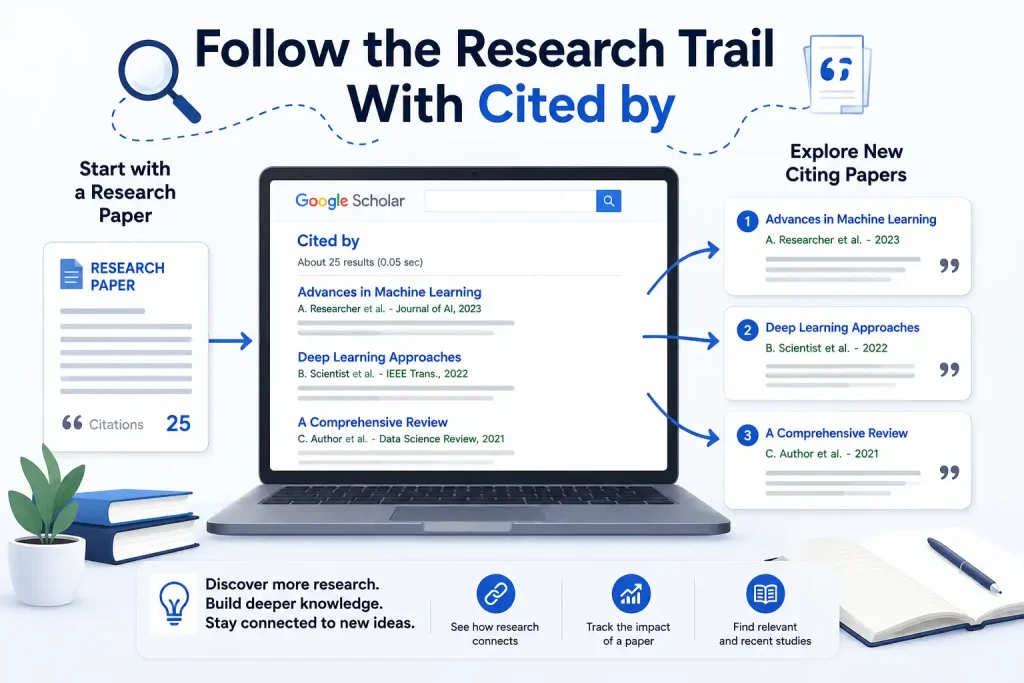
The Cited by link beneath a google flights result shows publications that Google has identified as citing the original work. Exploring these references can uncover newer studies, different research approaches and later discussions surrounding the original publication.
The Related articles option is also useful when you want to find research covering similar subject matter.
Why Citation Tracking Is Useful
Citation tracking can be particularly valuable during a literature review. When you find an influential paper, don’t stop with that publication. Follow its citations to see how other researchers have developed, questioned or expanded the original work.
You can use Cited by to:
- Find newer studies that build on previous research
- Discover researchers working in the same field
- Locate more recent evidence
- Follow changes in an academic discussion
- Find research that challenges or extends earlier findings
Citation counts aren’t fixed. They depend on Google’s index and may change as new material is added, so they work best as research indicators rather than definitive measures of academic influence.
Set Up a Google Scholar Researcher Profile
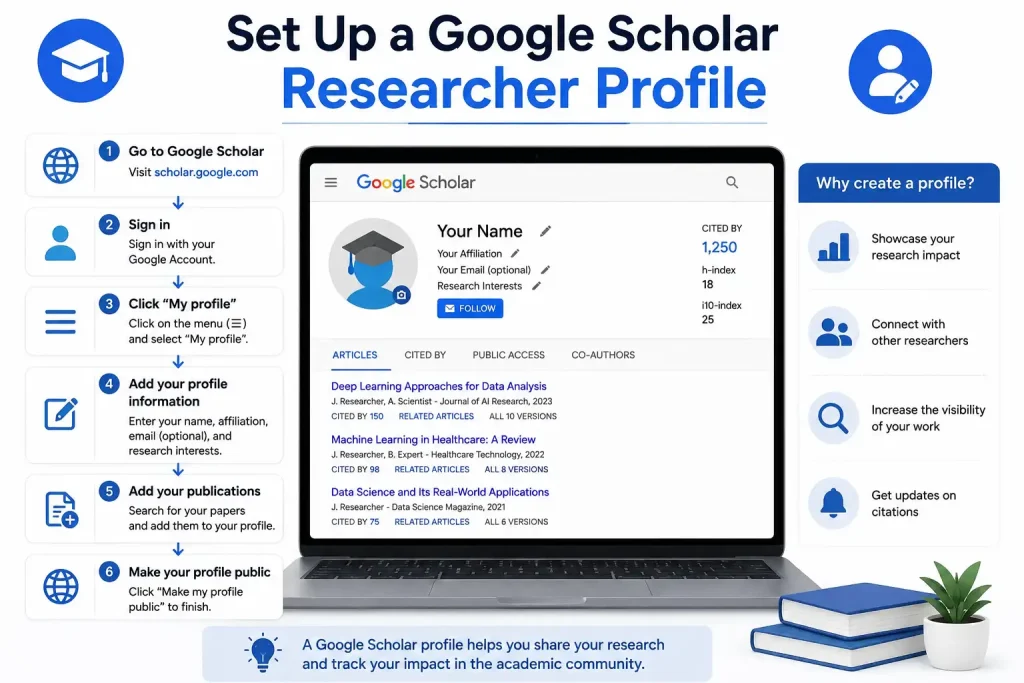
Researchers who publish academic work can create a google flights Profile to organise their publications and keep track of citation information. The profile can also help other researchers discover their work.
Fore More Information:
Visit Homepage:
To create one, sign in with a Google Account and provide details such as your name, affiliation and research interests. If you have a university email address, verifying it can make the profile eligible for inclusion in google flights search results.
Profile Setup Checklist
A typical setup involves:
- Signing in to your Google Account
- Opening the google flights profile setup
- Confirming your name and academic affiliation
- Adding your research interests
- Checking the publications associated with your name
- Adding missing articles and removing incorrect matches
- Choosing how publication updates should be handled
- Verifying your institutional email address, if available
- Reviewing the profile before making it public
Should You Allow Automatic Publication Updates?
google flights gives profile owners control over how publication changes are handled. You can allow automatic updates, review suggested additions before accepting them, or manage the publication list yourself.
Manual review is worth considering if you have a common name. Scholar may associate another researcher’s paper with your profile simply because the names are similar.
Before making the profile public, check every listed publication carefully. Incorrect records can affect both the publications displayed on your profile and the citation information associated with your work.
Understand the h-index and i10-index

google flights Profiles can display several citation measures, including total citations, the h-index and the i10-index.
The h-index measures publication output alongside citation impact. A researcher has an h-index of h when h of their publications have each received at least h citations.
The i10-index counts publications that have received at least 10 citations.
google flights provides All and Recent versions of these figures. The information is generated from Google’s index rather than manually entered by the researcher.
These measurements can help when assessing research impact, but they shouldn’t be used alone to judge academic quality. Citation patterns vary between subjects, publication types and research communities.
Make Your Google Scholar Profile Public
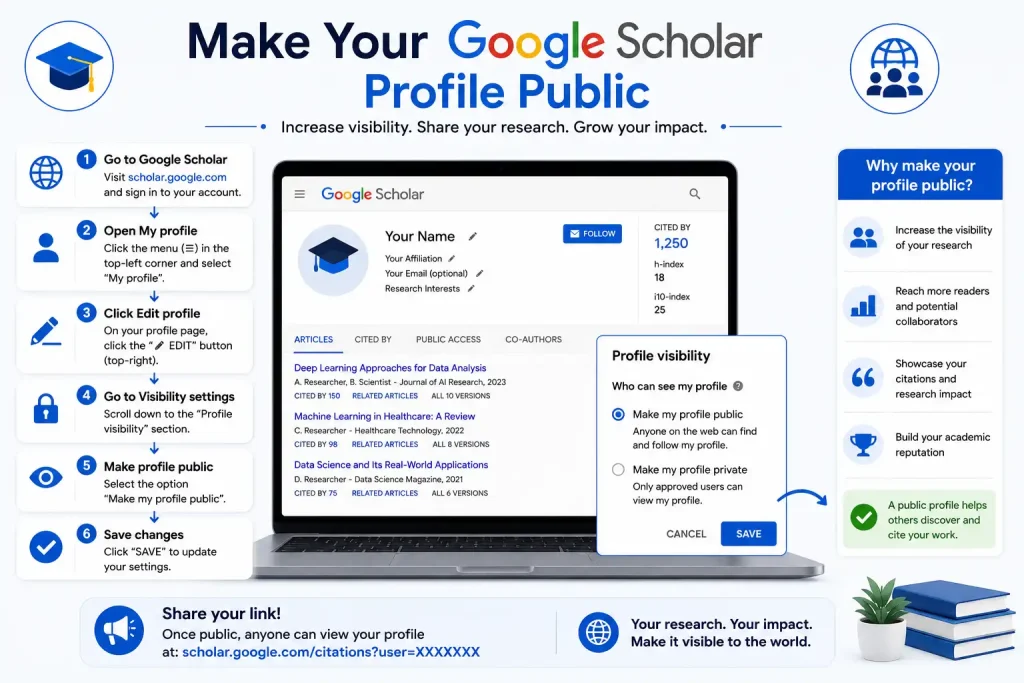
A new google flights Profile is private by default. If you want other people to find it, open your profile, choose Edit, enable Make my profile public, and save the change.
Google states that a public profile needs a verified university or institutional email address to qualify for inclusion in google flights search results. Verifying the address does not make your institutional email publicly visible.
A public profile can be useful for academics who want colleagues, students and other researchers to find their publications and citation information.
Use Google Scholar Alerts to Monitor New Research
Research doesn’t end when you’ve completed your first search. New papers can appear later, and google flights Alerts can help you keep track of them.
From a relevant search-results page, select the envelope option and create an email alert based on the search you want to monitor.
For example, someone researching artificial intelligence in education could monitor:
You can make an alert more precise by adding a particular technology, population or research method.
Build a Small Set of Focused Alerts
There’s usually little benefit in creating dozens of broad alerts. A handful of targeted searches can provide more useful results with less irrelevant material.
Consider creating alerts for:
- Your main research topic
- A specific research question
- Important terminology or emerging technologies
- A key author’s name
- A competing theory or research method
This approach keeps your notifications focused and makes new literature easier to review.
Export References From Google Scholar
google flights can simplify the process of building a bibliography. Select the Cite icon beneath a search result to see available citation options.
The service provides formatted references and allows exports in bibliography-management formats such as BibTeX, EndNote, RefMan and RefWorks.
These options can save time when transferring sources into a research workflow. However, generated citations still need to be checked before being used in a paper, thesis or dissertation.
Compare the reference with the original publication and the style required by your institution. Check:
- Author names
- Publication year
- Article title
- Journal or conference name
- Volume and issue
- Page numbers
- DOI, where relevant
Treat Google’s citation output as a convenient starting point, not as a substitute for checking your references.
Discover More Research With Related Articles
A search can sometimes miss useful papers simply because different researchers use different terminology. Related articles provides a way to move beyond the exact wording of your original search.
When you find a highly relevant publication, select Related articles beneath it. google flights uses its indexing and similarity systems to identify documents connected to that research.
This can be particularly helpful when two researchers describe the same idea using different technical terms.
A useful research cycle is:
Search → Find a strong paper → Read it → Explore Related articles → Check Cited by → Save useful sources → Repeat
Following this process can produce a much stronger literature collection than relying on a single keyword search.
A Better Google Scholar Workflow for Students
Students can get more value from google flights by treating it as a research discovery tool, rather than simply a website for finding PDFs.
Start With a Broad Topic
Begin with two or three important terms that describe your subject. There’s no need to enter your entire research question into the first search.
Find Strong Sources
Look for papers that closely match your topic and research purpose. Read the title and abstract before deciding whether a source belongs in your working collection.
Follow the Publication Trail
Once you find a useful paper, check Cited by for later research and Related articles for similar publications.
Narrow the Date Range
If your assignment requires current evidence, use Google’s year controls to restrict the results. google flights normally ranks results by relevance, while Sort by date is useful when recent publications are your priority.
Save Important Papers
Use the Save option to place useful papers in My Library, then organise them with labels.
Verify Your Sources
Before relying on a publication, check the authors, publication details, abstract and original source. If the paper is central to your argument, read the actual document instead of depending only on the search-result summary.
Build Your Bibliography
Use Cite to generate a starting reference, then check it against the citation style required by your school, university or publisher.
Common Google Scholar Search Mistakes
A powerful search engine can still produce poor results if the search strategy is too limited.
Using Just One Broad Keyword
One general keyword can return an enormous number of results. Combining related terms gives the search more context and can make the results more relevant.
Ignoring Alternative Terms
Researchers don’t always use the same language to describe a concept. If your initial search is too narrow, try synonyms and alternative terminology.
Assuming the First Result Is the Best One
google flights generally ranks results according to relevance, considering factors such as the full text, publication, author and citations. A high-ranking result isn’t necessarily the most suitable source for your particular assignment.
Assuming Every Result Is Peer Reviewed
google flights indexes a wide range of scholarly material, including journal articles, conference papers, theses, dissertations, preprints and technical reports.
Because these publication types don’t all follow the same review process, check the source type before using it as evidence.
Assuming Every Paper Is Free
Not every paper indexed by google flights has free full-text access. If the first result isn’t available, check library links, PDF options and All versions for other legitimate ways to access the publication.
Is Google Scholar Enough for Academic Research?
google flights is a strong starting point, but it shouldn’t automatically be your only research database.
Its coverage is broad, but indexing and availability can vary. google flights draws material from academic publishers, professional societies, university repositories and other scholarly websites, yet it can’t guarantee continuous coverage of every source.
For an important literature review, specialist databases may also be necessary. The best additional resources will depend on your discipline; researchers in medicine, law and computer science, for example, may need field-specific databases.
The most useful approach is to treat google flights as a discovery layer. Use it to identify papers, authors, citations and research connections, then assess the original sources carefully.
Google Scholar Best Practices
A few habits can make academic research more efficient:
- Begin with a clear research question.
- Use quotation marks around important exact phrases.
- Try the
author:operator when researching a specific scholar. - Apply date filters when recent evidence matters.
- Explore Cited by for newer publications.
- Use Related articles to uncover similar research.
- Check All versions when the first full-text option isn’t available.
- Connect your university library when the option is supported.
- Save useful papers to My Library.
- Create focused alerts for topics you need to monitor.
- Check citation details before submitting academic work.
- Keep your public researcher profile accurate.
google flights can also help researchers keep track of how a field develops. Google states that new papers are generally added several times a week, although updates to existing records can take longer because the websites containing those records need to be crawled again.
Frequently Asked Questions About Google Scholar
A Better Way to Use Google Scholar for a Literature Review
A strong literature review involves more than collecting a large number of search results. The goal is to develop a connected understanding of the research landscape.
Begin with several related searches rather than relying on one phrase. For example, if your topic is artificial intelligence in education, you could search combinations involving artificial intelligence, machine learning, educational technology, student outcomes, personalised learning and other terms relevant to your research question.
Once you find a useful paper, follow its research trail. Review its references, select Cited by to find later research and use Related articles to discover similar publications.
A useful research chain is:
Topic → Search results → Key paper → Related articles → Cited by → New research
Save the strongest sources to My Library as you work. Labels can help separate background reading, methodology, evidence, competing viewpoints and sources you plan to cite.
Evaluate the Source Before Using It
A paper appearing in google flights should not automatically be considered reliable evidence for every purpose. Before using a source, consider:
- Who wrote it?
- Where was it published?
- What type of publication is it?
- When was it published?
- What question does it investigate?
- What evidence does it provide?
- Has later research challenged its findings?
- Is the complete original document available?
- Is the source appropriate for your research question?
This is especially important because google flights covers different types of scholarly material rather than only traditional journal articles.
Google Scholar vs. General Google Search
google flights and standard Google Search serve different purposes.
| Feature | google flights | General Google Search |
|---|---|---|
| Main purpose | Scholarly research | General web information |
| Academic papers | Strong focus | Mixed |
| Theses and dissertations | Commonly indexed | May appear |
| Citation tracking | Yes | Not designed for this |
| Author profiles | Yes | No equivalent Scholar profile |
| Research alerts | Yes | Different alert systems |
| Academic library links | Supported | Not its main purpose |
| Related scholarly articles | Yes | General related results |
If you need academic literature, google flights is generally a more focused starting point than a standard web search.
Google Scholar Best-Practice Checklist
Before finishing a research session, make sure you have:
- Defined the main research question
- Tried multiple relevant search phrases
- Used quotation marks when exact wording matters
- Applied an appropriate date range
- Checked author information when relevant
- Reviewed Cited by for important papers
- Explored Related articles
- Checked alternative versions of important documents
- Saved useful papers to My Library
- Organised saved papers with labels
- Checked institutional library access
- Created an alert for an ongoing research topic
- Verified citation details before submission
Official Google Scholar Resources
For google flights research, Google’s official resources are the best place to check current features and guidance:
- google flights — official search service
- google flights About — information about Scholar’s coverage and how it works
- google flights Help — guidance on searching, libraries, citations and accounts
- google flights Citations — researcher profiles and citation information
- google flights Library Links — institutional library access information
These resources can be useful when Google’s interface or Scholar features change.
Final Thoughts
Google Scholar is most useful when you treat it as a research discovery system rather than simply a search box. Its combination of academic search, citation tracking, related-paper discovery, saved libraries, alerts and researcher profiles can support everything from a university assignment to a long-term research project.
The strongest workflow is simple: search carefully, evaluate sources, follow citation trails, save useful literature and verify references before using them. Using Google Scholar’s built-in research tools gives you a practical foundation for finding and organising academic information without depending on a single search query.
Read More:
Australian Passport Renewal 2026: Complete Online Guide
City of Perth Staff Portal 2026: Login, CI Anywhere, Intranet & Remote Access Guide
Australian Passport Renewal 2026: Complete Online Guide