The Australian Taxation Office (ATO) has replaced the former Tax Agent Portal with Online Services for Agents, a modern and secure platform built specifically for registered tax professionals. It provides a single location where Tax Agents, BAS Agents, and authorised practice staff can manage client tax matters, submit lodgements, access ATO records, and communicate securely with the ATO.
Compared with the previous Tax Agent Portal, the updated platform introduces stronger identity protection through myID and the Relationship Authorisation Manager (RAM). It also offers improved client management, faster access to tax information, enhanced reporting tools, secure digital correspondence, and better practice administration features.
Understanding the Tax Agent Portal
Now known as Online Services for Agents, the Tax Agent Portal is the Australian Taxation Office’s secure online system for registered tax professionals. It enables authorised users to manage client tax information, complete electronic lodgements, review tax accounts, update client details, and securely exchange information with the ATO from a single dashboard.
The platform is designed for:
Because the service contains confidential taxpayer information, every user must verify their identity using myID and receive the appropriate business permissions through Relationship Authorisation Manager (RAM) before access is granted.
Online Services for Agents at a Glance
| Feature | Details |
|---|---|
| Official Platform | Online Services for Agents |
| Previous Name | Tax Agent Portal |
| Managed By | Australian Taxation Office (ATO) |
| Login Method | myID |
| Business Authorisation | Relationship Authorisation Manager (RAM) |
| Eligible Users | Registered Tax Agents and BAS Agents |
| Primary Functions | Client management, tax returns, BAS, IAS, secure messaging and reporting |
| Security | Multi-factor authentication with myID |
| Availability | Online, 24/7 |
Why Tax Professionals Use Online Services for Agents
Online Services for Agents has become the primary digital workspace for Australian tax practitioners. Rather than switching between multiple systems, professionals can complete most of their daily compliance tasks from one secure platform.
Some of the key capabilities include:
By centralising these services, the platform helps accounting practices improve efficiency while maintaining high security standards.
What You Need Before Logging In
Before accessing Online Services for Agents, ensure the following requirements have been completed.
1. Hold an Active TPB Registration
Access is available only to professionals who are currently registered with the Tax Practitioners Board (TPB) as either a:
If your registration has expired or is no longer active, you may be unable to use the service until your registration has been reinstated.
2. Create and Verify Your myID
The Australian Government uses myID (previously called myGovID) to confirm your identity when accessing secure government services.
To prepare your account:
Identity verification may require documents such as:
A higher identity strength allows access to more government digital services.
3. Connect Your Business Through RAM
After setting up myID, you must link your digital identity to your business using the Relationship Authorisation Manager (RAM).
The process depends on your role within the organisation.
For Principal Authorities
Business owners, directors, or other authorised principals can:
For Employees and Contractors
Staff members cannot usually grant themselves access.
Instead, they must:
Without RAM authorisation, access to Online Services for Agents will generally be denied, even if myID has been successfully configured.
Information You’ll Need Before Registration
Having the following information ready can make the registration process much smoother.
| Requirement | Purpose |
|---|---|
| Active TPB registration | Confirms professional eligibility |
| myID account | Secure identity verification |
| Standard or Strong identity strength | Required security level |
| Linked ABN in RAM | Business authorisation |
| Registered Agent Number (RAN) | Practice identification |
| Internet connection | Secure online access |
| Mobile device | myID authentication |
How to Set Up Online Services for Agents
If you’re accessing the platform for the first time, follow these steps to prepare your account.
Step 1: Confirm Your Registration
Check that your Tax Practitioners Board registration is active before attempting to sign in.
Step 2: Register for myID
Download the myID mobile app, register your personal email address, and complete the identity verification process until your account reaches either Standard or Strong identity strength.
Step 3: Link Your Business in RAM
Use Relationship Authorisation Manager to connect your business.
Principal Authorities should:
Employees should:
Step 4: Verify Your Access
Before signing in, make sure:
Completing these checks before your first login can help prevent common access and authorisation problems.
Benefits of Using Online Services for Agents
Online Services for Agents offers a range of features that help tax professionals manage compliance work more efficiently while protecting sensitive client information.Offical Website
Key benefits include:
For registered Tax Agents and BAS Agents, Online Services for Agents has become an essential platform for handling everyday tax administration securely and efficiently.
How to Sign In to the Tax Agent Portal (Online Services for Agents)
Once your myID has been set up, your practice has been linked through the Relationship Authorisation Manager (RAM), and your registration is complete, you’re ready to access Online Services for Agents. Every login is protected by multi-factor authentication to help safeguard confidential taxpayer information.
Step 1: Visit the Official Online Services for Agents Website
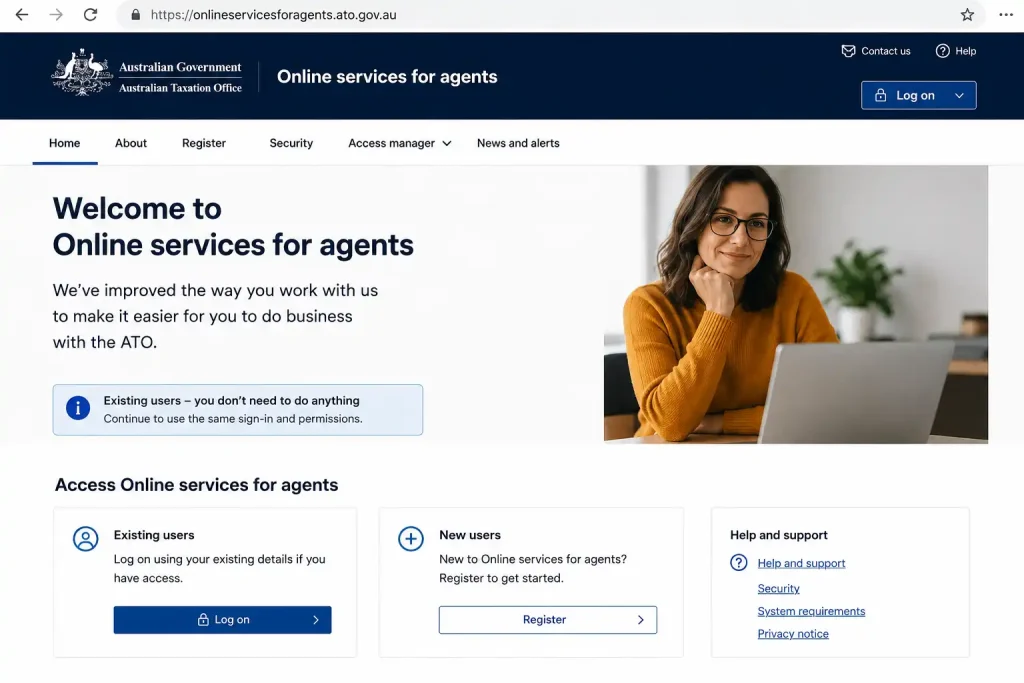
Begin by accessing the official Australian Taxation Office (ATO) login page. Using the official website ensures you’re signing in through a secure and up-to-date service while reducing the risk of phishing scams.
Select Log in to Online services for agents to continue.
Security Tip: Save the official page as a browser bookmark so you can access it directly whenever you need to sign in.
Step 2: Enter the Email Linked to Your myID
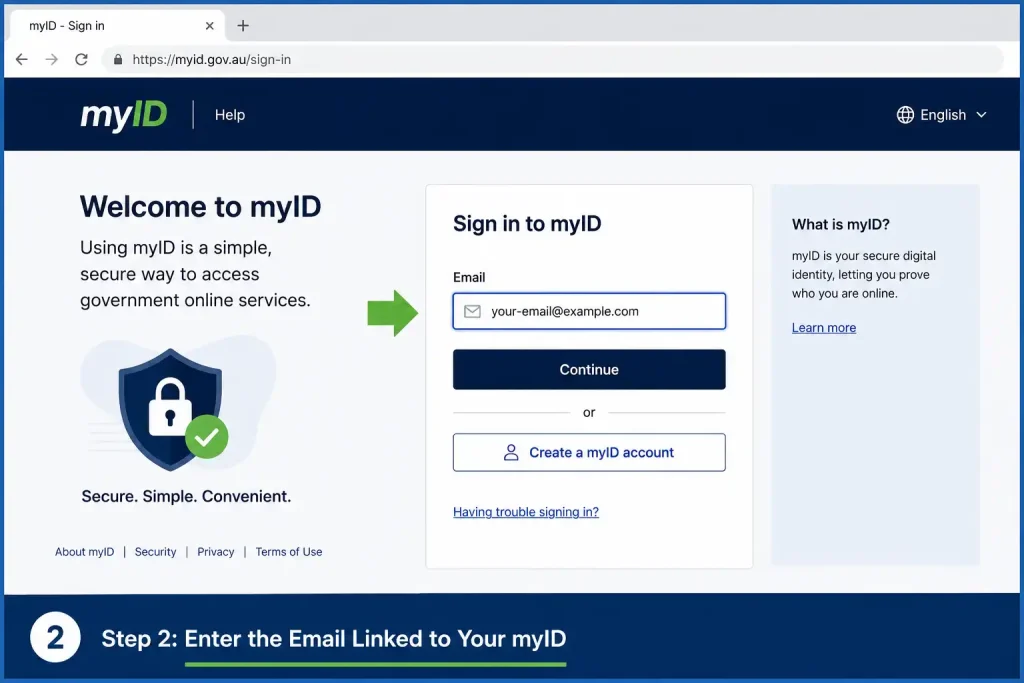
The login page will ask for the email address associated with your myID.
Before proceeding, make sure the email exactly matches the one used when your myID was created. Using a different email may prevent authentication.
After confirming the details, click Submit.
Step 3: Approve the Login in the myID App

Your identity must be confirmed using the myID app before access is granted.
Complete the verification by following these steps:
After successful authentication, you’ll be signed in automatically.
Step 4: Choose the Correct Registered Practice

If your myID is linked to more than one registered tax practice, you’ll be asked to choose which organisation you want to access.
Before entering the dashboard:
Choosing the correct practice ensures your client records, tax lodgements, and ATO correspondence are managed under the right business.
Getting Familiar with the Online Services Dashboard
After signing in, you’ll arrive at the main dashboard, which provides quick access to the features used most often by tax professionals.
Depending on your permissions, the dashboard may include:
The dashboard is organised to help practitioners quickly locate client information while maintaining strict security for sensitive tax records.
Managing Clients Through Online Services for Agents
Client management is one of the platform’s core functions. Once a client has authorised your practice, you can administer their tax obligations and access relevant records from a single location.
Adding a New Client
Use the following process to link a new client to your registered practice.
Step 1: Open the Clients Section
From the main navigation menu, select Clients.
Step 2: Select Add Client
Choose Add Client to begin creating a new client relationship.
Step 3: Enter the Client’s Identifier
Search for the client using one of the following:
Ensure the identifier matches the client’s official records exactly to avoid search errors.
Step 4: Review the Client Information
The system will display the client’s available details.
Confirm that the following information is correct before continuing:
If anything appears incorrect, double-check the TFN or ABN before proceeding.
Step 5: Select the Authorised Tax Accounts
Choose the tax accounts your practice has permission to manage.
These may include:
Step 6: Confirm the Client Relationship
After reviewing the information, finalise the client link.
Once approved, the client will be added to your directory and will be available for ongoing tax management and lodgements.
What Is Agent Nomination?
To strengthen account security, the Australian Taxation Office now requires Agent Nomination for many individuals and businesses before a registered tax practice can be linked.
This additional verification helps ensure only authorised tax professionals gain access to taxpayer information.
How Clients Nominate Their Tax Agent
If Agent Nomination is required, ask your client to complete these steps:
Once the nomination has been submitted, your practice has 28 days to add the client.
If that period expires, the client will need to complete the nomination process again before you can proceed.
Lodging Business Activity Statements (BAS) and IAS
Online Services for Agents enables registered practitioners to prepare and lodge both:
Electronic lodgement is generally faster than paper filing and allows agents to review calculations before submitting information to the ATO.
How to Lodge an Activity Statement
Step 1: Locate the Client
Open Clients and search using the client’s:
Step 2: Open Activity Statements
Navigate to:
Lodgements → Activity Statements
Step 3: Select the Outstanding Reporting Period
Locate the reporting period listed under Not Lodged, then open the relevant activity statement.
Step 4: Review Existing Information
The system may already contain pre-filled information based on ATO records, including:
Always review every figure carefully before making any edits.
Step 5: Enter Any Required Adjustments
Update the statement where necessary by entering the appropriate figures, such as:
Step 6: Calculate the Outcome
Select Calculate to allow the system to estimate:
Review the calculated figures to ensure they are accurate.
Step 7: Submit the Statement
Read the declaration carefully.
Tick the declaration checkbox, then select Lodge to submit the activity statement electronically.
After successful submission, the system will display a confirmation that the lodgement has been received.
Using Pre-fill Information
Pre-fill information can significantly reduce manual data entry when preparing client income tax returns.
To view available pre-fill data:
Depending on the client, available information may include:
Many practice management systems can import this information directly, helping improve accuracy while saving valuable preparation time.
Tips for Using Online Services for Agents Safely
Following a few simple practices can help keep your account secure and your workflow efficient.
Recommended best practices include:
Maintaining these habits helps protect sensitive client information, supports compliance, and reduces the likelihood of login or lodgement problems.
Main Features of Online Services for Agents
Formerly known as the Tax Agent Portal, Online Services for Agents brings together the Australian Taxation Office’s key digital services into one secure platform. It allows registered tax professionals to complete everyday compliance tasks, manage client information, and communicate with the ATO without switching between multiple systems.
Some of the platform’s most valuable features include:
Together, these tools help reduce manual administration, improve accuracy, and make day-to-day practice management more efficient.
Troubleshooting Common Login and Access Issues
Although Online Services for Agents is designed to provide reliable access, users may occasionally experience login or authorisation problems. Most issues can be resolved by reviewing account permissions or confirming that the required setup has been completed.
| Problem | Likely Cause | Recommended Solution |
|---|---|---|
| A930.03 – Access Denied | Missing or inactive RAM permissions | Ask your Principal Authority to review and update your authorisation in Relationship Authorisation Manager (RAM). |
| myID verification code does not appear | Expired session or network issue | Close and reopen the myID app, check your internet connection, confirm your device time is set automatically, then restart the login process. |
| Unable to add a client | Agent Nomination incomplete or incorrect TFN/ABN | Ask the client to complete Agent Nomination through their Online Services account and verify all identification details. |
| No permission to lodge returns | Required permissions have not been assigned | Request your Principal Authority to grant the appropriate lodgement or administrator permissions in RAM. |
| Portal temporarily unavailable | Scheduled ATO maintenance | Wait until maintenance has finished and check the official ATO service status before signing in again. |
Keeping Your Online Services Account Secure
Because the platform provides access to confidential taxpayer information, maintaining strong security practices is essential.
To help protect your account and your clients’ data:
Following these simple steps helps reduce the risk of unauthorised access.
Recommended Workflow for Tax Agents
A consistent workflow can improve efficiency, reduce errors, and minimise the need for corrections after lodgement.
Before Submitting a Return
Complete the following checks before lodging tax information:
After Lodgement
Once the return or activity statement has been lodged:
Maintaining this routine helps improve record-keeping and supports ongoing compliance.
Why Many Practices Choose Online Services for Agents
Online Services for Agents has become the preferred platform for many Australian accounting firms because it combines security, efficiency, and convenient access in one system.
Some of its key advantages include:
These benefits help tax professionals manage client obligations more effectively while maintaining high security standards.
FAQs
Final Thoughts
Online Services for Agents, formerly known as the Tax Agent Portal, has become the central digital platform for registered Australian tax professionals. By combining secure identity verification through myID, business authorisation using Relationship Authorisation Manager (RAM), and comprehensive client management tools, it enables tax practitioners to manage compliance efficiently in a secure online environment.
Whether you’re linking new clients, lodging BAS and IAS statements, reviewing pre-fill information, or working across multiple authorised practices, understanding how the platform operates can improve productivity and help maintain compliance with ATO requirements. Keeping your myID current, reviewing RAM permissions regularly, and following recommended security practices will help you make the most of the services available through Online Services for Agents.
Read More:
Working With Children Check Australia (WWCC): Complete Online Guide 2026
Storypark Login Made Simple: The Complete Access Guide for Families (2026)
Student Portal Navigator: The Ultimate Campus Access Guide (2026)
Passport Application Guide (2026): Complete Online Process & Requirements
Essential Assessment: The Complete Educator’s Handbook (2026)