Managing Australian tax affairs online is easier when your ATO services are connected to your myGov account. For individuals and sole traders, the ATO’s online services provide a central place to view tax information, manage personal details, lodge returns, check notices, handle payments and access relevant superannuation information.
The usual way to reach personalised ATO services is through myGov, where the Australian Taxation Office can be linked as a government service. Always start from an official government website rather than following unexpected links sent by email or text message.
What Is the ATO Portal Used For?
After linking the ATO to myGov, eligible users can access a range of tax and superannuation services from their account.
Depending on your circumstances, you may be able to:
- View tax information and account details
- Find your Tax File Number (TFN)
- Check employment income information
- View notices of assessment
- Lodge an income tax return through myTax
- Track the progress of a tax return
- Manage tax payments
- Set up eligible payment arrangements
- Update personal and financial information
- View relevant superannuation information
- Complete certain sole-trader lodgment tasks
The services available to you can vary according to your circumstances and the type of information held by the ATO.
Quick answer: To access personalised ATO online services, sign in to myGov, then select the Australian Taxation Office from your linked services.
Before You Try to Access the ATO
Having your account details ready can make the setup process much smoother. You first need an active myGov account, followed by a connection between myGov and the Australian Taxation Office.
Before you begin, check that you have:
- An active myGov account
- Access to the email address registered with myGov
- Your usual myGov sign-in method
- A mobile device if your security method requires one
- Your TFN and other relevant identity information when requested
- Supporting information that may be needed to answer identity questions
The information requested during the linking process isn’t necessarily the same for everyone. The requirements can depend on your circumstances and the method being used.
Visit Homepage
How to Access the ATO Portal Through myGov
Once your accounts are connected, accessing ATO online services involves only a few steps.
1. Start With an Official Government Website
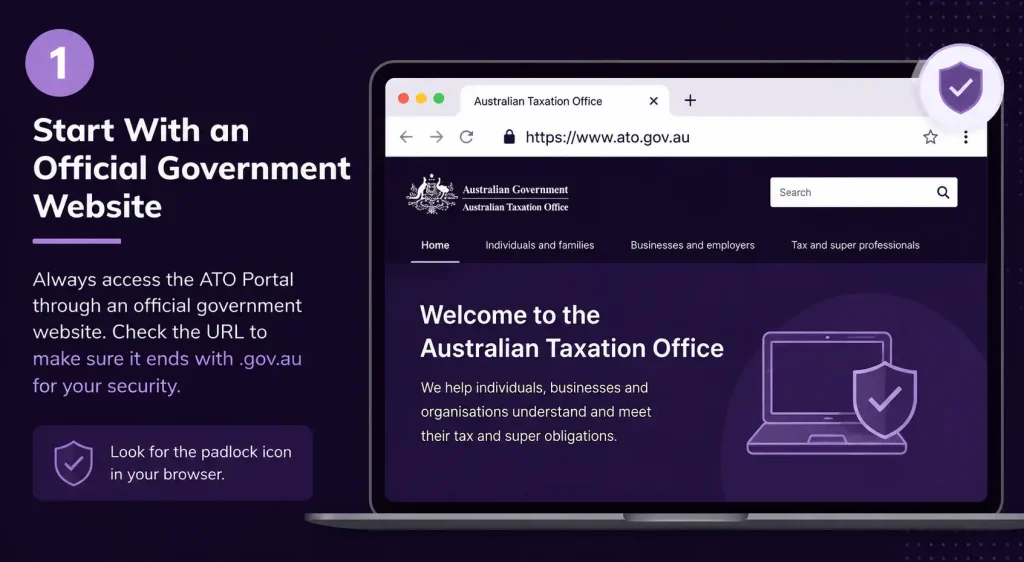
Use the official ATO online services page or navigate directly to myGov.
ATO Online Services:
Open ATO Online Services
Before entering any information, check the website address carefully. Genuine Australian Government services use official government domains such as ato.gov.au and my.gov.au.
Avoid signing in through links from unexpected messages, particularly if they ask you to provide passwords, security codes or financial information.
2. Sign In to myGov
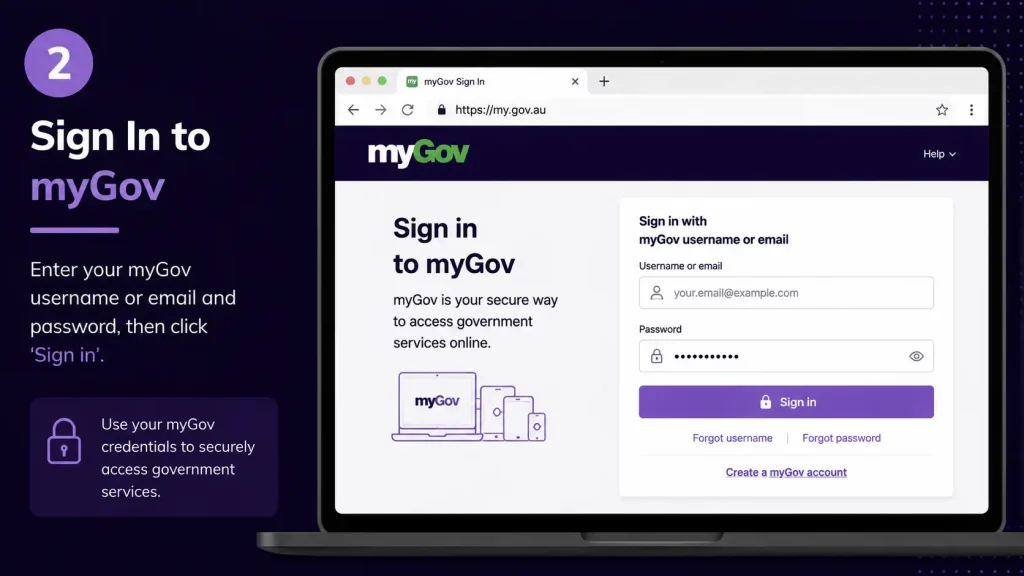
Choose the appropriate myGov sign-in option and complete the authentication process associated with your account.
Depending on your setup, current myGov sign-in methods can include:
- Digital ID
- Passkeys
- myGov sign-in details
If you use myGov sign-in details, additional verification may involve an SMS code, myGov Code Generator or an authenticator.
Offical Website
3. Complete the Security Verification
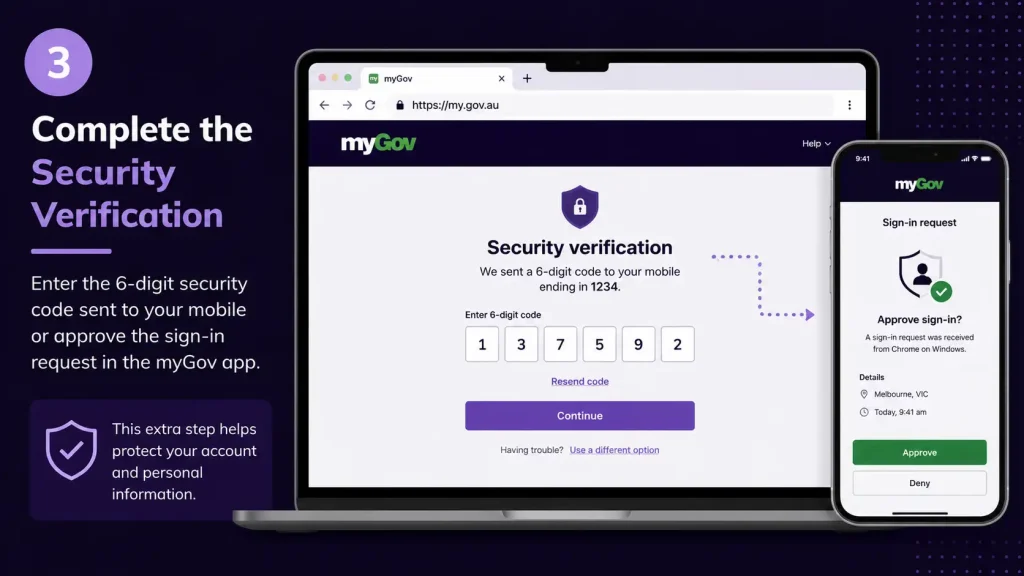
Follow the instructions displayed on screen. Your exact process depends on the security option connected to your account.
You may be asked to approve an authentication request, enter a verification code or use a passkey.
Security reminder: Never give your password, authentication code or other account-security information to another person.
4. Open the Australian Taxation Office Service
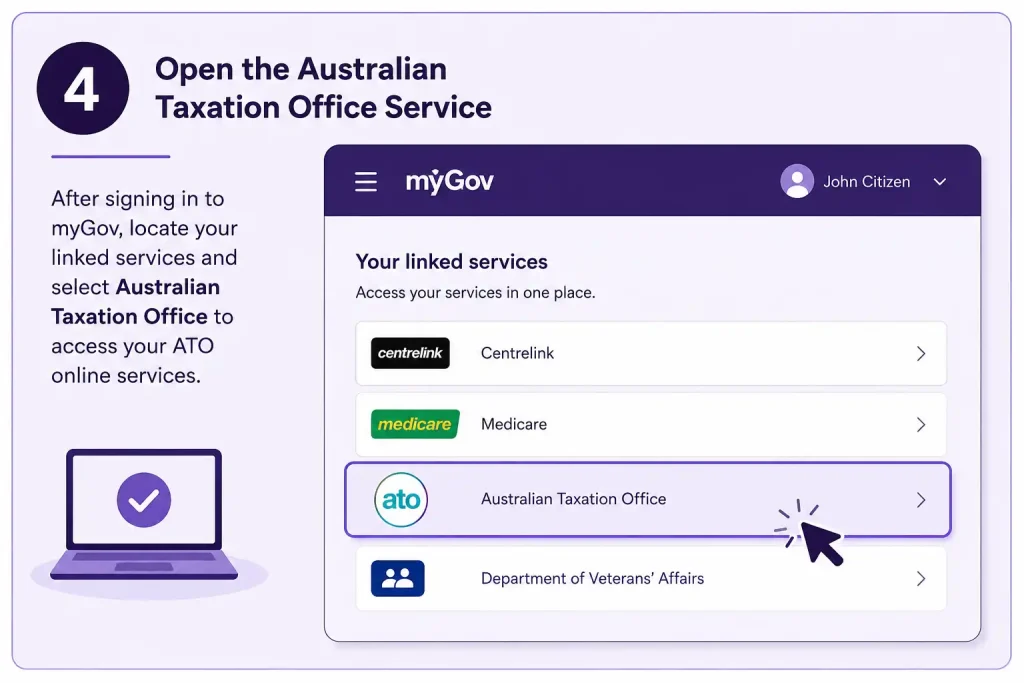
After signing in successfully, go to your linked services and select Australian Taxation Office.
If the ATO doesn’t appear in your linked services, you’ll need to connect it to myGov before you can access your personalised tax information.
How to Link the ATO With Your myGov Account
New users may need to complete a one-time linking process before ATO online services become available through myGov.
The basic process is:
- Sign in to myGov.
- Open View and link services.
- Locate Australian Taxation Office.
- Select Link.
- Enter or confirm the requested personal information.
- Complete any identity questions presented on screen.
Official instructions:
myGov ATO Linking Instructions
Information You May Need During Linking
The ATO can use information already associated with your records to help confirm your identity. Depending on your circumstances, this may include tax or financial information held by the ATO.
Your Tax File Number (TFN) is an important part of your tax records. Once ATO online services are linked to myGov, there is also an online option for finding your TFN if you need to retrieve it.
If a website asks you to provide tax information and you’re unsure whether it is legitimate, don’t continue. Close the page and access the service directly through the official ATO or myGov website.
Can You Use Digital ID to Sign In?
Digital ID is another sign-in option available within the myGov environment. Current myGov guidance states that a Digital ID, such as myID, can be used after it has been set up and connected to your myGov account.
For users accessing ATO online services through a Digital ID, the required identity strength can depend on the account setup. If myID is used at a particular identity strength, myGov guidance indicates that you may need to continue using myID at the same or a higher identity strength when accessing ATO online services.
Digital ID is voluntary.
ATO Portal Access at a Glance
| Stage | What happens |
|---|---|
| 1 | Open the official ATO or myGov website |
| 2 | Sign in to myGov |
| 3 | Complete your selected security method |
| 4 | Select the Australian Taxation Office |
| 5 | Open the ATO online services area |
| 6 | Select the tax or super service you need |
Once you’ve entered the ATO service, check the available options before making changes or submitting information. This can help you choose the correct service for the task you’re trying to complete.
What Can You Do After ATO Portal Login?
The ATO Portal isn’t simply a sign-in page. Once your ATO service is linked to myGov, it can provide access to several areas relating to your tax and superannuation affairs.
The available services can include personal information management, employment information, tax returns, payments and superannuation details.
Lodge and Track Your Tax Return
For many users, lodging an income tax return is one of the main reasons to use ATO online services.
Eligible individuals can use myTax to prepare and submit an income tax return online. The service can also provide access to tax information needed when completing a return.
After lodging, you can check the progress of your return through the ATO service. The current process involves signing in, selecting the ATO, opening Manage tax returns, choosing the relevant income year and checking the displayed status.
Review Your Personal Details
ATO online services can also be used to view and manage certain personal and financial information.
Keeping your details current is important because the ATO may use this information when communicating with you or handling tax-related payments and records.
Check Superannuation Information
Your linked ATO services can also provide access to relevant superannuation information. The options available within your account can vary depending on your individual circumstances.
For that reason, don’t assume that every ATO user will see exactly the same services or account information.
Manage Tax Payments
The ATO Portal can also help eligible users review tax payment information and manage certain payment arrangements.
If you’re dealing with an amount owed to the ATO, review the available options in your account carefully and make sure any payment or arrangement is appropriate for your circumstances.
Finding Your Way Around the ATO Portal
Once you’ve signed in successfully, the ATO Portal becomes the main area for handling your available tax and superannuation services. What appears on the dashboard depends on the type of account you have and whether you’re using ATO services as an individual, sole trader or another type of user.
For most individual users, the dashboard provides access to areas such as tax returns, account information, payments, personal details and superannuation.
Main Services Available
| ATO service | What you can generally do |
|---|---|
| Tax returns | Lodge and manage eligible income tax returns |
| Income information | Review information recorded by the ATO |
| Notices of assessment | Check relevant assessment details |
| Payments | View amounts owing and manage eligible payments |
| Personal details | Review or change available personal information |
| Superannuation | Access available super information |
| Account information | Check your current ATO account position |
The services displayed aren’t identical for everyone. Your circumstances and the services connected to your account determine what you can access.
Lodging an Income Tax Return Through the ATO
Eligible individuals can use myTax, the ATO’s online tax-return service, through their ATO online services.
Before beginning, have any information you may need that isn’t already available in your online tax record. Some information may be pre-filled, but it still needs to be checked carefully before you submit your return.
The Online Tax Return Process
1. Sign in to myGov
Go to the official myGov website and authenticate using your selected sign-in method.
2. Open your ATO service
From your linked government services, select Australian Taxation Office.
3. Find myTax or your tax-return section
Choose the relevant tax-return option available in your ATO account.
4. Check the pre-filled information
Review income and other details already supplied to the ATO. Pre-filled information can save time, but it shouldn’t be treated as automatically complete or error-free.
5. Enter anything that’s missing
Add the information required to finish your return.
6. Review everything carefully
Pay particular attention to income, deductions and bank details before proceeding.
7. Lodge your return
Submit the completed return through the online service and retain the confirmation details for your records.
Good practice: Always review pre-filled information before lodging. You’re responsible for making sure the information in your return is correct.
Checking the Progress of a Tax Return
Lodging your return is only one part of the process. You can also use the ATO service to see what is happening after submission.
A typical route is:
myGov → Australian Taxation Office → Manage tax returns → Choose income year → View status
The labels or layout may change as online services are updated, so follow the options shown in your current account.
A lodged return also doesn’t necessarily mean that the assessment has already been completed. Processing can take time, and the ATO may contact you if further information is required.
Managing ATO Payments Online
Your ATO account can also show information about amounts payable and available payment options.
If you have an amount owing, check the account details carefully before making a payment. The options available to you can depend on the type of amount owed and your circumstances.
Official ATO payment information:
ATO payments and payment options
Check These Details Before Paying
Before making a payment, confirm:
- The amount currently shown on your account
- The relevant tax period
- The correct payment reference information
- The payment method you’re planning to use
- Whether an eligible payment arrangement is available
Never rely on payment instructions received unexpectedly through an email or text message. If something looks suspicious, go directly to the official ATO website instead.
Updating Your Details in the ATO Portal
Keeping your information up to date helps the ATO maintain accurate records and communicate with you when necessary.
Depending on your account and the type of information involved, you may be able to manage details such as:
- Contact information
- Residential or mailing address
- Financial institution information
- Other personal information available through your account
Take extra care when entering bank details. An incorrect financial institution record could cause problems when a refund or other payment is due.
Protect Your Financial Information
Don’t change important financial details through a link supplied in an unexpected SMS or email. Open your browser and go directly to the official ATO or myGov website instead.
ATO and myGov Linking Problems
For some people, the most difficult part of setting up ATO online services is connecting the ATO to myGov.
If the linking process doesn’t work, avoid guessing answers or repeatedly entering information at random. The ATO uses information associated with its records to establish your identity.
Possible reasons for a failed link include:
- The information entered doesn’t match ATO records
- Personal details were entered incorrectly
- A required record or document isn’t available
- Your circumstances don’t meet the relevant linking requirements
- The ATO service has already been linked
- A temporary technical issue is affecting the service
Depending on the circumstances, you may need to contact the ATO for assistance or obtain a linking code.
Use Genuine Information When Answering Linking Questions
Some identity questions may ask about previous tax or financial information. Use your actual records rather than trying to estimate an answer.
If you don’t know the information requested, stop and check your records before trying again. Incorrect answers can prevent the verification process from succeeding.
ATO Portal Login Problems: What to Try
An account can be correctly set up and still experience occasional access problems. Technical issues, authentication problems and browser errors can all interfere with the login process.
| Problem | Possible solution |
|---|---|
| Can’t sign in | Check your myGov sign-in details and authentication method |
| Security code doesn’t arrive | Check your mobile connection and available authentication options |
| Session expires | Sign in again and avoid leaving the page inactive |
| Page doesn’t load | Refresh the page or try again later |
| Browser error | Clear cached data and cookies or use private browsing |
| ATO service is unavailable | Check official ATO service-status information |
| ATO isn’t shown in myGov | Confirm that the service has been linked |
| Linking doesn’t work | Compare your information with your official records |
Don’t assume a login error means your account has been blocked. In many cases, the problem can be related to authentication, the browser or temporary service availability.
When Your Security Code Doesn’t Arrive
If you’re waiting for an SMS or another authentication code, avoid repeatedly requesting new codes straight away.
Try these checks:
- Make sure your phone has network access.
- Give the message a short time to arrive.
- Check whether another configured authentication method is available.
- Try the myGov app or another authentication option connected to your account.
- If the problem continues, use official myGov assistance rather than attempting to bypass the security process.
Current myGov sign-in options can include Digital ID, passkeys and myGov sign-in details with additional authentication.
Fixing Browser and Session Errors
Not every ATO Portal problem originates with your account. Sometimes an outdated browser session, cached information or stored cookies can interfere with a government website.
If the portal isn’t loading properly, try opening it in a private or incognito window.
You can also:
- Close unnecessary ATO and myGov tabs
- Restart your browser
- Install available browser updates
- Clear relevant cached data
- Try another supported browser
- Restart your device
- Check your internet connection
If the same problem occurs on multiple devices and browsers, the issue may be affecting the online service rather than your computer.
What If the ATO Website Is Down?
Government online services can occasionally be unavailable because of planned maintenance or temporary technical problems.
A server or availability message doesn’t automatically mean that your account has been suspended or blocked.
Check the official ATO website for current service information and maintenance notices:
If maintenance is underway, you may simply need to wait until the announced maintenance period has finished before trying again.
Keeping Your ATO Portal Account Secure
Your ATO account contains sensitive tax, personal and financial information, so protecting your login details is essential.
The safest approach is to access the service directly through official government websites rather than clicking unexpected links.
Good Security Practices
- Use the official ATO or myGov website.
- Check the website address before signing in.
- Never give your password to another person.
- Never share authentication codes.
- Don’t enter your TFN or banking details into suspicious websites.
- Keep your browser and device updated.
- Sign out when using a shared computer.
- Treat unexpected emails and SMS messages with caution.
If you receive a message claiming to be from the ATO and something about it seems unusual, don’t use the supplied link. Navigate directly to the official website instead.
ATO Portal vs myGov: Understanding the Difference
The terms ATO Portal and myGov are sometimes used interchangeably, but they aren’t the same service.
myGov is the Australian Government’s online account platform. It allows users to connect government services to a single account.
ATO online services provide access to tax and superannuation information and the services offered by the Australian Taxation Office.
A useful way to understand the relationship is:
myGov account → Australian Taxation Office linked service → ATO online services
This distinction is particularly useful when troubleshooting. A problem signing in to myGov itself is different from successfully signing in to myGov but being unable to open the linked ATO service.
What to Do Before Leaving the ATO Portal
After you’ve finished your task, take a moment to make sure everything has been completed correctly.
If you’re using a shared or public computer, don’t simply close the browser. Instead:
- Confirm that your task was completed.
- Save any confirmation information you need.
- Review important transaction details.
- Sign out of myGov.
- Close the browser.
Signing out is a small but important security step, particularly when another person could use the same device.
FAQs
Final Thoughts
For most individuals, the important first step is making sure your myGov account and ATO service are properly connected. Once that is done, you can access the tax and superannuation services available to your account from the online environment.
If you’re having trouble, don’t immediately assume that your ATO account is blocked. Check the linking information, authentication method, browser, internet connection and official service availability before trying again.
Most importantly, treat your ATO login like any other sensitive financial account. Start from an official .gov.au website, keep passwords and authentication codes private, verify information before submitting it, and use official ATO or myGov support when you can’t resolve an access problem yourself.
Read More:
Storypark Login 2026: Complete Guide to Secure Account Access
Passport Application 2026: From Online Form to Final Lodgement
ATO Business Portal 2026: Complete Login & Online Services Guide
Minecraft Education 2026: The Complete Guide to Creative & Interactive Learning
Passport Renewal 2026: Complete Guide to Requirements, Fees & Online Application
Essential Assessment: The Complete Educator’s Handbook (2026)