Handling tax responsibilities online has become a routine part of running a business in Australia. The ATO Business Portal, also known as Online services for business, provides a central online environment where businesses and organisations can manage a wide range of Australian Taxation Office matters.
Through the service, eligible users can deal with activity statements, review tax accounts, make payments, arrange payment plans, update registration information and communicate securely with the ATO. If you are authorised to manage more than one business, you may also be able to switch between entities from the same login.
What Can You Do in the ATO Business Portal?
The services available to you depend on your role, permissions and the circumstances of the business. Common functions include:
- Managing and lodging activity statements
- Checking tax accounts and payment balances
- Viewing payment reference numbers
- Making payments to the ATO
- Setting up payment plans
- Updating tax registration information
- Sending and receiving secure messages
- Managing authorised users
- Nominating registered tax or BAS agents
- Monitoring relevant Single Touch Payroll information
- Accessing certain certificates and business services
- Handling other reporting and tax-related responsibilities
The ATO considers Online services for business an important online channel for many interactions between businesses, organisations and the tax office.
Quick answer: The ATO Business Portal is an online service that allows businesses and organisations to manage many tax and super-related responsibilities. Access generally involves a Digital ID such as myID, with RAM used to establish the required business relationship.
What You Need Before Using the ATO Business Portal
Getting access is not simply a matter of creating a portal password. Your login is connected to your personal identity and your authority to act for a particular business.
In most cases, two key components are involved:
1. myID
myID is the Australian Government’s Digital ID app. It allows you to prove your identity when accessing participating government online services.
Every person using online services on behalf of a business should have their own myID. It is an individual identity and should not be shared with another person.
The Australian Business Register states that users need a Standard or Strong identity strength for access to its online services.
2. Relationship Authorisation Manager (RAM)
Relationship Authorisation Manager (RAM) connects your Digital ID with the business you are authorised to represent.
A simple way to understand the relationship is:
Your identity → myID → RAM → Business ABN → ATO Online services for business
The principal authority generally establishes the original connection between the business’s ABN and their Digital ID. Other people can then receive appropriate access through the authorisation process.
ATO Business Portal Access Checklist
Before trying to sign in, make sure you have the following:
| Requirement | Why it matters |
|---|---|
| myID | Verifies your personal digital identity |
| Standard or Strong identity | Supports access to the relevant online services |
| Business ABN | Identifies the business you are acting for |
| RAM authorisation | Links your identity to the business |
| Appropriate permissions | Determines which functions you can access |
| Personal email address | Used with your individual myID |
Your available functions depend on the permissions assigned to your account.
Setting Up Your ATO Business Portal Access
If this is your first time using Online services for business, it is better to prepare your Digital ID and business authorisation before attempting to log in.
Step 1: Set Up Your myID
Start by downloading the official myID app and completing the identity verification process.
Your myID belongs to you personally. It is separate from the business, while RAM is used to establish your authority to act for that business.
The Australian Business Register identifies myID as the Digital ID used for its online services and recommends that each user establish their own identity rather than sharing one.
Visit Homepage
Keep your email address personal
Use an email address that belongs to you rather than a shared business mailbox wherever appropriate. This helps maintain the connection between your Digital ID and your individual identity.
Step 2: Link Your Business Through RAM
After your myID is ready, you need to establish the connection between your Digital ID and the business’s Australian Business Number (ABN) through RAM.
The exact process depends on your position within the organisation.
If you are the principal authority
The principal authority is generally the person responsible for establishing the business’s initial connection with its Digital ID. Depending on the business structure, this may be an eligible sole trader or an appropriate individual associate.
The principal authority normally creates the initial ABN-to-Digital-ID relationship.
If you are an employee or administrator
You may not need to create the original business connection yourself.
An existing principal authority or authorisation administrator can provide you with the required authority through RAM.
This distinction is important. Having a myID does not automatically give you access to the ATO information of every business.
ATO Business Portal Login: Step-by-Step Process
Once your myID and RAM arrangements are in place, you can proceed to the actual ATO Business Portal login.
1. Open the Official ATO Login Page
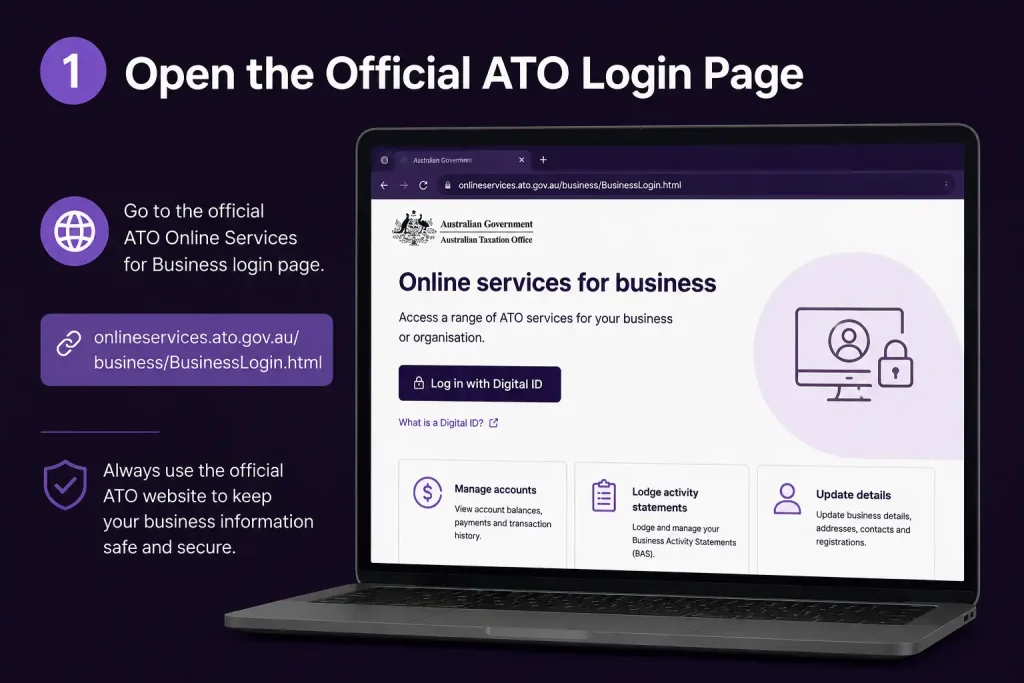
Use the official Online services for business login rather than an unfamiliar website or search result.
The ATO login service currently uses Digital ID as the sign-in method.
2. Choose Digital ID Sign-In

Select the option to continue using your Digital ID.
When requested, enter the email address associated with your myID.
3. Confirm the Login in myID

During authentication, you may see a 4-digit code on the login screen.
Open the myID app and use the displayed code to confirm that you are the person attempting to access the service.
4. Choose the Correct Business

If your Digital ID has access to more than one business or entity, you may be given the option to select the relevant organisation after authentication.
Before continuing, carefully check the:
- ABN
- Business or entity name
- Organisation you intend to manage
This extra check is particularly useful for accountants, business advisers, employees and anyone who works with multiple organisations.
What You See After Signing In
After successful authentication, you will enter the Online services for business environment.
The menus and functions shown can vary according to the business and your assigned permissions. Common areas include:
- Lodgments
- Accounts
- Profile
- Employees
- Communication
- Services
- Business and entity selection tools
Online services for business can support tasks such as activity statement management, account and payment handling, secure communication and tax registration management.
Your permissions still matter
Seeing a particular menu does not necessarily mean you have unrestricted authority.
Your access is determined by your role and the permissions assigned to you. For example, an employee authorised to perform selected business tasks may have considerably different access from the principal authority.
Managing Tax Registrations Online
The ATO Business Portal can also be used to manage certain tax registrations.
After signing in, registration-related options can be found in the relevant Registrations area. What you can manage depends on the business’s circumstances.
Possible registrations include:
- GST
- PAYG withholding
- PAYG instalments
- Fringe Benefits Tax (FBT)
- Other applicable tax registrations
Online services for business supports the management of tax registration information, including GST and PAYG withholding.
GST Registration
GST registration is relevant to many Australian businesses, but whether you need to register depends on your particular circumstances and turnover.
The threshold information included in the source material is:
- $75,000 for many businesses
- $150,000 for non-profit organisations
Having an ABN does not automatically mean that you must register for GST. Check the GST rules that apply to your business before making the registration decision.
Updating Your Business Information
Keeping your business information accurate is important because the ATO uses these details when dealing with your organisation.
Depending on your circumstances and permissions, relevant profile and communication sections may allow you to maintain information such as:
- Contact details
- Communication preferences
- Business addresses
- Postal information
- Financial institution details where available
However, some changes involve more than simply editing a profile.
What If Your Business Structure Changes?
A significant change in business structure may require a new ABN rather than an update to the existing ABN record.
For example, moving from a sole trader structure to a company can involve a different ABN arrangement.
The Australian Business Register provides services for applying for, updating and cancelling ABNs.
Important: Don’t assume that an ATO Business Portal profile update is enough when the legal structure of your business changes. Check the relevant ABN requirements as well.
Using the ATO Portal for BAS Lodgment
For businesses with reporting responsibilities, the Business Activity Statement (BAS) area is one of the most important parts of Online services for business.
The portal allows businesses to manage activity statements electronically.
A typical BAS process can be viewed as:
Sign in → Lodgments → Activity statements → Select the statement → Enter information → Review → Submit
Before beginning, have the relevant figures from your accounting or bookkeeping records available.
What Information Can a BAS Include?
The information required depends on the obligations attached to your business. It may include:
- Total sales
- GST collected
- GST credits
- PAYG withholding
- Other relevant tax amounts
Not every business will complete the same fields.
Your accounting records still matter
The ATO portal is the place where you submit your information, but it is not a replacement for your underlying bookkeeping and accounting records.
Before lodging a BAS, compare the figures against your accounting software and supporting records. Reconciling the information beforehand can help identify discrepancies before the statement is submitted.
BAS Lodgment Checklist
Before selecting Submit, take a moment to review the following:
- ☐ Correct business and ABN selected
- ☐ Correct reporting period selected
- ☐ Sales figures checked
- ☐ GST information reviewed
- ☐ PAYG withholding information checked where applicable
- ☐ Accounting records reconciled
- ☐ Calculated balance reviewed
- ☐ Declaration read carefully
- ☐ Lodgment confirmation saved
Once the BAS has been successfully submitted, keep the confirmation and relevant payment details with your business records.
Key Points to Remember About the ATO Business Portal
The ATO Business Portal is much more than a sign-in page. It provides businesses and organisations with an online environment for managing a range of ATO responsibilities.
The basic access relationship can be remembered as:
myID → RAM → ABN → ATO Online services for business
Once the required access is established, eligible users can use the service for tasks including BAS lodgment, tax registrations, account management, payments, secure communication and other business-related tax services.
ATO Business Portal: BAS, Payments, Accounts and Troubleshooting
The ATO Business Portal is used for much more than submitting tax forms. Once you have access, you can review business tax accounts, check transactions, manage payments, communicate securely with the ATO and access other services available to your business.
The options displayed on your account depend on the entity’s tax obligations and your user permissions. For that reason, two businesses may see different information after signing in.
Lodging a BAS Online
For businesses that need to submit a Business Activity Statement (BAS), the portal provides an online way to prepare and lodge the statement.
Before opening the BAS, gather the figures you will need from your accounting and bookkeeping records. Sales information, GST records and relevant payroll figures should be available so you can compare the figures entered into the portal with your underlying records.
Find the activity statement that needs attention
After completing the ATO Business Portal login, open Lodgments and locate your activity statements.
Check the reporting period carefully before selecting a statement. Depending on the business’s obligations, activity statements may be required monthly or quarterly.
Enter and check the BAS information
Open the relevant statement and use the available preparation option. Work through the fields rather than transferring figures without checking them against your accounts.
Common BAS fields include:
| BAS field | What it generally covers |
|---|---|
| G1 | Total sales |
| 1A | GST payable on sales |
| 1B | GST credits on purchases |
| W1 | Total amounts withheld from payments |
| W2 | Amounts withheld from relevant payments, where applicable |
The fields presented to you can vary depending on the reporting obligations attached to your business.
Do a final review before lodging
Before submitting the BAS, confirm that:
- The correct ABN is selected.
- The reporting period is correct.
- Sales figures match your records.
- GST amounts have been checked.
- PAYG withholding figures are correct where relevant.
- The calculated result appears reasonable.
- You have read the declaration before submitting.
A BAS is an official tax lodgment, so checking the figures carefully is important.
Submit the statement and save the confirmation
When you’re satisfied with the information, complete the required declaration and lodge the BAS.
After a successful submission, retain the confirmation with your business records. If the BAS creates an amount payable, use the payment details provided for that obligation rather than relying on an old payment reference.
Checking Your ATO Business Accounts
The portal also gives businesses a way to keep track of their tax accounts.
Inside the Accounts section, you can review transactions, balances and other obligations associated with the business. This can help answer practical questions such as:
- Is there an outstanding amount?
- Has a recent payment been recorded?
- Is a refund showing?
- When is the next payment due?
- Which transactions have been added to the account?
Activity Statement Account
An activity statement account can include amounts associated with obligations such as GST and PAYG withholding.
If the balance doesn’t look right, review the transaction history before assuming there is an error. A recently lodged BAS or payment may need to be processed before the account reflects the latest activity.
Income Tax Account
The income tax account relates to income tax transactions and obligations for the relevant entity.
Depending on the business, it may help you review:
- Previous assessments
- Amounts owing
- Payments
- Credits
- Due dates
The information available can differ according to the entity and its tax circumstances.
Superannuation-Related Information
Businesses with employees also need to consider their superannuation responsibilities.
Although ATO online services cover various tax and super-related services, individual superannuation matters may not appear in exactly the same format as an income tax account. If you’re dealing with a specific superannuation issue, refer to the relevant ATO guidance for that obligation.
How to Check an ATO Balance
Regularly reviewing your account can help you spot unexpected amounts before they become a problem.
After signing in, select the appropriate account and work through the transaction history. A useful way to understand a changing balance is:
Opening balance → Lodgments → Assessments → Payments → Credits/refunds → Current balance
This sequence can show where the current balance came from.
Why reviewing transactions helps
Suppose you expect your business to have a zero balance but the portal shows an amount owing. Before paying it immediately, look at the transactions that created the balance.
Possible reasons include:
- A recently lodged statement
- A payment that has not yet appeared
- An assessment
- Interest or another charge
- A credit
- An earlier unpaid amount
If you cannot explain a transaction, use the ATO’s secure communication options when available rather than sending sensitive tax information through ordinary email.
Paying an ATO Business Liability
The ATO offers different ways for businesses to pay tax debts and other liabilities. The suitable payment method depends on the liability and the instructions associated with the relevant account or notice.
Payment methods can include electronic funds transfer and BPAY, with the appropriate payment reference information used to identify where the payment should be allocated.
Keep the Correct Payment Reference Number
A Payment Reference Number (PRN) helps the ATO allocate a payment to the correct account or liability.
Never guess a PRN. Use the reference supplied for the particular payment obligation.
Payment checklist
Before paying, verify:
- The correct business is selected.
- The amount is correct.
- The due date has been checked.
- The correct payment reference is being used.
- Your payment method and bank details are correct.
Afterwards, keep evidence of the completed payment for your records.
Payment Plans for Businesses
If your business cannot pay a tax debt in full, you may be able to arrange a payment plan with the ATO.
Online payment-plan options are available to eligible taxpayers, but the conditions and eligibility requirements depend on the circumstances. Not every business automatically qualifies for the same arrangement.
The safest approach is to check the payment-plan option available through your account and follow the ATO’s current requirements.
Don’t wait until the deadline has passed
If you already know that a tax liability cannot be paid on time, deal with it as early as possible rather than ignoring the debt.
Review the options available through the ATO. Where appropriate, a payment arrangement may help you manage the outstanding liability while continuing to meet your tax responsibilities.
Updating Business Bank Details
Keeping financial institution information up to date is particularly important when the ATO needs to issue a refund.
Review the financial information recorded for your business and make changes when necessary. This may be relevant if you have:
- Changed your business bank account
- Closed an old account
- Opened a new business account
- Discovered that refund information is outdated
Because this involves sensitive financial information, always confirm that you’re using the genuine ATO online service before submitting an update.
Single Touch Payroll Information
Employers may also use ATO online services to review information associated with their payroll responsibilities.
Single Touch Payroll (STP) enables employers to report payroll information to the ATO through compatible payroll software.
Depending on the reporting arrangement, information sent through payroll software can include:
- Salaries and wages
- PAYG withholding
- Superannuation information
The ATO’s online environment can then provide access to relevant information and reporting status.
What if payroll figures don’t match?
If figures in the ATO environment don’t agree with your payroll records, start by checking the original payroll system.
The portal displays information received by the ATO. It does not replace the payroll software or accounting records used to create and submit the original information.
Using Secure ATO Communication
Online services for business also provide secure communication options for eligible matters.
When available, secure online communication is preferable to putting confidential tax information into an ordinary email. It can be useful for matters such as:
- Account enquiries
- Supporting documents
- ATO requests
- Lodgment problems
- Business circumstances
- Other tax administration matters
Sending a Secure Message
The general process is:
Sign in → Open Communication/Secure Mail → Start a message → Select the subject → Write your enquiry → Add supporting information if required → Send
Before sending anything, make sure you’re working from the correct business account.
Keep records of important correspondence
For significant tax matters, retain copies of:
- Your message
- The ATO’s response
- Documents you supplied
- Supporting evidence
- Relevant dates
- Reference numbers
Maintaining these records can make future discussions about the same matter much easier.
Certificates, Clearances and Other Online Services
Depending on the business and your permissions, the ATO Business Portal may provide access to additional services, including certain certificates and clearances.
A business may need official documentation to demonstrate a particular tax status for a contract, transaction or another business purpose. The specific certificate or service available depends on the circumstances.
If you can’t find the service you need, don’t automatically assume it has been removed. Some services have specific eligibility requirements or may be provided through another government system.
Managing More Than One Business
Accountants, bookkeepers, business owners and authorised employees can sometimes have access to several ABNs.
When working with multiple businesses, selecting the correct entity is essential.
Before performing an important action, check the business name and ABN, particularly when you are:
- Lodging a statement
- Reviewing an account
- Changing registration information
- Sending a secure message
- Making an account-related request
A useful habit
Before making a significant change, ask yourself:
Am I working in the correct business account?
That quick check can prevent an avoidable administrative mistake.
ATO Business Portal Troubleshooting
A login problem doesn’t necessarily mean the ATO service is unavailable. Issues can also come from your Digital ID, RAM authorisation, browser, permissions or selected business.
Can’t Sign In With myID?
Check the following:
- You’re using the correct myID email address.
- The myID app is available on your device.
- Your identity has been established correctly.
- You’re following the verification instructions shown on screen.
- Your device has an active internet connection.
If the problem appears to be with the Digital ID itself, use the official myID support information.
You Can Log In but Can’t See Your Business
This may indicate an authorisation or RAM problem.
Check whether:
- Your myID is the identity connected to your access.
- The business has authorised you.
- Your authorisation has expired or been removed.
- You’re using the correct Digital ID.
- The ABN relationship has been established correctly.
The ATO and Australian Business Register provide guidance about connecting Digital ID access to a business through RAM.
You Selected the Wrong ABN
Stop before lodging anything or changing business information.
Return to the business selector and choose the correct entity. Don’t submit a statement or update registration details until you’ve confirmed that the ABN is correct.
The Account Balance Doesn’t Look Right
Don’t immediately assume the ATO has made a mistake.
First review:
- Recent lodgments
- Payments
- Credits
- Assessments
- Due dates
- Previous balances
If the difference still cannot be explained, contact the ATO through an appropriate official channel.
ATO Business Portal Security Practices
The portal contains sensitive business and financial information, so account security should be treated as part of everyday administration.
Keep your myID under your control
Your myID represents your personal identity. Never allow someone else to use it as though they were you.
Use the genuine ATO website
Access the service through the official ATO website or a trusted bookmark. Be cautious with unexpected links received through emails or text messages.
Confirm the business before acting
If you have access to several entities, check the ABN and business name before viewing financial information, lodging documents or making changes.
Keep your device protected
Use an up-to-date operating system, browser and appropriate security software when accessing government services.
Never share authentication information
Your Digital ID and authentication process should remain under your control. Don’t share authentication details with another person.
FAQs
Final Thoughts
The ATO Business Portal brings many routine tax tasks into one online service, making it easier for businesses and organisations to manage their ATO responsibilities. Whether you’re lodging a BAS, reviewing an account balance, arranging payments, updating registrations or communicating securely with the ATO, many everyday tasks can be handled online.
The first step is getting your access set up correctly. Your myID verifies your identity, while RAM establishes your connection to the business you’re authorised to manage. Once you’ve logged in, take a moment to confirm the correct ABN and reporting period before submitting a lodgment, changing business information or making a payment.
A few good habits can also prevent avoidable problems. Keep your business details and user permissions current, check tax figures against your accounting records before lodging, and retain important confirmations, payment references and ATO correspondence. When accessing your account or looking for current information, always use the official ATO website.
Read More
Working With Children Check Australia (WWCC): Complete Online Guide 2026
Storypark Login Made Simple: The Complete Access Guide for Families (2026)
Student Portal Navigator: The Ultimate Campus Access Guide (2026)
Passport Application Guide (2026): Complete Online Process & Requirements
Essential Assessment: The Complete Educator’s Handbook (2026)
Tax Agent Portal: The Complete Professional Guide (2026)
Passport Renewal 2026: Complete Guide to Requirements, Fees & Online Application
Minecraft Education 2026: The Complete Guide to Creative & Interactive Learning