The DET Portal is the central online access point for many NSW Department of Education services. It is used by public-school students, teachers, administrative staff, other department employees and approved account holders. Rather than signing in separately to every supported service, users can begin through the department’s portal and access the applications available to their account.
For students, the portal provides a route into department-supported learning tools and digital services. Students generally need their department username and password, while staff use their Department User ID and password. The exact services available depend on the user’s role, school and account permissions.
What Does the DET Portal Do?
Think of the DET Portal as a gateway rather than one individual application. After authentication, it can connect an authorised NSW Department of Education user with the systems and services enabled for their account.
The experience varies according to whether you’re a student, teacher, school administrator or another authorised employee. Students may see learning-related resources, whereas staff can access workplace systems and applications. Supported services can also use single sign-on, allowing an authenticated department account to open connected applications without requiring a completely separate sign-in each time.
Who Can Sign In?
The portal is intended for authorised NSW Department of Education users, including:
Parents and carers shouldn’t assume that a standard student or staff login is designed for their use. Some parent-facing school services have their own authentication arrangements, so the appropriate sign-in method depends on the service.
DET Portal Login Requirements
Before attempting to sign in, make sure you have the credentials connected to your department account.
| User | Typical credentials | Main purpose |
|---|---|---|
| Students | NSW Department of Education username and password | Learning tools and student services |
| Teachers and staff | Department User ID and password | Staff systems and applications |
| Other authorised users | Credentials issued for their department account | Approved department services |
Your account determines which applications you can access. If you’re a student who doesn’t know your department username or password, the department advises contacting your school.
How to Access the DET Portal
Use the official NSW Department of Education portal whenever possible. This reduces the risk of entering your credentials on an unrelated or misleading website.
1. Open the Official Portal
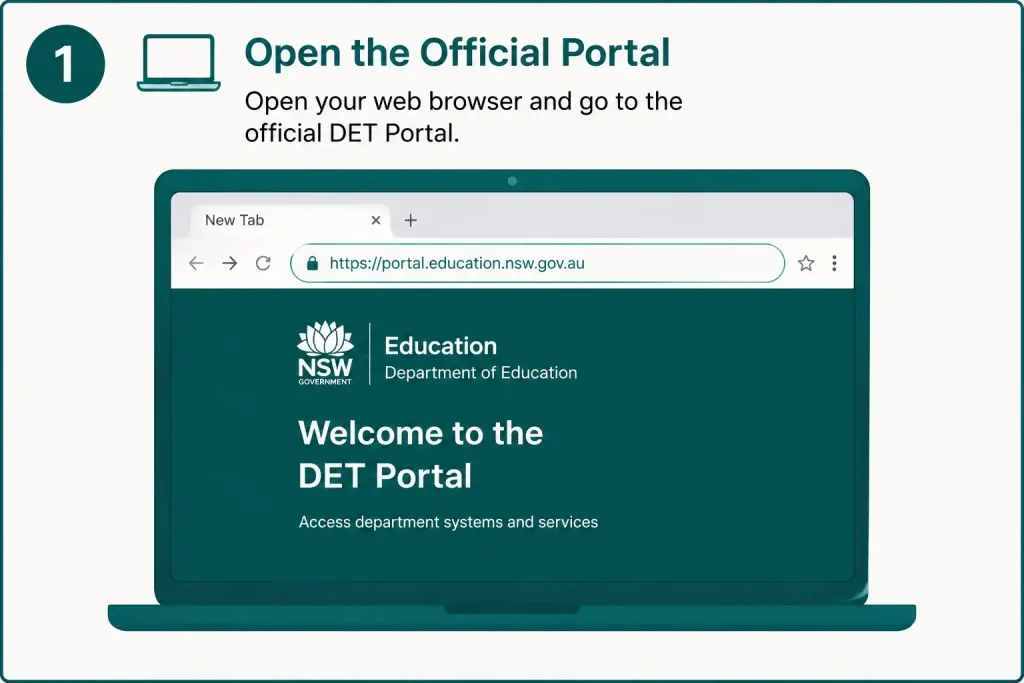
Visit the NSW Education portal using your browser:
portal.education.nsw.gov.au
Check the web address before entering your username or password, especially if you reached the portal through a search engine.
2. Choose the Right Access Route
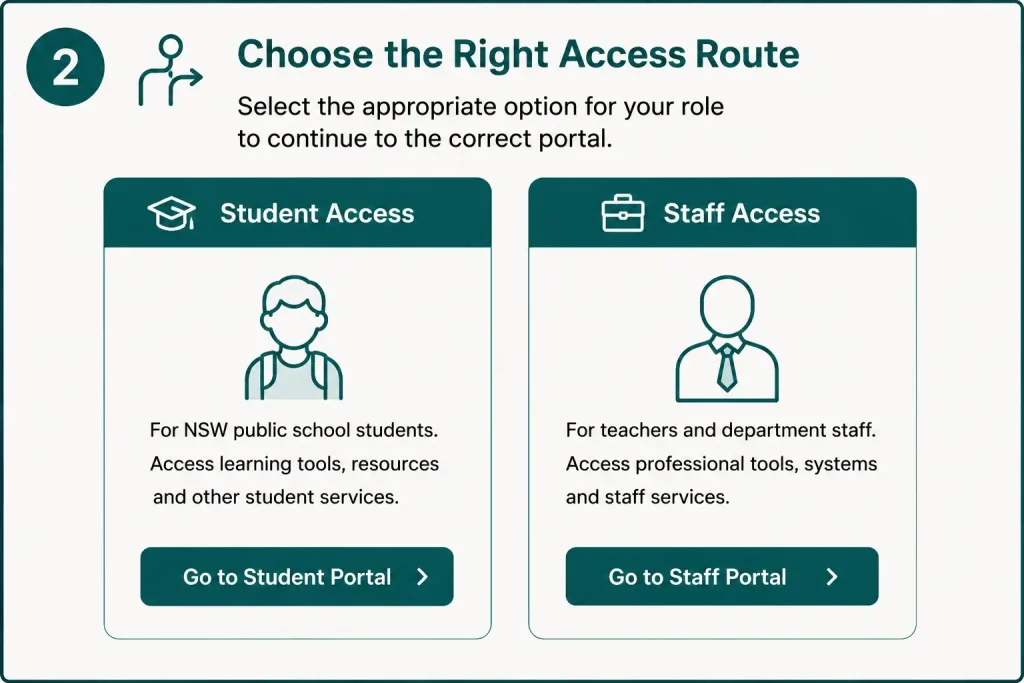
Select the option that corresponds to your role.
The department’s resources distinguish between the Student Portal and Staff Portal, with students using the former for department-provided learning tools and staff accessing workplace systems through the latter.
3. Enter Your Department User ID
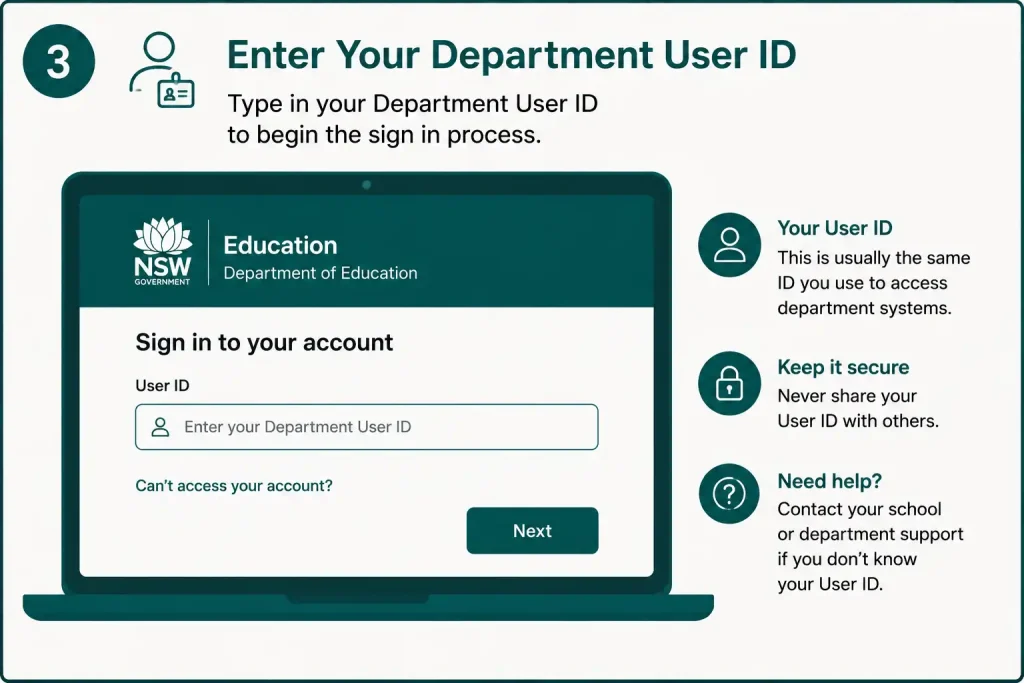
When the authentication screen appears, enter your department User ID exactly as provided.
If you’re copying the ID from another location, check for accidental spaces at the beginning or end. Small typing errors can prevent a valid account from being recognised.
4. Type Your Password
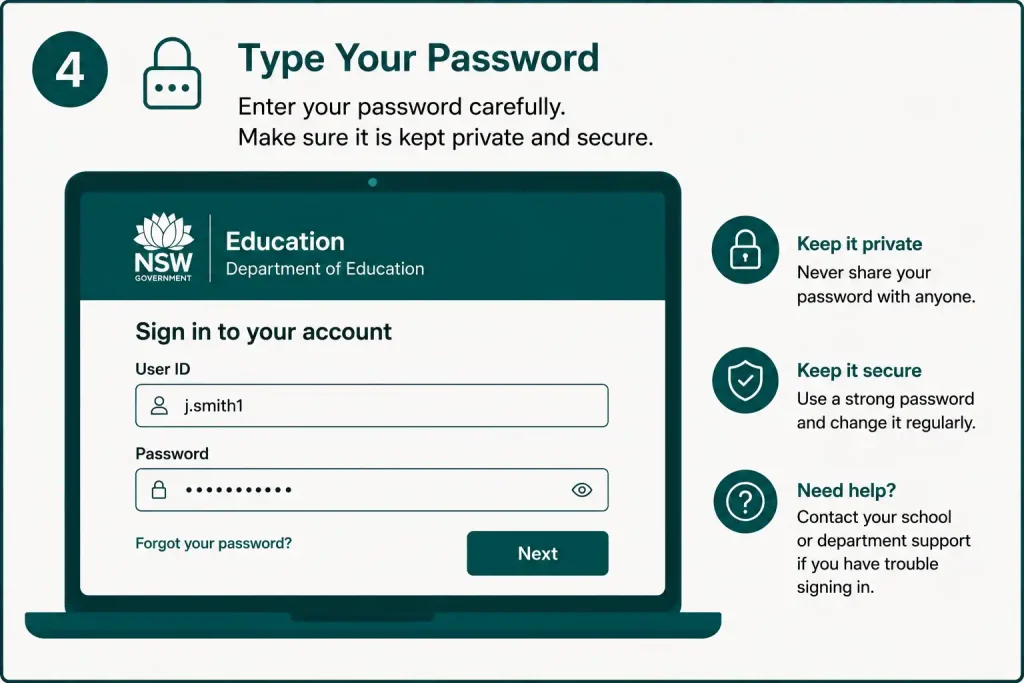
Enter your current department password and continue.
If the password isn’t accepted, check whether Caps Lock is switched on before trying again. If you still can’t sign in, use the appropriate password recovery option rather than repeatedly guessing passwords.
5. Complete Any Required Security Check
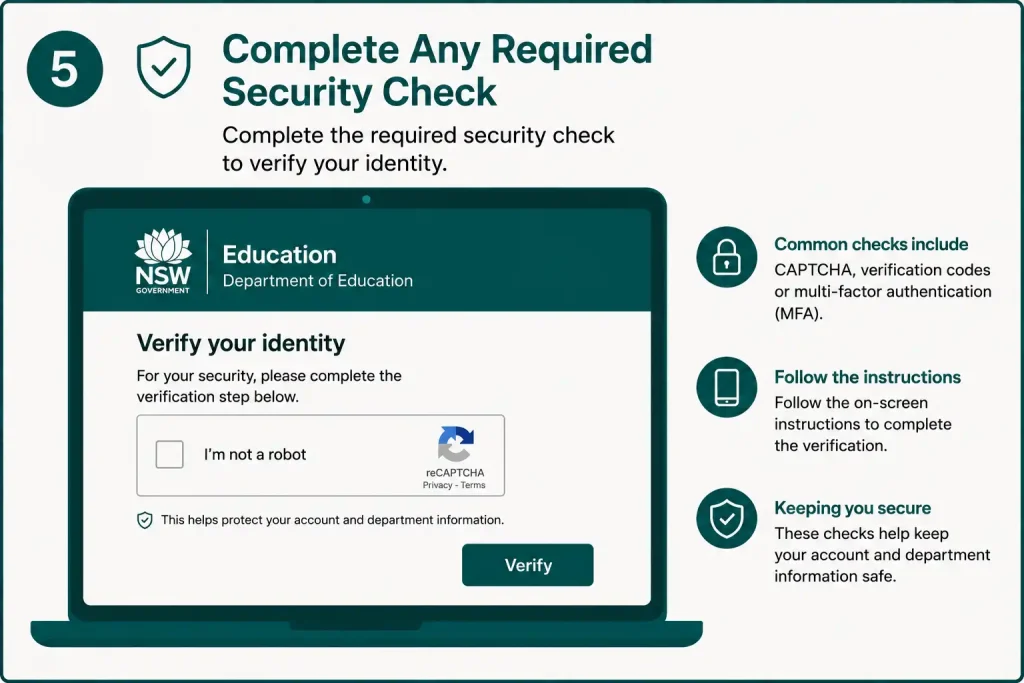
Some accounts may require an additional verification step depending on the user’s account and circumstances.
After successful authentication, the portal should direct you towards the services and applications available under your account permissions.
What Can Students Access?
For students, the service nsw provides a starting point for NSW Department of Education digital learning services. The tools shown can vary according to the school, year level, student group and permissions attached to the account.
Schools may use platforms such as Google Classroom or Microsoft Teams, while department-provided resources can be accessed through the Student Portal.
Google Workspace and Microsoft 365
Depending on what has been enabled for your school or account, the student environment may provide access to cloud-based productivity and learning tools.
These services can support activities such as:
The key distinction is that the service nsw works as an access gateway. It isn’t necessarily a replacement for each individual learning platform.
Student Email
Eligible students may have access to department-provided communication services through their school account.
If you’re uncertain whether a particular email service or learning platform is available, check with your teacher or school. Creating an unrelated account may not give you access to the department’s resources.
Digital Learning Resources
The wider NSW Education digital environment can provide access to approved learning resources and platforms. However, the resources available to an individual student aren’t necessarily identical across every school.
Your school can confirm which learning tools you are expected to use if you’re unsure what should appear after signing in.
DET Portal Access for Teachers and Staff
For NSW Department of Education employees, the portal is an important route into staff systems and supported single-sign-on applications.
A department staff password can provide access to the Staff Portal and supported SSO applications, including staff email.
Depending on your role and permissions, the available systems may cover areas such as:
Not every employee receives the same dashboard. What you can see and launch is determined by your account, role and permissions.
How Staff Single Sign-On Helps
One useful feature of the service nsw is single sign-on for supported department applications.
Once you’re authenticated, connected services can recognise your department identity instead of requiring you to treat every application as a separate account. This is particularly useful for staff who work with several department systems during the day.
The department’s access-request documentation also describes applications being launched from the Staff Portal through single sign-on when the user is already authenticated.
Fore More Information:
Visit Homepage
Forgot Your DET Portal Password?
A forgotten password is a common reason for failed portal access. The recovery route depends on whether you are a department staff member or a student.
Staff Password Recovery Options
Staff can use the department’s official password recovery facilities when the necessary security information has already been configured.
The listed recovery methods include:
Recover Your Password by Personal Email
If personal-email recovery is available for your account:
The department confirms that staff can use this recovery process from a personal device if they cannot access their normal department device.
Reset Using Your Mobile Phone
Staff who have mobile recovery configured can request a security code.
The department’s instructions require the user to enter their User ID, select the mobile recovery method, generate a code, enter the six-digit SMS code and then create a new password.
Use Secret Questions
Secret questions provide another recovery route when they were configured beforehand.
If you never set up the required questions, this option won’t be available to you. Where supported, mobile or personal-email recovery can be used instead.
What Should Students Do If Their Password Doesn’t Work?
Students should normally contact their school when they have trouble accessing their department account.
The department’s password-reset guidance specifically directs students, parents and carers to their school for password assistance. Students therefore shouldn’t attempt staff-only recovery procedures. Instead, contact a teacher, school administrator or the appropriate school support person.
DET Portal Password Requirements
When staff create or change a department password, it needs to meet the department’s current security requirements.
The reset instructions specify requirements such as:
Avoid reusing your department password on unrelated websites. Keeping department credentials private helps protect both your account and the information available through it.
DET Portal Login Not Working? Try These Fixes
A correct password doesn’t always mean the problem is with your account. Browser or device issues can also interfere with access.
Work through these checks:
The NSW Department of Education also recommends basic browser troubleshooting, including trying another browser and clearing cached data and cookies, before escalating certain technical problems.
Staff IT Support
If you’re a staff member and can’t resolve a password or login issue through the available self-service options, the department directs staff to EDConnect.
The current guidance lists 1300 32 32 32, with option 5 for IT support and staff password assistance.
Students should generally contact their school rather than using staff-only support channels.
DET Portal Login: Quick Reference
| Issue | Recommended action |
| Student doesn’t know their password | Contact the school |
| Staff forgot password | Use the official recovery options |
| Personal email recovery available | Follow the email recovery process |
| Mobile recovery configured | Request and enter the SMS security code |
| Secret questions configured | Use the secret-question recovery option |
| Portal won’t load correctly | Try another browser and clear cache/cookies |
| Staff still can’t access the account | Contact EDConnect |
| Unsure which student tools are available | Ask the school or teacher |
What You Can Find After DET Portal Login
The student dashboard is designed to put commonly used school resources in one location. NSW Department of Education guidance identifies areas including Email, Oliver Library, Help, Notifications, Learning, Search Sites, Other Sites, Calendar and Quick Access.
The exact dashboard isn’t necessarily the same for every student. Your school and department account determine which services and links are displayed.
Email and Communication
Students with a department-provided email service can use the portal environment to reach school communication tools. How these services are used depends on the school’s arrangements, so students should follow instructions from their teachers.
If an expected service isn’t visible, check with your school before assuming there is a problem with your account.
Learning Tools
The service nsw can act as a launch point for department-supported learning resources and platforms selected by your school.
Schools may use services such as Google Classroom, Microsoft Teams or other learning-management systems. If you’re unsure which platform your class uses, your teacher or school can confirm it.
Some current services also use the Student Portal as their normal entry point. NSW Education, for example, states that students can access NSWEduChat through the student portal with their department login.
Oliver Library
Oliver Library is another area that may be available through the student portal. Where a school uses Oliver, students can use it to find library resources and school-supported reading materials.
Calendar and Notifications
Calendar and notification features can help students keep track of information published through their school’s digital environment.
Don’t assume the portal calendar replaces your official timetable. If there is a difference, follow the latest timetable or instructions supplied by your school.
DET Portal for Teachers and Staff
The staff environment serves a different purpose from the student portal. NSW Department of Education employees can use their department accounts to reach authorised internal systems and supported single-sign-on applications.
Depending on your position and permissions, the available services may include:
The dashboard isn’t identical for every employee. Two staff members may therefore see different applications even though both use the Staff Portal.
Professional Learning
Authorised employees may access department professional-learning services through their staff account. Some services, including MyPL, can use department single sign-on.
The MyPL login instructions direct NSW Department of Education employees to sign in through the department portal.
Can You Use the DET Portal on a Personal Device?
Yes, staff may sometimes need to access department services away from a department-managed computer. NSW Education’s guidance indicates that certain password-management procedures can be completed from devices such as mobile phones when necessary.
For normal portal access, use a current browser and make sure you’re visiting the official NSW Education domain.
Safer Login Habits
Before entering your department credentials:
The department’s student guidance specifically recommends signing out when accessing the portal from a shared device.
How Staff Can Change Their DET Portal Password
Staff who know their current password can change it before it expires or stops working.
The department’s stated process is:
The system checks the new password against the department’s password policy before saving it.
Working From Home After a Password Change
A newly changed password may not immediately work everywhere.
For corporate staff working from home, the department explains that locking the device for around 15 minutes may be necessary for synchronisation. School staff working remotely may need to connect their device to department Wi-Fi before the new password works for device login.
So, if the new password works in the portal but not immediately on a department device, synchronisation may be the reason.
DET Portal Password Recovery Options for Staff
Staff have several recovery methods, provided they were configured on the account beforehand.
| Recovery method | Requirement |
|---|---|
| Personal email | Registered personal email |
| Mobile | Registered mobile phone |
| Secret questions | Previously configured answers |
| EDConnect | Department support when self-service recovery isn’t possible |
The first three are self-service options. Staff who cannot complete recovery can seek further assistance through EDConnect.
What Students Should Do If They Forget Their Password
Students shouldn’t use staff-only password recovery procedures.
NSW Department of Education guidance directs students, parents and carers to contact the school for login assistance. This allows the school to provide the appropriate support for the student’s account.
If you can’t access your student account:
Common DET Portal Login Problems
A failed login isn’t always caused by a wrong password. Browser data, expired sessions and account permissions can also affect access.
My Password Is Correct but Login Still Fails
Start by entering the password again carefully. Check Caps Lock and make sure there aren’t accidental spaces.
If the problem continues, try another browser or clear your browser’s cache and cookies. These are among the basic troubleshooting measures recommended by NSW Education.
An Application Is Missing From the Portal
If the portal opens normally but a particular application isn’t displayed, the issue may be related to account permissions rather than login credentials.
Not every user receives access to every application. Check whether your role should have access, then contact the appropriate school or department support channel if necessary.
My New Password Doesn’t Work on My Work Computer
Staff working remotely may need to allow time for password synchronisation.
School staff working from home may also need to connect their device to department Wi-Fi before the updated password synchronises completely.
The Portal Works but One Application Doesn’t
When the portal itself works but a separate application produces an error, the problem may belong to that application rather than the portal.
Before contacting support, record:
These details can make it easier for technical support to identify the issue.
Is There a DET Portal Mobile App?
NSW Education has changed how some portal services are accessed on mobile devices. A 2025 Technology for Learning update stated that the native NSW DoE Portal mobile application was being removed from app stores, while staff could continue accessing the portal through a web browser on work or personal devices.
For that reason, the official web portal is the most straightforward access method rather than relying on an old app installation.
DET Portal Security Best Practices
Your department account may provide access to school information, communication tools and internal systems, so basic account security matters.
Protect Your Credentials
Never send your password to another person or give it to a friend, classmate or colleague. Your department credentials should remain private.
Use the Official Portal
Bookmark the official portal in your browser rather than relying on unfamiliar login pages from search results. This makes it easier to return to the correct service and reduces the risk of entering credentials on an unrelated website.
Sign Out on Shared Computers
Always sign out when you’ve finished using a computer that other people can access, including shared school or library devices.
Keep Staff Recovery Options Available
For staff, maintaining configured recovery methods can make password problems easier to resolve. NSW Education supports personal email, mobile and secret-question recovery methods for staff accounts.
DET Portal Troubleshooting Checklist
Before contacting support, run through these checks:
DET Portal: Student and Staff Access Guide
The service nsw is a central access point for NSW Department of Education digital services. What appears after you sign in depends on whether you are a student, teacher or another authorised department user, as well as the permissions attached to your account.
Students can use the portal to reach supported learning services, while staff may have access to a wider range of professional and administrative systems. Not every user sees the same applications, so a missing service does not necessarily mean there is a problem with the portal.
What Can You Access Through the DET Portal?
The portal provides a central starting point for department-supported online services. Rather than keeping track of numerous separate entry points, authorised users can begin at the relevant portal and choose the service available to their account.
Student learning services
Depending on the school and the student’s access, the Student Portal can provide entry to services such as Microsoft 365 and other digital learning tools.
Current NSW Education guidance also shows students accessing OneNote through Microsoft 365 from the Student Portal. Other learning platforms may be used by individual schools, including Google Classroom, Microsoft Teams or another learning-management system.
The exact services available therefore depend on what the student’s school uses and what has been enabled for their account.
Canva Education and other supported tools
The Student Portal can also provide access to department-supported educational services.
For example, NSW Education currently provides students with access to Canva Education through the student portal using single sign-on. This means students can use their department account to reach the service rather than managing a separate set of login details.
Staff applications depend on your role
Staff members do not automatically receive access to every department application. Their available services are determined by their role and the permissions associated with their account.
This role-based approach is particularly important for systems that contain student or employment information. NSW Education technology policy states that access to student information should be restricted to staff who have a genuine need to know.
DET Portal Services for Students in 2026
The Student Portal remains an important route into NSW Department of Education’s digital learning environment.
A current Student Portal guide identifies features including:
NSW Education’s Technology for Learning resources also continue to provide Student Portal guidance, indicating that the portal remains a key access point for department-supported digital services.
NSWEduChat
NSWEduChat is one example of a newer department service available through the student environment.
NSW Education states that students from Year 5 to Year 12 can access NSWEduChat through the Student Portal or directly through its official service using their NSW Department of Education login.
This shows how the portal can function as an authentication gateway as new department services become available.
Student pathways and career activities
The wider portal environment can also support student pathway activities.
According to NSW Department of Education’s Student Pathways Plan information, students log into their DoE Student Portal, while schools can access student responses through the Staff Portal.
This creates separate access routes for the same school activity. Students complete the required work, while authorised staff can access the information needed to support them.
Why Can’t I See an Application?
A successful login does not guarantee that every department application will appear in your account.
If an expected service is missing, possible reasons include:
The correct response is not to try to bypass the department’s access controls. If you believe you should have access, contact your school or the appropriate department support channel and explain which service you need.
Staff Access and Account Management
For department staff, the portal is part of a wider access-management system rather than simply a collection of shortcuts.
NSW Education technology procedures explain that authorised school leaders can manage staff application access and reset staff passwords through department systems.
This is why repeatedly attempting to log in may not solve an access problem. If you can sign in but cannot see a particular application, your account may simply lack the necessary permission.
Staff password recovery
Staff may have access to department self-service password recovery options where these have been configured. Available recovery methods can include:
If self-service recovery is unsuccessful, staff can contact EDConnect for further assistance.
How to Access the DET Portal on a Phone or Tablet
The service nsw can be used through a web browser, making it possible to access department services when you are away from a department-managed computer.
A typical mobile or tablet login process is:
Students can use common browsers such as Chrome, Microsoft Edge and Safari for browser-based Student Portal access.
For staff, NSW Education technology guidance also confirms that certain password-management tasks can be carried out from personal devices when necessary.
When an Internet Problem Looks Like a Portal Problem
Not every login or browsing issue is caused by the service nsw itself.
School-managed computers and bring-your-own devices may have additional network requirements. A 2026 NSW Education Technology for Learning update notes that some school-managed and BYO devices may require users to sign in to Internet @ Edge before they can browse the web or use web-based applications.
If websites fail to load while you are at school, check whether the device needs to complete the school’s normal internet authentication process.
Information to collect before contacting support
Before reporting a technical problem, record the details that could help identify where the fault occurs:
These details can help technical support determine whether the problem is related to your account, browser, network connection or a specific application.
DET Portal Security: Protect Your Department Account
A department account may provide access to education services and information, so protecting your login details is essential.
Keep your password private
Never give your department password to classmates, friends or anyone else simply because they claim they need to test your account.
If another person needs access to a department system, they should use their own authorised account.
Check the website before entering your password
Before signing in, make sure you are using the official NSW Department of Education portal.
Be particularly careful with links received through unexpected emails or messages. Avoid entering department credentials into unfamiliar websites or pages reached through questionable advertisements.
Sign out on shared computers
Students should sign out after using a shared computer. NSW Education’s Student Portal guidance specifically recommends logging out when using a shared device.
It is a small precaution, but it helps prevent the next person using the computer from accidentally gaining access to your account.
Student Portal vs Staff Portal
The service nsw environment is not identical for every user. Students and staff have different access paths, and the services displayed depend on account permissions.
| Area | Student Portal | Staff Portal |
|---|---|---|
| Main audience | NSW public-school students | Teachers and department staff |
| Login | Department User ID and password | Department User ID and password |
| Learning tools | Yes, depending on school | Yes, where authorised |
| Microsoft 365 | Available through supported student access | Available according to staff permissions |
| School administration | Generally not available | Available to authorised staff |
| Professional services | Not intended for students | Available where authorised |
| Password support | Usually through the school | Self-service options and EDConnect |
| Application visibility | Based on student access | Based on role and permissions |
The important distinction is that the service nsw is not one universal dashboard. Your account type, role and permissions determine what you can see and use.
Frequently Asked Questions
Final Thoughts
The DET Portal provides NSW Department of Education students and staff with a central place to reach the digital services connected to their accounts. Whether you’re accessing learning resources as a student or department systems as a staff member, starting with the official portal helps ensure you’re using the correct access route.
If you experience login problems, check your credentials and browser first. Students should contact their school for account assistance, while staff can use the department’s available password-recovery options or seek EDConnect support when needed.
For the safest experience, always use the official DET Portal, keep your login details private and sign out when using shared devices. With the right credentials and access permissions, the portal makes it easier to reach the NSW Education services available to you.
Read More:
MyUNSW Login & Student Portal Guide 2026: Enrolment, Timetable, Results & zPass
Department of Transport and Main Roads (TMR) Queensland: Complete Online Services Guide 2026
ATO Online Services for Business Login 2026: Complete Portal Guide
Google Scholar 2026: Search, Citations, Profiles, Alerts & Research Guide
Australian Passport Renewal 2026: Complete Online Guide
City of Perth Staff Portal 2026: Login, CI Anywhere, Intranet & Remote Access Guide
Australian Passport Renewal 2026: Complete Online Guide