The NSW Planning Portal is the NSW Government’s digital platform for finding planning information, viewing land-use controls, submitting development-related applications and keeping track of planning matters. Through the current NSW Planning website, users can access services such as development applications, complying development certificates, application tracking and the NSW Planning Portal Spatial Viewer.
Whether you’re a property owner, NSW resident, developer or planning professional, the Portal provides a central place to manage planning-related information and applications. You can use it to access your account, search property and planning information, lodge relevant applications and monitor their progress.
Understanding the NSW Planning Portal
The NSW Planning Portal is an online service for handling planning applications and finding property and planning information across New South Wales. The services available to you can vary depending on your project, but may include development applications, complying development services, property searches, application tracking and other planning resources.
It can be especially useful before starting building or other work on a property. Using the NSW Planning Portal Spatial Viewer, you can search for an address and check details such as zoning and other planning controls that may apply to the site.
If you need to submit a development application, the online Portal provides tools for preparing and lodging the application and following its progress after submission. A Planning Portal account is required to complete an online development application, according to NSW Government information.
Who May Need to Use the Portal?
The service nsw can be useful for a range of people involved in property and planning matters, including:
- Property owners
- NSW residents considering work on their property
- Developers
- Planning consultants
- Architects and other planning professionals
- People submitting development applications
- Individuals researching proposed developments
- Council and government planning staff
The appropriate service will depend on what you are planning to do and where the property is located. Checking the relevant planning information before starting an application can help you identify the controls and services that apply to your project.
How to Access the NSW Planning Portal
The NSW planning websites were brought together as part of a major website integration, with planning.nsw.gov.au and planningportal.nsw.gov.au moving onto a single site from December 2025. NSW Planning advises that existing links will continue to work, and the Planning Portal login can still be accessed through the website.
Official NSW Planning website:
NSW Planning
Planning Portal login:
service nsw Login
The current sign-in page allows you to enter your registered email address and password. If you prefer, you can also use the available Service NSW account login option.
Details to Have Ready
Before opening the login page, make sure you have the information relevant to the way you intend to use the Portal:
- Registered email address – The email associated with your Planning Portal account.
- Portal password – Required when signing in directly with your email and password.
- Service NSW details – Needed if you choose the Service NSW login option.
- Application details – Useful when accessing or tracking an existing planning matter.
- Property information – Have the relevant property details available if you’re starting a new development application.
If you’re new to the service nsw, look for the account creation/registration option on the login page and follow the prompts to set up your access.
How to Create Your NSW Planning Portal Account
A service nsw account gives you access to online planning services that require you to sign in. NSW Government registration guidance indicates that an account is needed to use the Portal’s digital services.
1. Start at the NSW Planning Website

Begin by visiting the official NSW Planning website and find the Planning Portal login option. Following the website integration, NSW Planning continues to provide access to the Portal through its website.
2. Choose Sign In or Create an Account
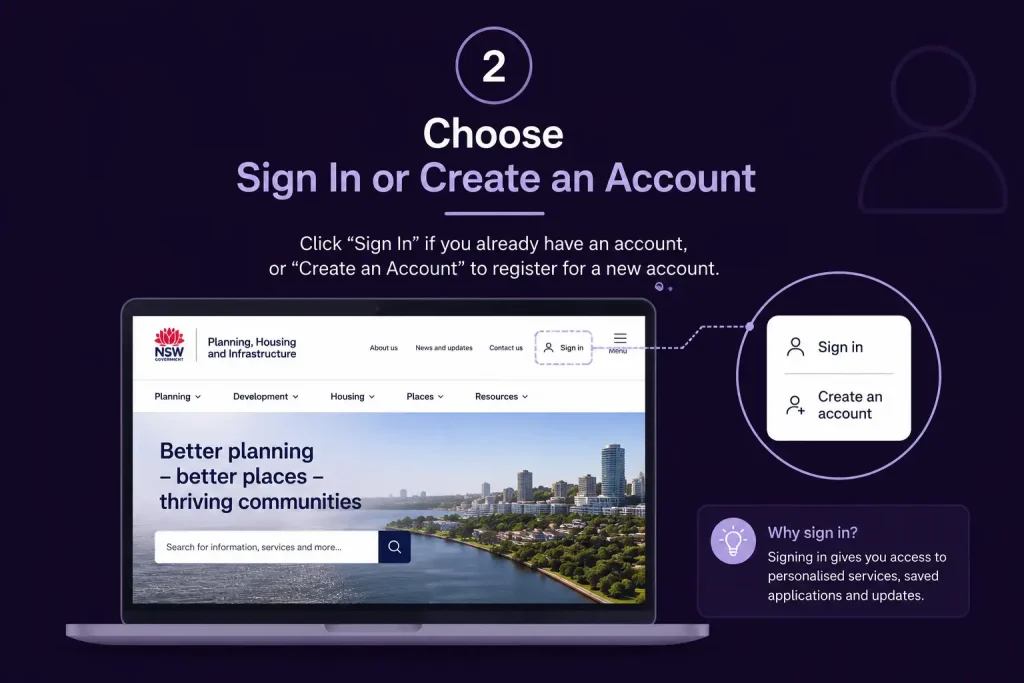
Open the Planning Portal login page. Existing users can enter their account details to sign in, while new users should select Create account and follow the on-screen registration instructions.
3. Enter Your Registration Details

Complete the information requested during account setup. Depending on your role or user type, this may include contact details and other profile information.
For organisations and larger planning consultancies, earlier NSW registration guidance has indicated that a shared organisational email can help when several people need visibility of applications. Before using one, consider how your organisation will manage account access and security.
4. Complete the Verification Process
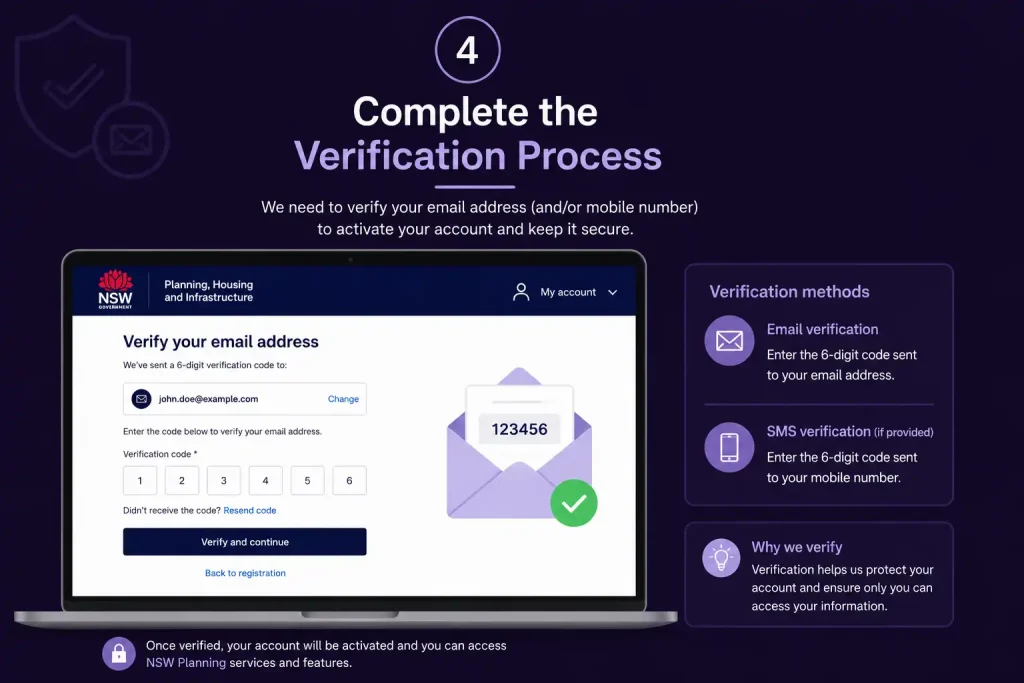
Follow the verification steps provided by the Portal. Once your registration has been confirmed, return to the login page and sign in using your newly created account.
5. Check Your Planning Portal Dashboard

After logging in, you can use the dashboard to manage your Planning Portal activity. The information available will depend on your permissions and the applications linked to your account, including work that is active, completed, being prepared or already submitted.
NSW Government online DA documentation describes the dashboard as the area where users can access applications they have prepared or lodged and start a new application.
Fore More Information:
Visit Homepage
Before You Lodge a Development Application
Starting a development application without first checking the property and planning rules can lead to avoidable delays. A site assessment should come before you invest time in preparing the application.
Check the Site Using the NSW Planning Portal Spatial Viewer
The service nsw Spatial Viewer is a useful starting point for researching property and land-use information. By searching for the property address, you can view mapping details such as zoning and other relevant planning controls.
Property Information to Review
Before you begin preparing your application, check the following:
- Property address
- Lot and DP details
- Land zoning
- Relevant planning controls
- Local environmental planning information
- Development opportunities and restrictions
- Environmental or other site-specific considerations
The Spatial Viewer is helpful for initial research, but complex proposals may still require advice from a qualified planning professional.
Why an Early Property Check Is Important
Planning requirements can vary significantly across NSW. Rules that apply to one property may not be the same as those affecting another site, even when the properties are relatively close to each other.
Reviewing the property before preparing plans can help you determine which planning pathway may apply and what supporting information could be needed for the proposal.
NSW Planning outlines a range of development approval pathways, from exempt development through to state significant infrastructure.
Development Applications and Alternative Approval Pathways
The approval process depends on the type of development you are proposing. A Development Application (DA) is one pathway, but it isn’t the only option available under NSW planning rules.
A DA is a formal application for development consent. Where consent is required, the application is generally assessed by the relevant local council, although another authority may be responsible in certain circumstances.
Complying Development provides another approval option for proposals that meet the specified requirements. The service nsw offers an online service for applying for complying development certificates, and applicants must create or register for a Portal account before beginning an online application.
Fore More Information:
Visit Homepage
How to Work Out Which Approval Route Applies
Before deciding to lodge a Development Application, consider the proposal from several angles:
- What work or development are you planning?
- Where is the property located?
- Does the proposal require development consent?
- Could the work meet the requirements of another approval pathway?
- Is an environmental assessment needed?
- Which authority is responsible for assessing the proposal?
For more complex developments, it can be worthwhile to speak with the relevant consent authority before lodging an application. NSW Planning recommends discussing the requirements with the appropriate consent authority beforehand, which can help you understand what supporting documents may need to accompany the DA.
Lodging a Development Application in the NSW Planning Portal
After confirming that a Development Application (DA) is the correct approval pathway, you can move on to preparing your application online.
Start a New Application
Sign in to your service nsw account and go to your dashboard.
From there, select the option to create a new application, then choose the appropriate development application service for your proposal.
You will usually be asked to select the local government area (LGA) in which the property is located.
Provide the Proposed Development Information
Your application should give a clear picture of what you intend to develop. The information identified in NSW Planning guidance can include:
- A description of the proposed development
- The estimated cost of the development
- A land plan
- Development sketches
- Information for the environmental assessment
Depending on the nature of your proposal, you may also need to provide other supporting documents.
Make the Development Description Clear
The project description should be specific enough to explain exactly what you are proposing. Avoid broad or unclear wording when you can describe the development more precisely.
Use the supporting plans and reports to provide the technical information needed for assessment. Take care when preparing the estimated development cost, as this is also required as part of the application information.
Fore More Information:
Visit Homepage
Documents You May Need for a DA
The documents required for a Development Application (DA) depend on the type of development you’re proposing. Requirements can vary between projects, so check what applies to your specific proposal rather than relying on a standard document list.
Typical supporting material may include:
| Document | Purpose |
|---|---|
| Site plan | Shows how the proposed development relates to the property |
| Architectural plans | Provides drawings of the proposed building or works |
| Structural information | Sets out relevant construction details where required |
| Statement of Environmental Effects | Covers environmental and planning considerations |
| BASIX certificate | Applies to certain types of residential development |
| Owner’s consent | Confirms the necessary consent from the property owner |
| Cost information | Sets out the estimated cost of the proposed development |
service nsw guidance for local development lists several key pieces of application information, including the development description, estimated development cost, land plan, development sketch and environmental assessment information. Depending on the proposal, supporting documents may also include a Statement of Environmental Effects, Owner’s Consent and Cost Estimate Report.
For residential developments, you may also need to consider BASIX. NSW Planning states that a BASIX certificate is required for certain new homes, renovations costing $50,000 or more, and pools or spas with a capacity of more than 40,000 litres.
Check Your DA Before You Submit
Take a moment to review the application before you reach the final submission stage. A careful check can help catch missing information or documents that could otherwise delay the assessment.
Use this checklist to make sure:
- The property address is correct
- The applicant details are accurate
- The correct council or consent authority has been selected
- The development description accurately explains the proposal
- The development cost information is correct
- All required plans have been attached
- Any required environmental documents are included
- Owner’s consent has been provided where necessary
- BASIX documents are included where applicable
- File names are clear and easy to identify
- All attached documents open correctly
- Every required field has been completed
It’s worth checking the attachments as well as the online form. If a required document is missing, the assessment authority may need to request further information, which can add time to the assessment process.
Submit the Development Application and Save Its Reference
Once all the application details have been reviewed, lodge the application through the Portal.
After submission, make a note of the application reference or PAN number issued by the system. You can use this identifier to find the application later or when discussing it with the relevant authority.
service nsw records use PAN numbers and other application references to identify applications. Public records can show a PAN number together with the corresponding DA number and current application status.
Practical tip: Store your submission confirmation details in a secure place as soon as the application has been lodged. Having these details readily available can make later communication with the council or planning authority much easier.
What Happens After You Lodge?
Lodging your application is only the start of the assessment process. Approval isn’t automatic, and submitting the application doesn’t mean the assessment is complete.
The relevant consent authority will examine your application and the supporting material provided. Depending on the type of proposal, the process may include requests for more information, referrals, further assessment or public exhibition.
The service nsw also supports several planning workflows, including applications, modifications and requests for additional information. Current Portal training resources provide guidance on reviewing applications, requesting amendments and seeking further information.
Application Fees
The amount you pay depends on the application and planning service involved.
NSW Planning has a dedicated Planning Portal service fees resource that covers fees for applications, certificates and other planning services.
Fee amounts can change, so avoid relying on figures published on older or unrelated websites. Always check the current NSW Government information that applies to your particular application.
Updating and Troubleshooting NSW Planning Portal Applications
After you lodge a development application, the NSW Planning Portal is the central place to monitor its progress and deal with any actions that need your response.
Checking the Status of Your NSW Planning Portal Application
Log in to your NSW Planning Portal account and open your applications area. From the dashboard, you can generally see which matters are still being prepared and which have already been lodged.
Depending on the application and assessing authority, you may see statuses such as:
- Draft — the application is still being prepared.
- Lodged — the application has been submitted.
- Under Assessment — the relevant authority is reviewing the proposal.
- Determined — a decision has been made on the application.
Status names and the steps that follow them can differ depending on the type of application and the authority handling it.
Checking Applications Through Public Tracking
You don’t necessarily need to access your own account to research planning activity. NSW Planning also provides public application-tracking services that can be used to find planning applications and development information.
Depending on the search service available, you may be able to view details such as:
- Application reference or PAN
- Property address
- Description of the proposed development
- Local government area
- Current application status
- Determination details
- Other publicly available planning information
Useful tip: If you’re considering buying a property, checking planning applications can give you a better picture of development activity linked to the site or nearby properties.
Dealing With Requests for Further Information
An assessing council or other authority may ask for additional material before it can continue assessing your application.
When a request arrives through the NSW Planning Portal, read the requirements carefully before preparing your response. Identify exactly what has been requested and check whether the authority has given you a deadline.
A Practical Way to Respond
Open the relevant application
Sign in and find the application connected with the information request.
Review every requirement
Work through the request carefully and identify anything that needs clarification, correction or additional evidence.
Prepare the supporting material
The response may require updated plans, reports, statements, calculations or other project documents, depending on the proposal.
Review your files
Before uploading anything, confirm that each document belongs to the correct application and can be opened and read properly.
Upload the response through the Portal
Use the response or document-upload function attached to the existing application instead of creating a separate application.
Confirm the submission
Follow any confirmation steps required by the Portal and keep evidence that your response was submitted.
NSW Planning’s training resources also provide information about reviewing applications, making amendments and responding to requests for additional information.
Important: Don’t overlook a request from the assessing authority. If you’re uncertain about what it means, contact the relevant council or authority for clarification rather than submitting information based on an assumption.
Using the NSW Planning Portal as a Property Owner
The NSW Planning Portal can be useful to property owners who are planning building work, home renovations or a more substantial development.
For many property-related enquiries, starting with a search for the site can help establish the relevant planning information.
Find and Review the Property
Use the Portal’s planning and property tools to locate the relevant site and review information such as:
- Property address
- Lot and deposited plan details
- Land zoning
- Applicable planning controls
- Relevant Local Environmental Plan information
- Other mapped planning information
This initial check can help you understand whether your proposed work might need approval and which planning controls may affect the project.
A property search should be treated as an initial planning check rather than a complete assessment. More complicated proposals may require advice from a qualified planner, architect, surveyor, engineer or another appropriate professional.
NSW Planning Portal for Developers and Planning Professionals
For developers and planning professionals, the Portal provides a central digital process for preparing and managing planning applications.
For a larger project, getting the core information together before starting the application can make the process easier to manage.
Prepare the Project Before You Start
Site details
- Confirm the correct property.
- Check the lot and DP details.
- Review the applicable zoning.
- Identify the relevant planning controls.
Development details
- Clearly define what you intend to build or change.
- Establish the estimated development cost.
- Prepare preliminary plans.
- Consider the environmental issues relevant to the proposal.
Professional input
Depending on the project, you may need assistance from:
- Architect
- Town planner
- Surveyor
- Engineer
- Environmental consultant
- Building professional
Getting these elements organised early can help reduce repeated changes to an application once it has been commenced.
NSW Planning Portal and BASIX Requirements
For some residential developments, BASIX (Building Sustainability Index) forms an important part of the planning process.
BASIX applies to certain residential developments in NSW and considers sustainability measures, including water and energy use.
According to NSW Planning, a BASIX certificate is required for certain new homes, renovations costing $50,000 or more, and swimming pools or spas with a capacity of more than 40,000 litres.
Where BASIX applies, check that the certificate details match the development plans.
Keep Your BASIX Information Consistent
Problems can arise when the building features shown on the plans don’t match the specifications used for the BASIX certificate. Differences between these documents may lead to questions during assessment.
Before lodging the application, compare the relevant plans and project documents to make sure they describe the same proposal.
Troubleshooting Common NSW Planning Portal Issues
Using the Portal doesn’t always go smoothly. Account access, document uploads and application visibility can all cause problems.
Unable to Log In
Start by checking that you’re using the official NSW Planning login service.
Review the following:
- Your email address is correct.
- Your password has been entered correctly.
- You’ve selected the appropriate login method.
- Your account registration has been completed.
- Your browser is working properly.
The current login page also includes an option to sign in with a Service NSW account.
If you still can’t access your account, use the support options provided by NSW Planning. Creating another account unnecessarily can create further confusion.
Application Missing From Your Account
If you can’t find an application, first make sure you’re signed into the account that was used for that application.
For professional and organisational users, permissions may also affect what applications are visible. Check that the appropriate user has access to the matter.
If the application remains unavailable, have the application reference number ready when contacting Portal support or the relevant authority.
Unable to Upload a Document
An unsuccessful upload may result from the file itself, a technical problem or an issue with the application workflow.
Try these checks:
- Open the file on your computer to confirm it works.
- Make sure you’ve selected the correct document.
- Use the file format requested by the Portal.
- Give the file a clear and recognisable name.
- Refresh the session and try the upload again.
- Contact Portal support if the problem continues.
Don’t keep uploading multiple versions without first checking which file has actually been attached to the application.
Understanding NSW Planning Portal Fees
Development and planning applications may attract fees, with the amount depending on the application type and its circumstances.
Fees can change, so check the latest NSW Government information rather than relying on older blog posts or comments in online forums.
Keep a Complete Application Record
It is sensible to retain copies or records of:
- Application reference number
- Submission confirmation
- Payment details
- Uploaded plans
- Reports and certificates
- Correspondence
- Requests for further information
- Responses submitted through the Portal
- Final determination documents
Maintaining these records is especially useful when a developer or property owner is managing several planning matters at the same time.
NSW Planning Portal Account vs Public Application Tracking
The NSW Planning Portal and public application-tracking services have different purposes.
| Function | NSW Planning Portal Account | Public Tracking |
|---|---|---|
| Manage your own applications | Yes | No |
| Prepare applications | Yes | No |
| Lodge applications | Yes | No |
| Upload requested documents | Yes | No |
| Monitor your application | Yes | Limited/public information |
| Research other applications | Limited by access | Yes |
| Login required | Usually | No for public searches |
Put simply, a Portal account is intended for managing your planning work, including preparing and submitting applications. Public tracking is intended for researching planning information that has been made available to the public.
Final NSW Planning Portal Check Before Lodgement
Before submitting a development application, take a few minutes to review the complete package.
Property Details
☐ Property address is correct
☐ Lot and DP details are correct
☐ Zoning has been checked
☐ Relevant planning controls have been reviewed
Application Details
☐ The appropriate application pathway has been selected
☐ Applicant information is correct
☐ Development description is complete
☐ Estimated development cost has been entered accurately
Supporting Documents
☐ Site plans are attached
☐ Architectural plans are attached where required
☐ Environmental documents are attached
☐ Statement of Environmental Effects is prepared where required
☐ Owner’s consent has been provided where required
☐ BASIX certificate is included where applicable
Final Review
☐ All mandatory questions have been answered
☐ Documents open correctly
☐ Plans and reports contain consistent information
☐ The correct authority has been selected
☐ The application reference has been saved after submission
A short final review can catch errors before lodgement and reduce the need for avoidable corrections later.
Planning Portal Mistakes That Can Cause Problems
A strong application isn’t measured by the number of files attached to it. The information needs to be accurate, relevant and consistent across the application and its supporting documents.
These are some of the issues worth checking before you submit.
Check the Property Before Preparing Detailed Plans
Starting with detailed plans before investigating the property can create unnecessary work.
Begin with the property’s address and review the available zoning, planning controls and other relevant information. This gives you a better basis for deciding how to proceed with the proposal.
Confirm the Correct Approval Pathway
Different developments can require different approval processes. Don’t assume that every project should begin with a DA.
First consider whether your proposal may fall under another planning pathway, such as complying development, before selecting the application type.
Keep Every Part of the Application Consistent
Your description, plans, reports, certificates and development cost information should all relate to the same proposal.
If the design changes significantly, review the associated documentation as well. A revised plan may mean that related reports or certificates also need to be updated.
Prepare Supporting Documents Early
Some developments rely on information prepared by several professionals. Waiting until the last stage to collect everything can delay submission.
Allow sufficient time to obtain the plans, reports, certificates and other supporting material needed for your particular application.
Save Your Application Reference
Once an application has been submitted, keep the PAN or other application reference with your records.
You may need this reference when checking the application’s progress or communicating with the relevant authority.
Respond Promptly to Information Requests
An assessing authority may ask for further information during the application process. Read any request carefully and provide the requested material through the correct application workflow.
Leaving a request unanswered can affect the progress of the application, so check for updates and action requests when they arise.
Practical Tips for First-Time NSW Planning Portal Users
The Portal can feel unfamiliar if you’ve never lodged a planning application online. The process combines digital forms with technical documents, so good preparation can make a noticeable difference.
Begin With the Site
Before focusing on the application form, understand the property itself. Review the available planning information and establish what controls may affect the proposed development.
Understand the Requirements Before Creating Documents
Don’t assume that every development needs the same supporting material. A small residential project may have different requirements from a larger or more complex development.
Review the applicable requirements before arranging plans, reports and certificates.
Keep an Organised Digital Record
Create a dedicated folder for your application and retain important material such as:
- Plans
- Reports
- Certificates
- Correspondence
- Application references
Keeping these records together makes it easier to find information when you need it later.
Use Descriptive File Names
Clear filenames make a collection of planning documents much easier to manage.
For example, Site-Plan-Rev-02.pdf gives you useful information at a glance, whereas a generic filename such as document2.pdf does not.
Carry Out a Final Review
Submitting online doesn’t make the application any less formal. Before lodging, check the information entered, supporting files and application details carefully.
A final review can help identify missing or inconsistent information before submission.
Where to Get Help With a Planning Portal Issue
When something goes wrong, identify the type of problem first. A Portal login issue is different from a missing document, a planning requirement or a question about how a council will assess a proposal.
Your issue may relate to:
- Your NSW Planning Portal account
- A technical problem
- A missing document
- A planning requirement
- A council-specific requirement
- Assessment of a Development Application
For technical difficulties with the Portal, use the support information available through the NSW Planning service.
If your question concerns the planning requirements for a particular development, the relevant local council or consent authority may be the appropriate organisation to contact.
The right contact will depend on the nature of the issue, so first establish whether you’re dealing with a technical Portal problem or a planning matter.
NSW Planning Portal FAQs
Final Thoughts
A successful experience with the NSW Planning Portal starts before the application is opened. First investigate the property, then work out which planning pathway applies, gather the necessary supporting information and use the Portal to manage the application carefully.
For property owners, the Spatial Viewer and other planning information can provide a useful starting point for understanding a site. Developers and planning professionals may also benefit from keeping documents well organised and monitoring application activity throughout the process.
Planning requirements, fees and digital services can change over time. Before lodging an application, confirm the current NSW Government requirements and check with the relevant council or consent authority where necessary rather than relying only on an older guide.
Read More:
Turnitin Login Australia: How to Log In, Submit Assignments and Check Similarity Reports
Births, Deaths and Marriages Victoria: Certificate Application Guide 2026
Tax Agent Portal Login 2026: ATO Online Services for Agents Guide
Mathletics Australia: Login, Student Portal, Parent & Teacher Guide 2026
ATO Tax Guide 2026: Website, Tax Return, Rates, Login & Deductions
DET Portal Login 2026: NSW Department of Education Student & Staff Guide