For Australian registered tax agents, BAS agents and authorised practice staff, the tax agent portal login provides access to the ATO’s Online Services for Agents.
Access is not based on a standard username-and-password system. Instead, professionals use a Digital ID such as myID, along with business authorisation through the Relationship Authorisation Manager (RAM). The services and functions available to each person can also depend on the permissions assigned through Access Manager.
Official ATO login:
ATO Online Services for Agents Login
The easiest way to understand the system is to separate identity from authority: myID confirms who you are, while RAM and associated permissions determine what you can access or do for a business or practice.
What Is Online Services for Agents?
The ATO’s Online Services for Agents is a dedicated online platform for tax and BAS professionals. It provides access to various services used to manage client matters and complete tax-related activities electronically.
What you see after signing in isn’t necessarily the same as what another person in the practice sees. Your role, business authorisation and Access Manager permissions all influence the functions available to you.
Online Services for Agents is one of the ATO’s key digital services for tax professionals, alongside services such as the Practitioner Lodgment Service and Australian Business Register.
Who Can Use the Tax Agent Portal?
Access is intended for appropriately authorised tax professionals and practice personnel, including:
- Registered tax agents
- BAS agents
- Authorised employees working for tax or BAS practices
- Other authorised representatives
- Practice staff with the necessary ATO permissions
Having a working myID does not automatically provide access to every tax-agent function. A person can successfully verify their identity but still be unable to complete a particular task if the required business relationship or service permissions haven’t been granted.
Tax Agent Portal Login Requirements
Before trying to sign in, make sure your Digital ID, business authorisation and required permissions are already established.
| Requirement | Purpose |
|---|---|
| myID | Verifies your identity through a Digital ID |
| RAM authorisation | Links you with the relevant business or practice |
| ATO permissions | Controls the services and client functions available to you |
| Compatible device | Allows you to complete myID authentication |
| Internet connection | Required to use the online services and myID app |
| Current contact details | Supports account and authorisation processes |
The ATO uses myID and RAM as key components for accessing dedicated online services used by tax professionals.
Before Logging In
Keep your smartphone nearby and make sure the myID app is ready to use. Your myID is personal to you rather than belonging to the tax practice, so it should be associated with an email address that you personally control.
The myID service is a personal Digital ID that can be used for both business and personal government services.
How to Log In to the Tax Agent Portal
Once your Digital ID and authorisation are ready, signing in involves several authentication steps.
Open the Official ATO Login Page
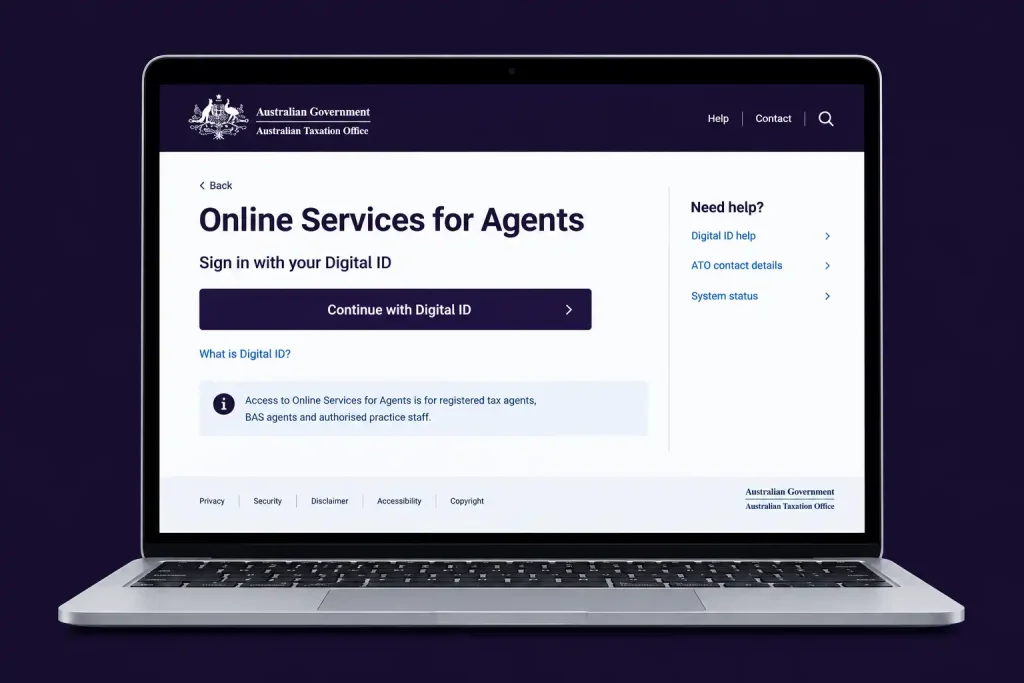
Begin with the official Online Services for Agents login page rather than a third-party website.
Using the official ATO website helps reduce the risk of entering authentication information into a fraudulent or misleading login page.
Select Digital ID
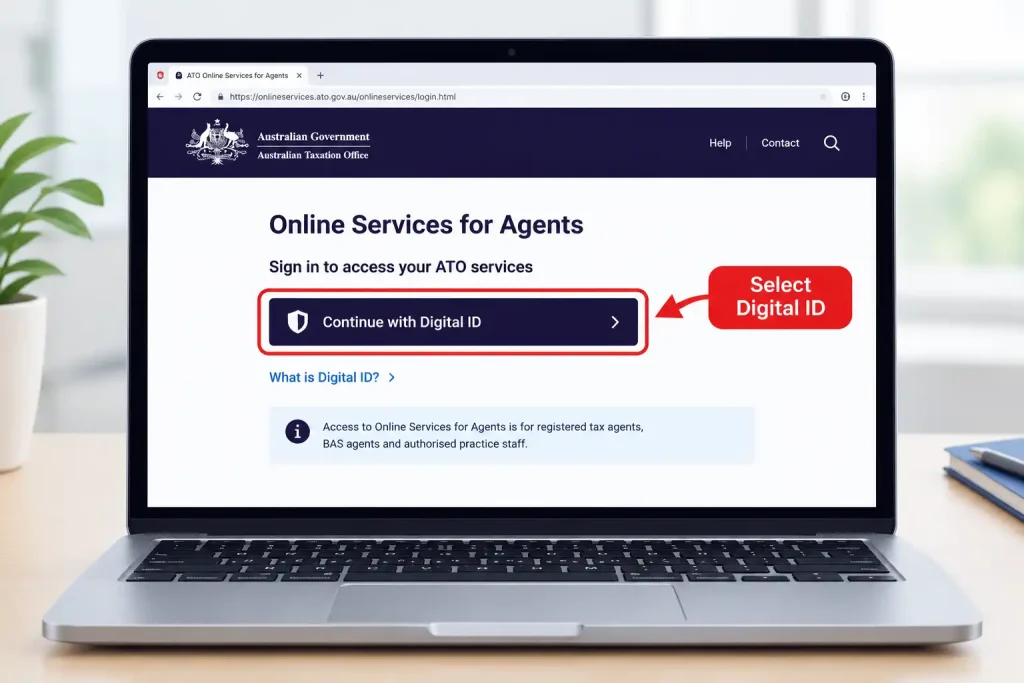
On the login page, choose the option to continue using Digital ID.
Instead of entering a conventional ATO portal password, the authentication process moves to your Digital ID provider.
Choose myID
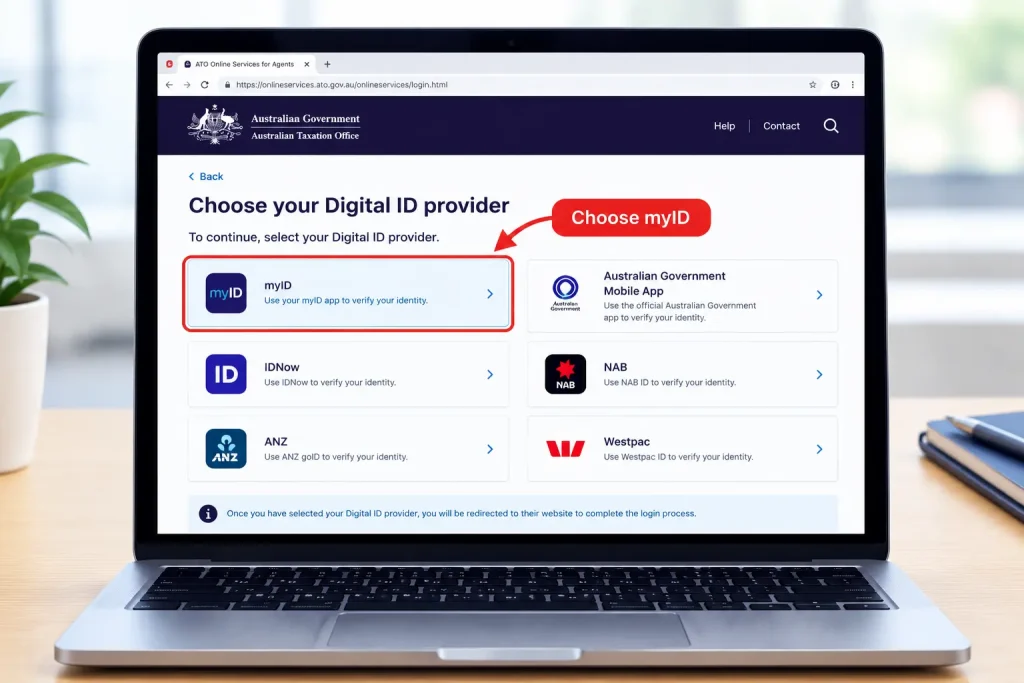
When prompted to select your Digital ID provider, choose myID.
myID is the Australian Government Digital ID application used to verify your identity when accessing participating government services. The government service remains on its own website; the myID app handles the identity verification.
Follow the On-Screen Authentication Instructions
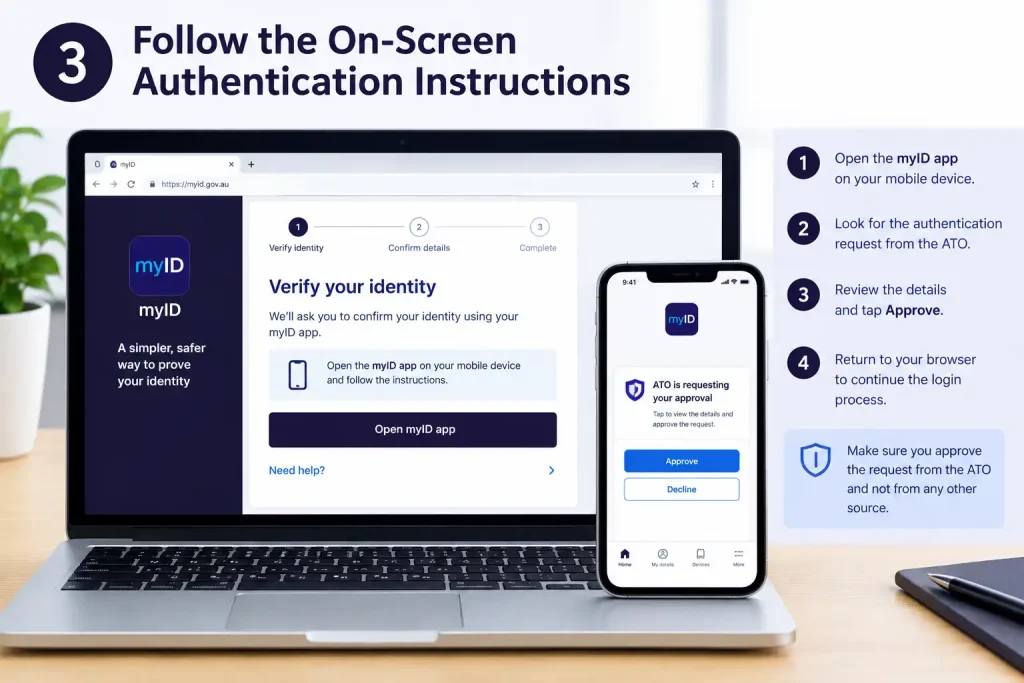
Continue with the instructions displayed on your computer.
Depending on the current login process, you may need to enter the email address linked to your myID or use a displayed authentication code or QR option. The exact screens can change as Digital ID services are updated, so rely on the instructions shown by the official ATO and myID services at the time you sign in.
Open the myID App
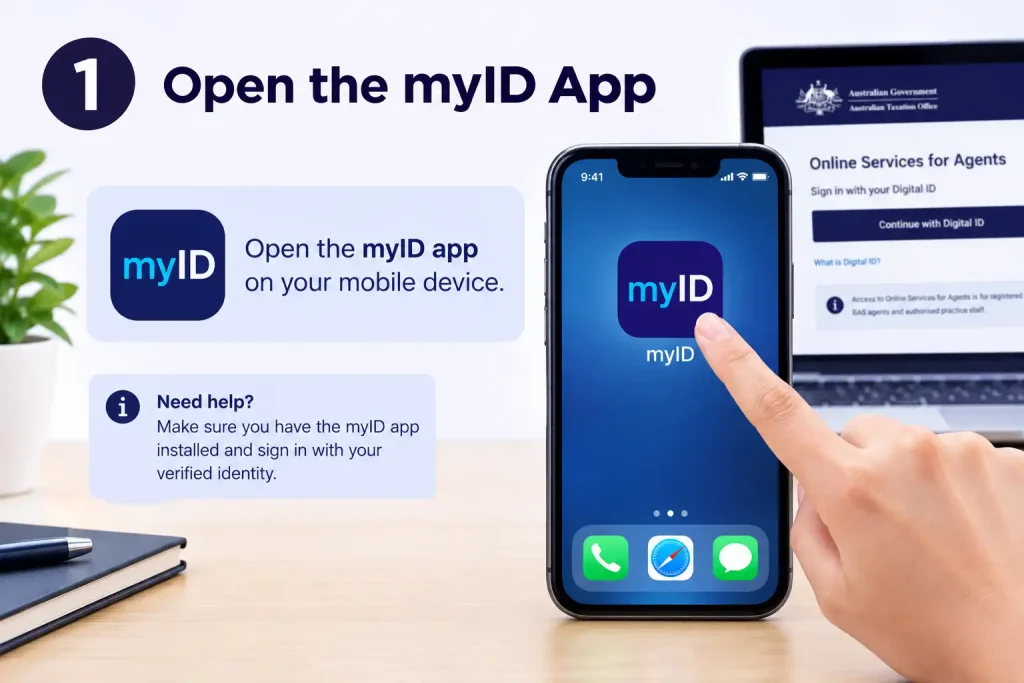
Use your smartphone to open the myID app.
The application verifies that the person attempting to access Online Services for Agents is the individual associated with the Digital ID.
Approve the Authentication Request
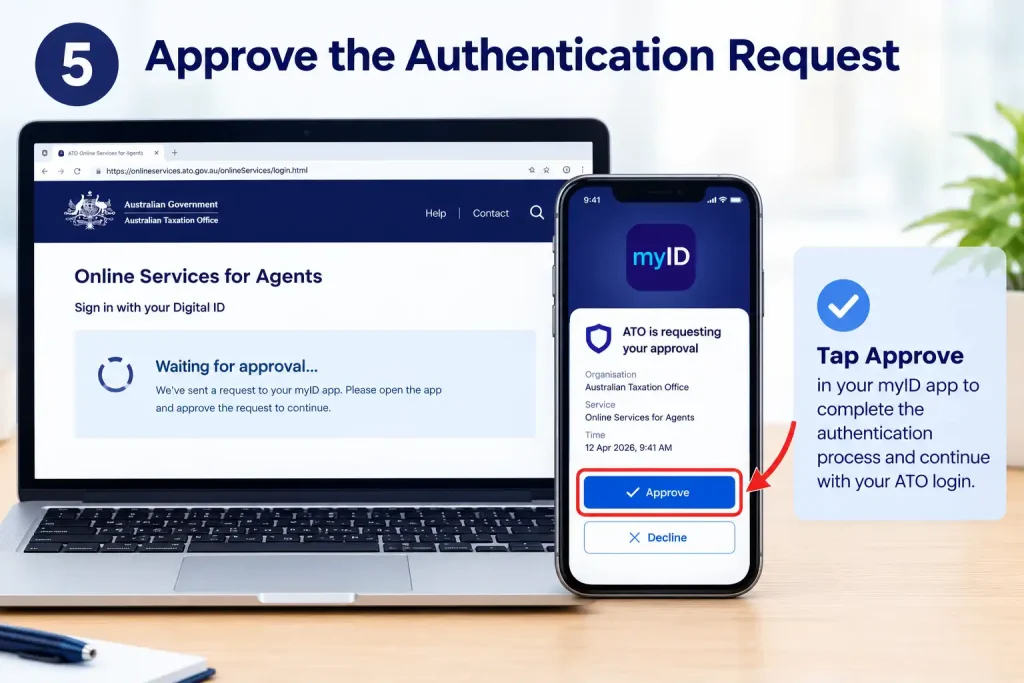
Complete the authentication request through myID.
You may be asked to use your myID security credentials or an enabled device security feature, such as fingerprint or facial recognition. myID supports device biometrics to make app access more convenient.
Select the Correct Business or Practice
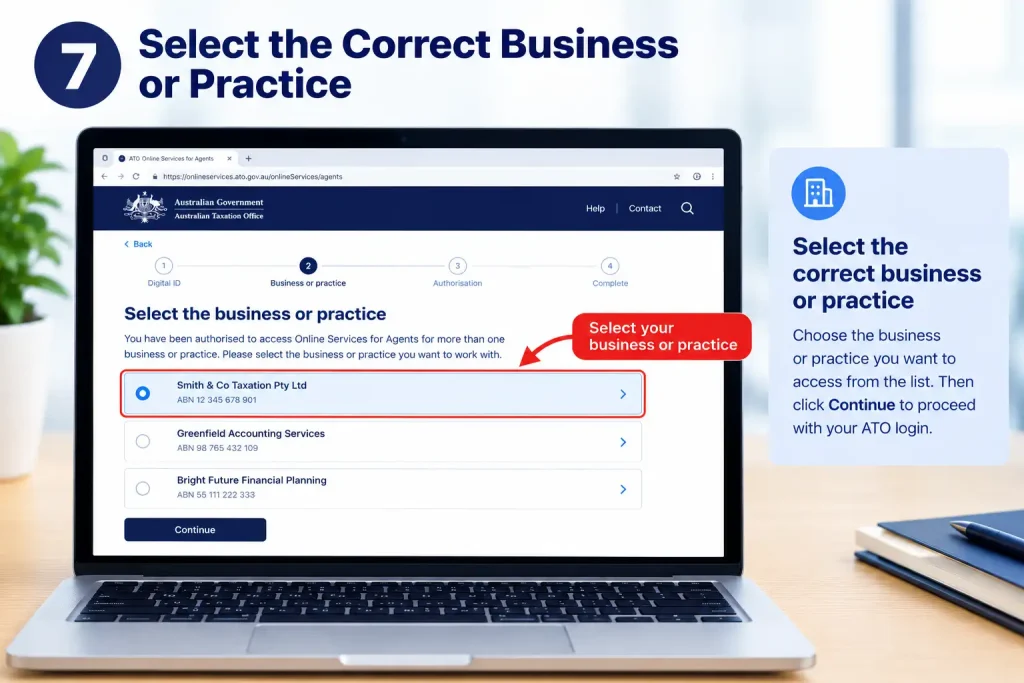
If your authorisation connects you with more than one business, practice or entity, select the correct one when prompted.
This is particularly important for professionals who work with multiple practices, branches or authorised entities. Selecting the wrong business could place you in a session with permissions that don’t match the task you need to perform.
Why RAM Is Important After Signing In
It is easy to assume that myID controls everything once you’ve successfully authenticated. It doesn’t.
The system effectively deals with two separate questions:
myID: Who are you?
RAM and permissions: What are you authorised to access or do?
The ATO explains that tax professionals use myID and RAM to access dedicated online services, while the functions available within those services can depend on Access Manager permissions.
That makes RAM a key part of resolving tax agent portal access problems.
What If Your Authorisation Is Missing?
You can successfully verify your identity and still encounter an access or permissions error.
If that happens, your practice may need to check several areas:
- Confirm that your myID has been established correctly.
- Make sure the correct business relationship is in place.
- Check your authorisation through RAM.
- Review your Access Manager permissions.
- Confirm that the tax-agent services relevant to your role have been assigned.
RAM and Access Manager work together, and the level of authorisation assigned to an individual affects what that person can do within Online Services for Agents
Fore More Information:
Visit Homepage
Tax Agent Portal Login vs myID
Although the two are connected, the tax agent portal and myID serve different purposes.
| Feature | Tax Agent Portal | myID |
|---|---|---|
| Main purpose | Provides access to ATO services for agents | Verifies your identity |
| Typical users | Tax and BAS professionals and authorised practice staff | Individuals accessing participating government services |
| Where it is used | ATO Online Services for Agents | myID authentication process |
| Business permissions | Governed by authorisation and permissions | Establishes your Digital ID |
| Client/service access | Depends on ATO permissions | Does not independently provide client permissions |
Knowing this distinction can make troubleshooting much easier. If myID authentication succeeds but Online Services for Agents still denies access, the issue may relate to RAM, business authorisation or permissions rather than the Digital ID itself.
Setting Up myID for ATO Professional Services
If you haven’t established your Digital ID, you’ll need to do so before the tax agent portal login can be completed through myID.
myID allows individuals to establish a Digital ID using accepted identity information. Identity-strength options and document requirements can change, so use the current official myID instructions when creating or upgrading your Digital ID.
Once established, myID can be used with participating government services. The myID service states that it supports access to more than 140 government online services.
Protect Your myID
Your Digital ID should be treated as personal security information. Keep your authentication details private and avoid actions that could allow another person to access your account.
Do not:
- Share your myID password or passcode.
- Approve authentication requests you didn’t initiate.
- Give another person access to the phone you use for authentication.
- Store sensitive authentication information somewhere others can access it.
- Follow unexpected login links received through emails or messages.
Tax practices should also review staff access when someone’s role changes and remove or modify permissions where necessary.
RAM Authorisation for Tax Agents and Practice Staff
RAM becomes especially important when several people need to access ATO services on behalf of a practice.
The authorisation process connects an individual’s Digital ID with the appropriate business relationship. Depending on the arrangement, a principal authority or authorised administrator may be involved in creating or managing that relationship.
The ATO states that employees should have their own myID before they are authorised, because myID belongs to the individual rather than the business.
For tax and BAS agents dealing with external clients, the authorisation process can be different from standard employee authorisation. The ATO has introduced client-to-agent nomination arrangements for certain situations, so practices should follow the current process that applies to their circumstances.
Pre-Login Checklist
Before attempting another tax agent portal login, check each of these items:
- myID has been set up.
- You can access the email address associated with myID.
- Your smartphone is available.
- The myID app is working correctly.
- Your practice or business relationship has been established.
- The required ATO permissions have been assigned.
- Your browser is up to date.
- You are using the official ATO login page.
- You know which practice or entity you need to access.
Checking these details before signing in can help avoid repeated failed login attempts.
What Can You Access Through Online Services for Agents?
Online Services for Agents supports a wide range of activities for tax professionals, although the exact options available depend on your role and permissions.
Current ATO service information indicates that the platform can support professional activities involving client accounts, reports, lodgment-related functions, messages, file transfers and other tax-agent tasks.
This is why permissions and authorisation are so important. Two people working at the same practice may have different access levels and therefore see different functions after logging in.
Tax Agent Portal Login Problems: Password Recovery, Permissions & Troubleshooting
A failed tax agent portal login doesn’t necessarily mean there is something wrong with your myID. Access to the ATO’s Online Services for Agents relies on several connected systems, including myID, RAM and Access Manager, so an issue with any one of them can prevent you from getting through.
The quickest way to troubleshoot the problem is to work out exactly where the login process stops:
| Where the problem occurs | What to check |
|---|---|
| Before myID authentication | myID setup or browser |
| After myID authentication | RAM and practice authorisation |
| While choosing a business | Business or entity relationship |
| When opening a specific service | Access Manager permissions |
| When the whole service is unavailable | ATO service status |
One ATO error to watch for is “No Australian business number (ABN) found.” This can occur when your myID hasn’t been properly connected to the agent’s practice ABN.
Forgotten Your myID Password?
Your myID credentials are separate from a traditional ATO portal password. If you forget your myID password, the recovery process is handled within myID rather than through an ATO password-reset page.
The current myID instructions direct users to choose “I forgot my password” from the app’s login screen. If further verification is required, you may need to confirm your identity again using the email address associated with your myID.
Password recovery process
Open the official myID app and choose I forgot my password when the option appears. Follow the identity-verification instructions and use the email address linked to your Digital ID.
Once verification is complete, create a new secure password. You can then return to the official ATO Online Services for Agents login page and begin the tax agent portal login again.
Never give your myID password, authentication codes or approval requests to another person, even if they claim they are helping you resolve an ATO account problem.
Does Tax Agent Portal Login Use Multi-Factor Authentication?
The login process provides more protection than a conventional password-only system.
Your myID establishes your individual identity, while security features on your device help protect access to the myID application. Where enabled, this can include fingerprint or facial recognition.
The different parts of the access system have separate roles:
| Security component | What it does |
|---|---|
| myID | Establishes your individual Digital ID |
| Device security | Helps protect access to the myID app |
| RAM | Connects authorised users with businesses |
| Access Manager | Controls relevant ATO service permissions |
| Online Services for Agents | Provides the professional ATO environment |
This distinction matters when troubleshooting. An authentication failure is not necessarily the same as an authorisation failure.
When ATO Access Is Denied
What happens if myID works successfully but the ATO still won’t let you access the service?
In that situation, check your business relationship and permissions before repeatedly attempting to sign in.
Access Manager determines which functions users can access within Online Services for Agents, while RAM provides the relevant authorisation arrangements.
What should the practice administrator check?
Ask the practice administrator or other authorised person to review:
- Whether your myID is connected to the correct practice ABN
- Whether the RAM relationship is active
- Whether you have accepted the RAM authorisation
- Whether your Access Manager permissions are correct
- Whether the appropriate registered agent number or branch is available
- Whether your permissions need updating because your role has changed
RAM authorisation and Access Manager permissions perform different jobs. RAM establishes the relationship, while Access Manager controls service-level permissions.
How to Fix the “No Australian Business Number (ABN) Found” Error
One of the specific messages users may encounter is:
“No Australian business number (ABN) found.”
According to the ATO troubleshooting guidance, the first step is to check with your system administrator and confirm that your myID is connected to the agent’s practice ABN. If you are the system administrator, the ATO directs you towards the relevant RAM setup process.
Check these areas first
Start by confirming that you’re using the correct myID.
Then establish whether that Digital ID is actually connected to the practice. If the connection is already present, check the identity strength displayed in the myID app as well.
If the error remains, the practice administrator should review the RAM and Access Manager configuration rather than simply creating another Digital ID account.
Could Your myID Identity Strength Be the Problem?
Your myID identity strength can also affect tax agent portal login access.
ATO troubleshooting information states that people using a Basic myID may need to verify their identity to at least Standard identity strength. However, the ATO also notes that some users may be able to access Online Services for Agents with Basic identity strength. Different instructions can apply depending on whether your myID is already Standard or Strong.
If you’ve recently reset or changed your Digital ID, don’t assume its identity status is unchanged.
Open the myID app and check the identity information displayed on its home screen before making further changes to your account.
Not Receiving the myID Authentication Code?
If the expected authentication code doesn’t arrive, first check that you started the process from the ATO service you actually intend to use.
The myID help centre explains that government services aren’t opened from within the myID app. Instead, you begin on the relevant government service’s login page and then use myID to verify your identity.
Starting from a standalone myID login page can cause problems because myID needs to know which government service you’re trying to access.
For the tax agent portal login, begin here:
Select Digital ID and then continue through the authentication process shown on screen.
Browser Issues and Repeated Login Loops
Not every failed login is caused by your ATO account. Browser problems can also interfere with the authentication process.
If the login page keeps refreshing, won’t show the authentication option or becomes stuck, work through these checks:
- Close unnecessary ATO login tabs.
- Restart your browser.
- Install the latest available browser update.
- Clear cached browser data if the issue continues.
- Try a private or incognito window.
- Temporarily disable browser extensions that may interfere with the page.
- Check that JavaScript and cookies aren’t being blocked.
- Try another supported browser.
- Restart your computer if necessary.
If the page appears frozen, don’t keep submitting the same login attempt. Close the session and start again in a fresh browser window.
myID App and Internet Connection Problems
The myID app requires a reliable internet connection, and network problems can cause authentication errors.
For connection-related issues, the myID troubleshooting guidance recommends checking your internet connection, trying another available connection where possible and restarting the app.
A useful sequence is:
Check your connection → close myID → restart myID → restart your browser → return to the ATO login page → authenticate again.
If you’re using mobile data, confirm that myID is allowed to use it. On Wi-Fi, check whether other websites are loading normally.
Check Your myID and Device Are Up to Date
An outdated myID application or operating system can contribute to certain authentication problems.
The myID error guidance recommends checking that both the app and your device’s operating system are running their latest available versions.
Before changing your account or authorisation settings, check:
- myID app version
- Phone operating system
- Internet connection
- Device date and time
- Browser version
For some errors, myID also recommends enabling automatic date and time settings on the device.
Managing Access When a Practice Has Multiple Users
Tax practices often have several employees using Online Services for Agents, with each person responsible for different tasks.
That makes permission management particularly important.
The ATO has described arrangements where administrators can customise what individual users can access. Depending on the RAM permission setup, Online Services for Agents access may be managed through Access Manager, while another permission level can provide broader access automatically.
Good access management for administrators
Each staff member should receive the permissions appropriate to their role.
When an employee changes responsibilities or leaves the practice, review their access promptly. In the relevant setup, user deactivation is handled through RAM, while Access Manager manages service permissions.
Removing unnecessary access helps prevent former or transferred staff from retaining permissions they no longer require.
Agent Access Is Different From Client Authorisation
A practice employee’s access shouldn’t be confused with the authorisation arrangement between an external tax or BAS agent and a client.
The ATO states that authorising tax or BAS agents outside a business follows a different process from authorising employees. In some situations, the newer client-to-agent nomination process in Online Services for Business is used instead of RAM.
As a result, you shouldn’t assume that every client-agent relationship is established in the same way as an employee relationship.
When creating a new client relationship, use the current ATO instructions that apply to that particular arrangement.
Check for an ATO Service Outage
Before changing your myID, RAM or Access Manager settings, check whether the ATO service itself is experiencing an outage or maintenance.
The ATO provides an Online Services for Agents Dashboard where service availability and incidents can be monitored.
If the service is unavailable, changing your Digital ID or permissions won’t resolve the underlying problem.
Common myID Error Messages
The myID support service provides guidance for several authentication and app-related error messages.
| Error | Possible cause | Recommended action |
|---|---|---|
| CLR000001 | Authentication failed | Follow the instructions displayed to set up myID again |
| 45047 | Identity document was previously used | Reset the relevant setup or contact myID support if you don’t recognise the account |
| 45048 | Details couldn’t be verified | Check the information entered against the document provider |
| NWK000003 | Network connection problem | Check your internet connection and try again |
| UNK000001 | App or device problem | Update the app and operating system, then retry |
| Wrong 4-digit code | Code expired or was entered incorrectly | Restart the browser or app and request a new code |
These explanations and suggested actions are based on the current myID support guidance.
When Is It Time to Contact Support?
If you’ve checked your myID, RAM, permissions, browser and internet connection and the tax agent portal login still doesn’t work, contacting the appropriate support channel is preferable to repeatedly changing your Digital ID.
For myID-related problems, the official myID support information currently lists 1300 287 539, followed by option 2 and then option 1 for myID enquiries. International callers can use +61 2 6216 1111 and request transfer to the myID support line.
For practice-specific ATO access problems, your system administrator or practice administrator may need to inspect the RAM and Access Manager configuration first.
A Simple Tax Agent Portal Login Troubleshooting Path
When you’re unable to sign in, work through the problem in order rather than changing several settings at once.
Can you reach the ATO login page?
→ No: Check your browser, internet connection and ATO service status.
→ Yes: Continue.
Does myID authenticate successfully?
→ No: Troubleshoot your myID setup, app or device.
→ Yes: Continue.
Does the ATO recognise your practice or business?
→ No: Check the RAM relationship and practice ABN connection.
→ Yes: Continue.
Can you see the service you need?
→ No: Review your Access Manager permissions.
→ Yes: Continue.
Can you access the required client or function?
→ No: Check the relevant client or service authorisation.
→ Yes: Your tax agent portal login is functioning correctly.
This process helps identify the failing component without unnecessarily changing working account settings.
Security Practices for Tax Agent Portal Access
Tax professionals work with sensitive client information, so protecting the Digital ID and associated access rights is essential.
Keep your Digital ID personal
Never share your myID password or give colleagues access to your myID app. Each person should authenticate using their own Digital ID.
Don’t approve unexpected requests
If a myID authentication request appears when you haven’t attempted to access an ATO service, don’t approve it.
Review connected devices
The myID app includes a My Devices area where you can review your myID setup history. If you find a device you don’t recognise, follow the official security guidance to remove it.
Avoid suspicious login links
Don’t start a tax agent portal login from an unexpected email or text message. Instead, navigate directly to the official ATO website.
The myID service also provides information about recognising and reporting scams.
Tax Agent Portal Login: Key Points to Remember
A successful tax agent portal login depends on more than your Digital ID credentials. Several systems need to work together:
- myID verifies your individual identity.
- RAM establishes the relevant business relationship.
- Access Manager controls the ATO functions available to you.
- The correct practice or entity must be selected.
- Your browser and internet connection must work properly.
If myID authentication succeeds but the ATO still refuses access, concentrate on RAM, the practice ABN connection and Access Manager permissions before resetting your Digital ID again. This approach follows the ATO’s troubleshooting model and helps narrow down the actual source of the problem.
Tax Agent Portal Login 2026: What You Can Do After Signing In
Getting through the tax agent portal login is only the beginning. Once you’re inside Online Services for Agents, the options available to you depend on your role, business relationship and assigned permissions.
That means two authorised people working in the same practice may not see identical menus. Access Manager permissions can change which services and client functions appear for each user.
What Can Tax Agents Do After Logging In?
Online Services for Agents provides tax and BAS professionals with access to a range of client and practice functions. The exact features available to you depend on the authority and permissions attached to your user profile.
Depending on your access level, you may be able to:
- View relevant client information
- Manage tax-related obligations
- Check account details
- Work with lodgment services
- Review ATO messages
- Use available client service functions
- Manage information connected with authorised clients
Login Access Does Not Mean Full Access
Successfully authenticating with myID doesn’t automatically give you access to every ATO function.
For example, you may complete the tax agent portal login successfully but discover that a particular client or service isn’t available. In that situation, the problem may be with your authorisation or permissions rather than your Digital ID.
The practice administrator should check the relevant RAM relationship and Access Manager permissions when this happens.
A Reliable Workflow for Using Online Services for Agents
A consistent process is especially useful when you manage several clients or work alongside other staff in the same practice.
Before opening a client record
Check the following first:
- Your myID is working correctly
- Your practice relationship is active
- The required ATO permissions are assigned
- You’ve selected the correct business or entity
- The client relationship or authority is valid
These checks help confirm that you’re operating under the right identity, business relationship and client authority before you begin.
While working in the portal
Take a moment to confirm the selected client and entity before making changes or submitting information.
This is particularly important if you deal with several businesses. A quick check of the entity shown on screen can help prevent information from being entered or submitted against the wrong client.
When you’ve finished
Sign out after completing your work, especially if you’re using a shared or office computer.
Your Digital ID and the device used for authentication should remain under your personal control.
Bringing New Staff Into a Tax Practice
New employees should never use another person’s Digital ID or login details.
Each authorised staff member needs their own myID, because myID is an individual’s Digital ID rather than an account belonging to the business.
The access relationship can be understood as:
Staff member → myID → RAM/business relationship → ATO permissions → Online Services for Agents
This structure allows a practice to provide access to individual employees while keeping their identities and permissions separate.
When someone’s position changes, or they leave the practice, review their access and update it as required. Old permissions shouldn’t simply remain active after they’re no longer needed.
Protecting Your Tax Agent Portal Access
Tax professionals may work with confidential financial and personal information, so security should be part of every tax agent portal login.
Start from the official ATO service
Use the official ATO Online Services for Agents website rather than following unexpected login links.
Starting from the official service reduces the risk of entering authentication information into a fraudulent website.
Keep your myID private
Your myID credentials and authentication device are personal. Don’t share your password, passcode or device with another person.
Approve only authentication requests you started
A myID request should only be approved when you’ve personally begun the login process.
If an unexpected request appears, don’t approve it. Stop and investigate why it was generated.
Secure the phone you use for Digital ID
Because your smartphone can be part of the Digital ID authentication process, use the security features available on the device and keep its operating system current.
Investigate anything unusual
If the login process doesn’t look right or you notice unfamiliar activity, stop before continuing. Investigate the issue rather than approving or submitting something you’re unsure about.
Frequently Asked Questions
Final Thoughts
Getting into the tax agent portal requires more than a working login. Your myID verifies who you are, RAM connects you with the appropriate business relationship, and Access Manager controls the ATO services and functions available to your account.
If you can’t sign in at all, begin by checking myID and your browser. When authentication works but the expected ATO access is missing, shift your attention to the practice ABN, RAM authorisation and Access Manager permissions.
For security, always access the service through the official ATO website and never share your Digital ID credentials. Since government login processes and screens can change, check the official ATO and myID websites for the latest instructions whenever you’re unsure.
Read More:
Mathletics Australia: Login, Student Portal, Parent & Teacher Guide 2026
ATO Tax Guide 2026: Website, Tax Return, Rates, Login & Deductions
DET Portal Login 2026: NSW Department of Education Student & Staff Guide
MyUNSW Login & Student Portal Guide 2026: Enrolment, Timetable, Results & zPass
Department of Transport and Main Roads (TMR) Queensland: Complete Online Services Guide 2026
ATO Online Services for Business Login 2026: Complete Portal Guide
ATO Online Services for Business Login 2026: Complete Portal Guide